Participant
March 26, 2024
Answered

Update failed. Error 1328 applying patch AcroCloudConnect.dll

  • March 26, 2024
  • 2 replies
  • 13075 views

Hello,


just tried to install new update::
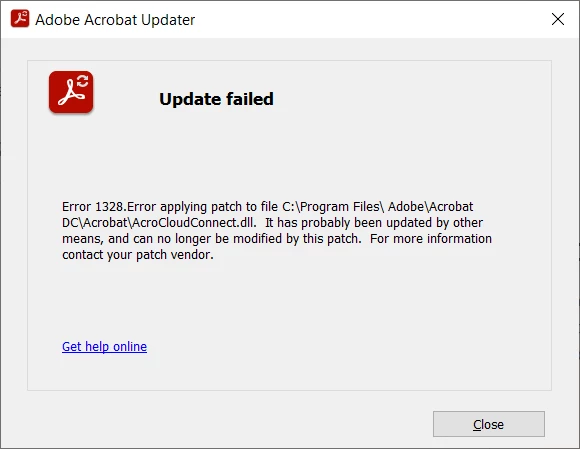


I already deleted the file and also repaired the whole Acrobat installation


Same error again and again


Thanks


This topic has been closed for replies.
Correct answer Trevor1674

Hi there


Hope you are doing well and thanks for reaching out.


Please try to download the patch manually from the link https://adobe.ly/4ahvvwC and see if that works for you.


~Amal


Thanks Amal. Yes, that seemed to work.

2 replies

borovickaAuthor
Participant
May 16, 2024

I downloaded AcrobatDCx64Upd2400220759.msp from the provided link and started the update manually.

Now i'm getting this error:


Retry = same error

Ignore = Error 2350 FDI server error

Abort = Rollback & Setup Interrupted


Could you please advise.


Amal.
Community Manager
Community Manager
May 16, 2024

Hi there


This issue is addressed with the latest release version 24.02.20736. Please retry the patch update. Additionally, you may need to run the patch twice if you encounter an error and abort it on first attempt.


Let us know how it goes.


~Amal

borovickaAuthor
Participant
May 18, 2024

i'm not sure what do you mean,

but i'm NOW at 2024.002.20736

and the update to 2024.002.20759 downloaded manually from your page FAILS


Participant
March 26, 2024

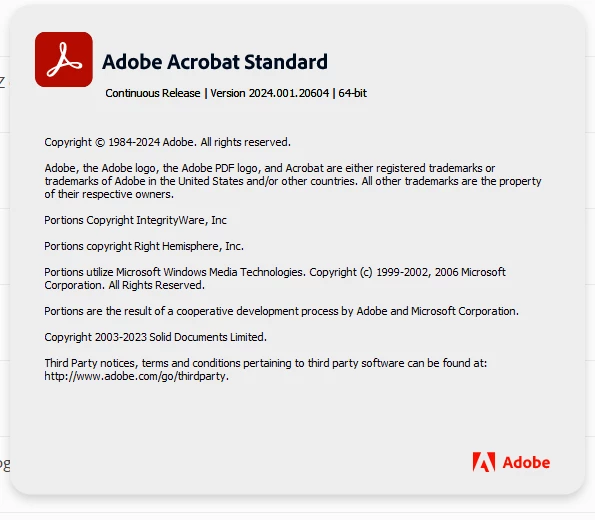
I've encountered the same. I fixed it (I think it's fixed) on a few computers by manually installing the patch and ignoring the many, many 1328 errors. Patch can be found in C:\ProgramData\Adobe\ARM\Acrobat_24.001.20604. Adobe says they're aware of the issue and have logged a bug report: ADC-4457358


Hopefully they address this soon, as I don't want to have to fix this manually on 100+ computers


Participant
March 28, 2024

...and right after I manually fixed a bunch of computers, Adobe released a new patch that broke them again! I'm turning off auto updates.

Amal.
Community Manager
Community Manager
May 8, 2024

I had the same issue at the end of March, which was fixed about a week later. However, the issue re-occured yesterday and the security update would not install. Hopefully Adobe will produce a fix soon.


Hi there


Hope you are doing well and thanks for reaching out.


Please try to download the patch manually from the link https://adobe.ly/4ahvvwC and see if that works for you.


~Amal
