
Participant
June 19, 2024
Answered

user typed text aligns randomly in the text fields

  • June 19, 2024
  • 2 replies
  • 998 views

Hello, 
I've been working on this fillable PDF form now for over a month and I'm losing my mind. I thought I've figured everything out, but now this. The text fields are set to the same properties - align Left, but when I type in the text, for some reason it goes all over the place (see the attached picture). Ideally, I'd like to have all the texts align Top Left. Even if only one line typed. 
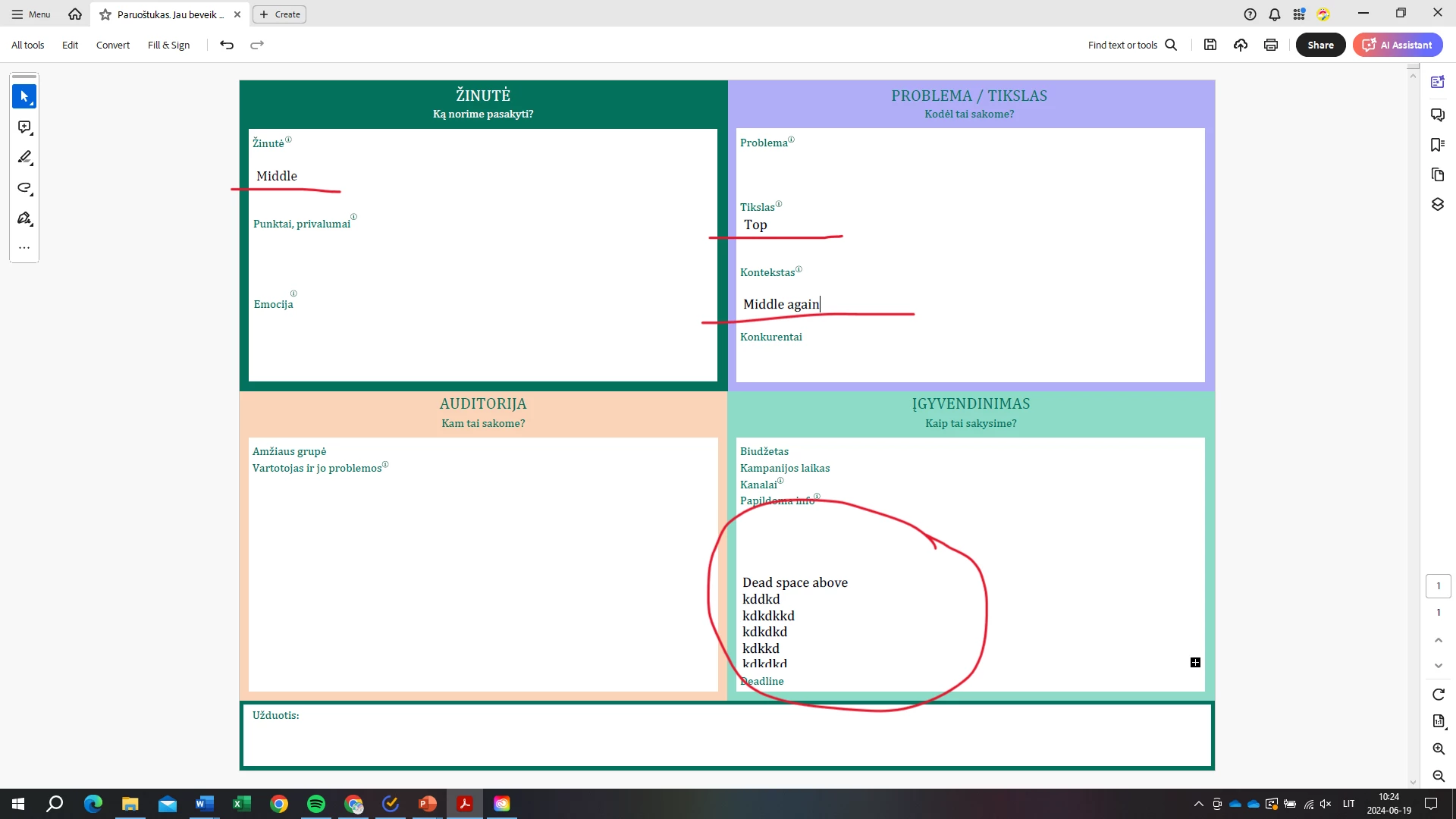
This topic has been closed for replies.
Correct answer PDF Automation Station

It's because "Allow Rich Text Formatting" is checked in the options tabs of the fields.  If it's a simple fillable form it should not be checked.  If you highlight the text in the field and press Ctrl + e a formatting bar will open.  The text that says Middle Again has an empty line before it.  If you remove that it will go to the top.  Some of the other fields have other formatting that you can see when you press Ctrl + e and click the More button.  The fields should be recreated without Rich Text Formatting.

2 replies

Bernd Alheit
Community Expert
Community Expert
June 20, 2024

Can you share the form?

Participant
June 20, 2024
PDF Automation Station
Community Expert
Community Expert
June 20, 2024

It's because "Allow Rich Text Formatting" is checked in the options tabs of the fields.  If it's a simple fillable form it should not be checked.  If you highlight the text in the field and press Ctrl + e a formatting bar will open.  The text that says Middle Again has an empty line before it.  If you remove that it will go to the top.  Some of the other fields have other formatting that you can see when you press Ctrl + e and click the More button.  The fields should be recreated without Rich Text Formatting.

PDF Automation Station
Community Expert
Community Expert
June 19, 2024

It appears as though the fields in bold have a larger font and are bold.  Larger font leaves more space from the left edge of the field than smaller font.  These fields are perfectly align.


Participant
June 20, 2024

I was talking about the space from the top not the left edge. Every box starts right under the green word on the left, so the there's a lot of dead space as they text is aligned int he center on the vertical  axis. And the fonts are all set to Auto, so don't know why they'd be all different sizes or boldness.