
Using Microsoft Information Protection plug-in for Acrobat Reader Presenting an error
Microsoft Information Protection (MIP) is a Microsoft rights management solution. Users of Azure Information Protection and other Microsoft Information Protection solutions can use Adobe Reader/ Adobe Acrobat to read labeled and protected content using a MIP plug-in offered by Adobe. Download here: https://helpx.adobe.com/acrobat/kb/mip-plugin-download.html
Background of the issue: I have downloaded the latest Acrobat Reader along with the latest MIP plug-in, and no matter what I do, I get the following error before being able to view the file: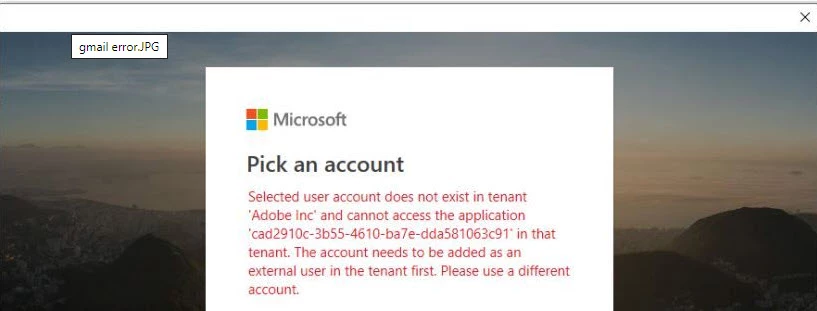
After closing out this error, I can view the file just fine. I can view these AIP protected PDF files via FoxIt Viewer and AIP Viewer without any errors. This only happens with Adobe Acrobat Reader. It doesn’t matter whether it is with Mac or on a PC. We have tested it with several people and all ran into the same problem. After working with a Microsoft engineer, he was able to open the files using his @16036140.com email account, but when he used his Microsoft accounts that were @10215394 or @outlook.com, he too ran into the symptoms. Closing out of that window allowed him to view the file.
Can we get an explanation as to why this is happening? Is Adobe just not respecting Microsoft accounts? It states clearly that my live account does not exist in Adobe Inc. tenant.
Just to completely rule out it wasn't an issue with our tenant's restrictions, I added the gmail account as an external user (guest account), but that did not resolve it.
Followed these instructions:
https://docs.microsoft.com/en-us/azure/information-protection/rms-client/protected-pdf-readers
Please advise.
 AdChoices