Inspiring
November 15, 2021
Answered

Vectors look horrible

  • November 15, 2021
  • 4 replies
  • 3368 views

I have an illustrator file that I am attempting to put together into a brochure.  My steps below:

1. Create Illustrator file, layers as pages

2.  Create InDesign file and import pages

3.  Export as print-ready, uncompressed, etc., etc.


When I open the PDF the smaller vectors look HORRIBLE.  Totally illegible.  I know Acrobat has been just terrible at this for so many years, but I am hoping that there is something that can be done.  It really makes it useless to send PDF's to clients for proofing/comments when it looks so bad.


What DOES work:

1.  Export from Illustrator as 300dpi JPEGS

2.  Combine JPEGS in Acrobat


Then you can easily see those vectors.  But, of course, they aren't vectors anymore!  

Screen shot below


Am I missing something?  You'd think Acrobat could accurately present vectors by now...



This topic has been closed for replies.
Correct answer JR Boulay

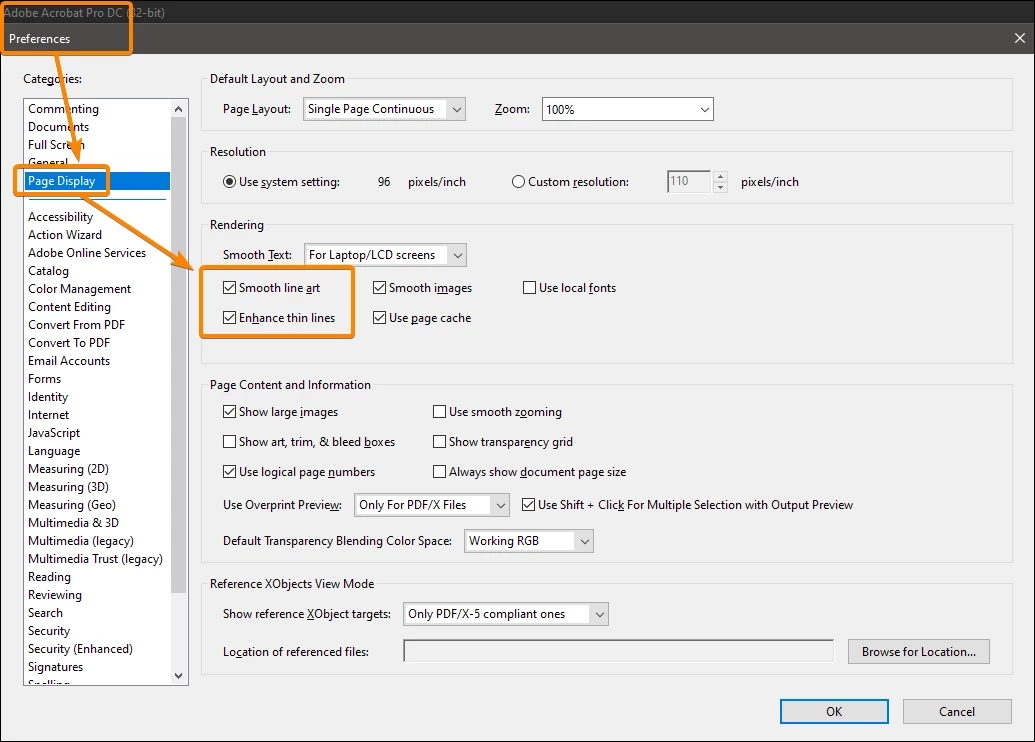
Try to play with these settings:


4 replies

Participant
January 10, 2023

Same issue here... Export all spreads a <600 ppi png from InDesign and recombine in acrobat. Annoying but looks as like it does in InDesign/Illustrator. Hope this helps.


-F

Participant
July 12, 2023

I was just experiencing a similar problem with how small vector icons were displayed in a PDF exported out of InDesign. Line thickness appeared wonky and appeared to vary a lot at different zoom percentages — even within a single icon when I know they had 100% consistent stroke widths in the source files. To be clear, this is only an issue for screen display, not printing.


I took the advice of JR Boulay from higher up in this thread to play with settings in Preferences under Page Display. Turning off "Enhance thin lines" resolved the issue. Now the icons look good however much you zoom in or out. 

JR Boulay
Community Expert
JR BoulayCommunity ExpertCorrect answer
Community Expert
November 15, 2021

Try to play with these settings:


Acrobate du PDF, InDesigner et Photoshopographe
JR Boulay
Community Expert
Community Expert
November 15, 2021

JPEGs are not vectors.

I suppose that in addition these are JPEGs in CMYK mode?

Acrobate du PDF, InDesigner et Photoshopographe
Inspiring
November 15, 2021

No, it's not going to print, no color profiles have been changed (it's all sRGB for web viewing).

try67
Community Expert
Community Expert
November 15, 2021

At which point in that process did you use Acrobat, exactly? Sounds like you use Illustrator and then InDesign, and Acrobat only displays the file as it was created from ID. I suggest you ask in the forums dedicated to those two applications what's the best workflow to achieve your desired result.

Inspiring
November 15, 2021

There is no problem with ID or AI.  The problem is with how Acrobat displays vectors.  It's been this way since Acrobat was created, it just seems like Adobe would make some effort to fix this as it's largely what Acrobat is for (a container to present vectors and bitmaps).


If you zoom in 1000 it looks like a vector, but viewed at 100%, 150%, etc., it looks just horrible.  As in so bad there's no way I can use it professionally to display work.


Has there not been any solution/effort to remidy what has been a known issue for decades?

Bevi Chagnon - PubCom.com
Legend
November 15, 2021

Haven't had any problem with vector rendoring in Acrobat, and we produce thousands of documents a year.


Asked before, and now again.

  1. Why are you using Illustrator to lay out pages? It's a graphics program, not a page layout program.
  2. What format are you using to save the Illustrator files and then importing into InDesign?
  3. Are you copying/pasting from Illustrator into InDesign?


Whether zoomed out to 50% or in  to 200%, they are crisp vectors of illustrations, maps, and charts.


|&nbsp;&nbsp;&nbsp;&nbsp;Bevi Chagnon &nbsp;&nbsp;|&nbsp;&nbsp;Designer, Trainer, &amp; Technologist for Accessible Documents ||&nbsp;&nbsp;&nbsp;&nbsp;PubCom |&nbsp;&nbsp;&nbsp;&nbsp;Classes &amp; Books for Accessible InDesign, PDFs &amp; MS Office |