
Copy link to clipboard
Copied
Hi,
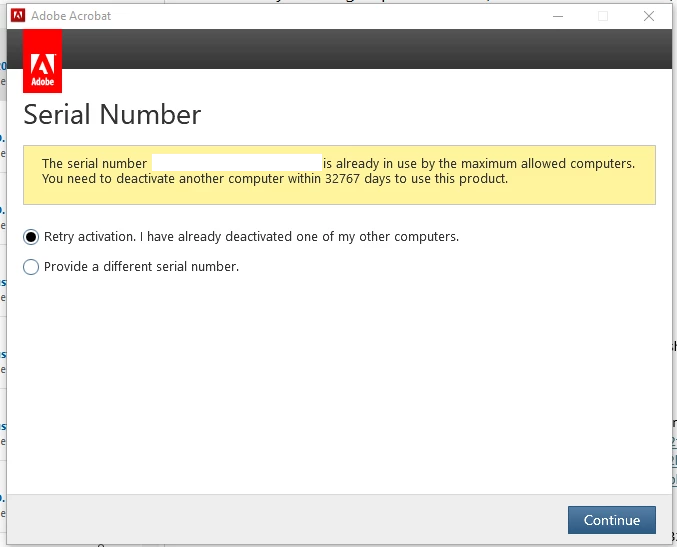
We are currently on a Volume License for Adobe Acorbat DC Version 12. Just recently we have been getting these pop ups(See attachment below). We also contacted Adobe Support via a phone call and they advised for us to reach out to the community (Case Number: ADB-34368485-K7D0. Issue: Manage Team License). We have searched through to see if we can kick out users but do not see a area where we can. Also we have not added any extra computers. I know that this is a much older version than we are at currently. Any assistance to get this moving would be greatly appreciated.
Copy link to clipboard
Copied
in the future, to find the best place to post your message, use the list here, https://community.adobe.com/
p.s. i don't think the adobe website, and forums in particular, are easy to navigate, so don't spend a lot of time searching that forum list. do your best and we'll move the post (like this one has already been moved) if it helps you get responses.
<"moved from using the community">
Copy link to clipboard
Copied
Thank you!
Copy link to clipboard
Copied
have any users ever "deactivated" (acrobat>help>deactivate)?
Copy link to clipboard
Copied
To my knowledge, I do not believe so. Would there be a way to check? The portal is very empty.
Copy link to clipboard
Copied
Looks like they do not have a Deactivate option.
Copy link to clipboard
Copied
is there an account, you can sign-in to using the enterprise credentials, https://account.adobe.com
Copy link to clipboard
Copied
Yes there is.
Copy link to clipboard
Copied
does it show activated devices?
Copy link to clipboard
Copied
Sadly it shows 0 devices activated.
Copy link to clipboard
Copied
sorry, that was a dead-end.
open the support tab on your admin console > start chat or start case or request expert session.
https://helpx.adobe.com/enterprise/using/support-and-expert-services.html
Copy link to clipboard
Copied
I appreciate the help! Sadly went back to Adobe chat and was reffered back here.
Copy link to clipboard
Copied
Copy link to clipboard
Copied
Get ready! An upgraded Adobe Community experience is coming in January.
Learn more