
What is the meaning of 'version' in tHostPerms on Acrobat Reader DC
Hey all,
So as noted in the documents for the Trust Manager for Acrobat Reader here , whenever trying to load a URL not in the user specified list, it will prompt the user on how they want to proceed. They can choose to 1. Always ask , 2. Always allow, or 3. Always block (These come under `iUnknownURLPerms` in the linked docs, but they are stored in `tHostPerms`).
I have tested this by trying to load the URL `https://www.example.com` and clicking and selecting Always allow. Sure enough, I received the following entry at \HKEY_CURRENT_USER\SOFTWARE\Adobe\Adobe Acrobat\DC\TrustManager\cDefaultLaunchURLPerms\tHostPerms:
version:2|example.com:2
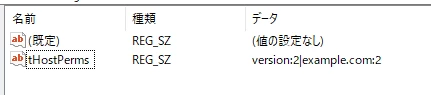
What I want to know is, what does `version:2` mean in this situation? Is it a reference to a specific host? is it something else?
Apologies for the likely dumb question but any help would be much appreciated!
 AdChoices