aliceb926
Participant
June 30, 2018
Answered

When I go to print in Acrobat reader, there is no option to shut off 2 sided printing. How do I do this???

  • June 30, 2018
  • 2 replies
  • 904 views

How do I shut off 2 sided printing??  There isn't an option in the print menu. Very frustrating!!!

This topic has been closed for replies.
Correct answer Stephen Marsh

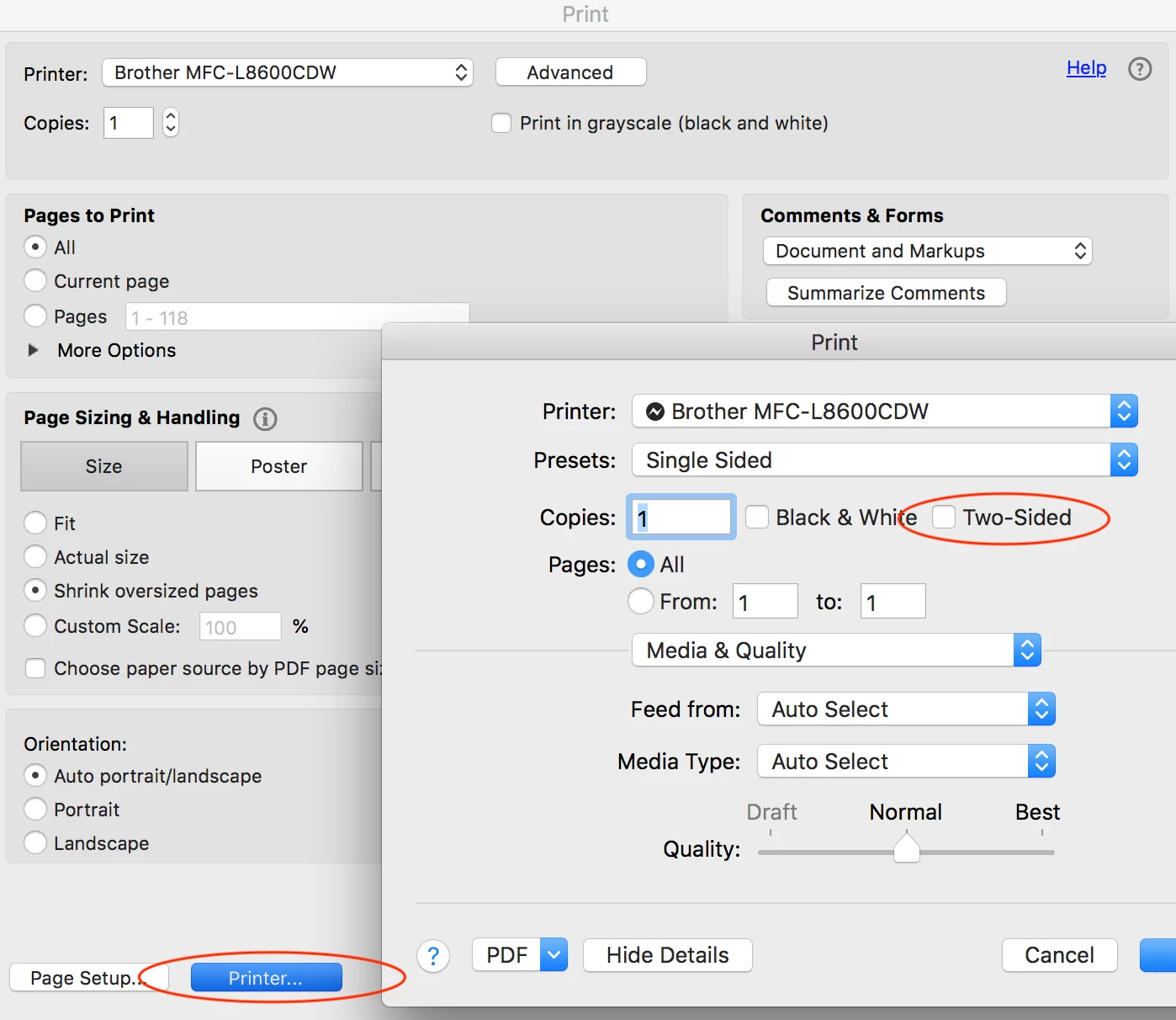
It is found once the print command is selected, under the printer button (probably depends on the driver):
2 replies

Abambo
Community Expert
Community Expert
July 2, 2018

You are on a MacOS computer? Acobat asks the printers capabilities. If the printer announces to the OS that it can do duplex printing, Acrobat shows the "print on both sides" button. A lot of printers don't advertise that feature, so Acrobat cannot make the changes for you.

You need to go to the printer drivers settings (as indicated by Stephen_A_Marsh ) to change parameters Acrobat isn't aware of. When printing is on duplex by default, that is your printer drivers default setting.

ABAMBO | Hard- and Software Engineer | Photographer
Stephen Marsh
Community Expert
Stephen MarshCommunity ExpertCorrect answer
Community Expert
July 2, 2018

It is found once the print command is selected, under the printer button (probably depends on the driver):