
Copy link to clipboard
Copied
I used Acrobat to add pdfs to a file (the project was designed by a vendor, so I don't have access to the original InDesign). When viewing on my computer, the hyperlinks are underlined, as I chose them to be. When I upload to our website, the links are there, but the lines are not.
When the original file is open on my computer:
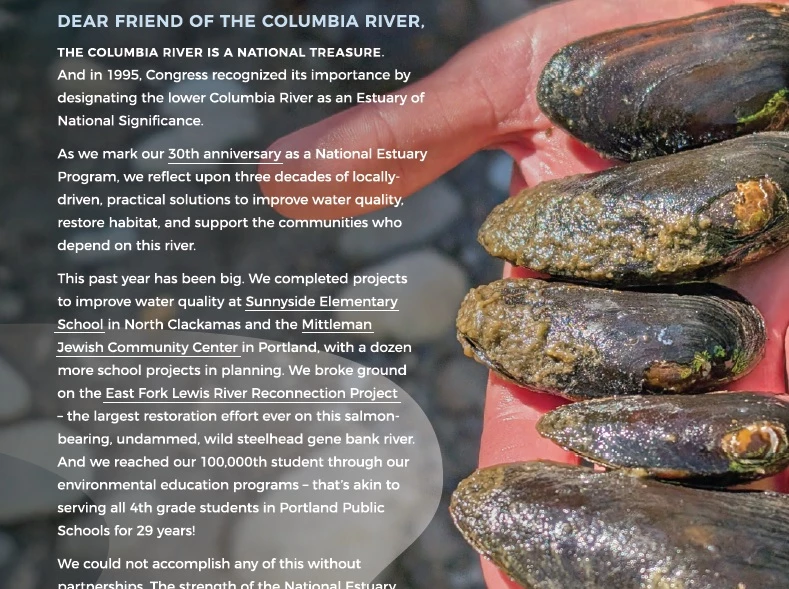
And when viewed online: https://www.estuarypartnership.org/sites/default/files/2025-10/LCEP-2025%20Year%20In%20Review.pdf. Note that if you click "Sunnyside Elementary School" on page 2 or any of the other links, the link opens. But no one will know there are any links to click without the underline. Can anyone help troubleshoot this?
Copy link to clipboard
Copied
Maybe not troubleshoot it, but I can provide a workaround.
Since the links actually work, but the highlights do not, let's try adding another highlight:
1. Get your Edit PDF toolset.
2. Highlight your first link. change the type color to the light blue/100% cyan you often see to highlight a hyperlink.
3. Save. Post. Test link and see if it works.
4. If it does, lather/rinse/repeat for the rest of the hyperlinks and post again for general use.
Hope this helps,
Randy
Copy link to clipboard
Copied
Maybe not troubleshoot it, but I can provide a workaround.
Since the links actually work, but the highlights do not, let's try adding another highlight:
1. Get your Edit PDF toolset.
2. Highlight your first link. change the type color to the light blue/100% cyan you often see to highlight a hyperlink.
3. Save. Post. Test link and see if it works.
4. If it does, lather/rinse/repeat for the rest of the hyperlinks and post again for general use.
Hope this helps,
Randy
Copy link to clipboard
Copied
Thanks Randy! I like your idea of a workaround. Grabbing the text was giving me issues, but I was able to just draw a straight line under each link, and that worked. Thankfully there aren't that many!
Interestingly, now that I've tested several things and different browsers, I've found that Firefox shows BOTH the link line and the added line. But both Chrome and Edge show only the added line. So that adds to the mystery!
Copy link to clipboard
Copied
Getting different responses from different browsers is not unusual at all. Processing HTML on the desktop, and mobile platforms for that matter, can often turn into an error, then trial process until you get the optimal results between all browsers.
Can I ask a favor of you? can you mark this question as answered for you? This alerts the moderators to tag it so it shows up in that "Related conversations" section at the top of the post and helps others who may find themselve in similar situations.
Glad it worked out for you,
Randy
Copy link to clipboard
Copied
Hopefully that worked?
Copy link to clipboard
Copied
Has this worked for you? If so, I'm happy that you're up and running again.
If you have any probelms with Acrobat — or any Adobe application, for that matter — feel free to come back and sound the alarm. There are lots of sharp folks around here who are happy to try and help.
Hoping your problem is solved,
Randy
Find more inspiration, events, and resources on the new Adobe Community
Explore Now