
Known Participant
December 15, 2021
Answered

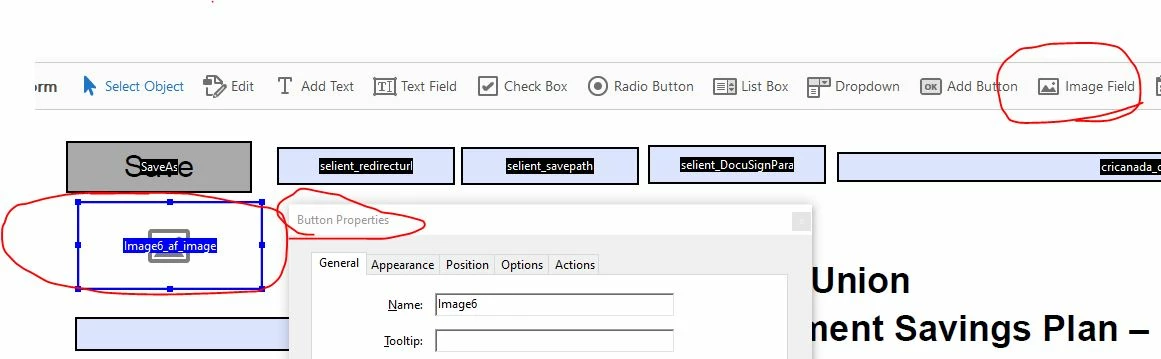
Why an image field shows a button properties page and not working like image in LiveCycle Designer

  • December 15, 2021
  • 1 reply
  • 5146 views

When I use Acrobat Pro DC to add an image field, the property page shows it is a button and not working like the image field in LiveCycle Designer which can load the image files dynamically.
 

This topic has been closed for replies.
Correct answer Bernd Alheit

Exit the form edit mode and click on the button.


Info: Acrobat and Designer creates different form types.

1 reply

Bernd Alheit
Community Expert
Bernd AlheitCommunity ExpertCorrect answer
Community Expert
December 15, 2021

Exit the form edit mode and click on the button.


Info: Acrobat and Designer creates different form types.

Known Participant
December 15, 2021

Thanks for the info. Is there a way to fill the image field dynamically via the .net codes?

Thom Parker
Community Expert
Community Expert
April 22, 2024

Thanks Thom! 


As for your comments "However, there is one thing you could try. Convert your image to a PDF and use that as the imported button icon.  PDFs do not require any image conversion. This has worked in the past in Reader.", do you mean use this way on the form level instead of folder -level script?


Thanks,

Michael


It doesn't matter. Not including the path will allow the function to be used in a document context. Converting the image to PDF  has no affect on whether the function is used in a trusted function or not. The "no image conversion" bit is important because Reader doesn't do image conversion. 


Thom Parker - Software Developer at PDFScriptingUse the Acrobat JavaScript Reference early and often