
keithk24724942
Participant
April 21, 2015
Question

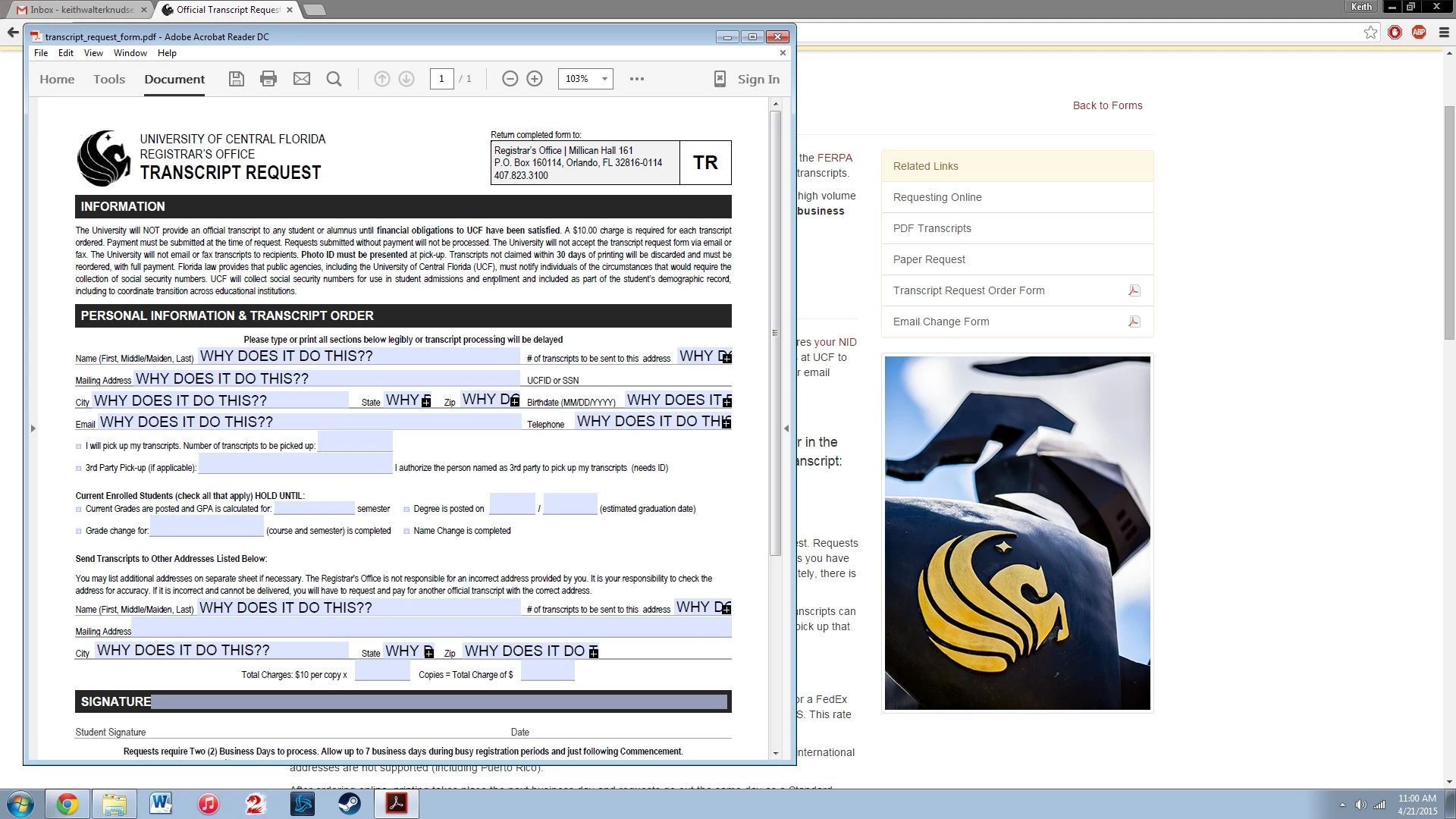
Why do my fill-able PDF forms auto fill every box with whatever I type in the FIRST box?

  • April 21, 2015
  • 3 replies
  • 134367 views

Every time I put information into any field in the document, It fills every field with what I put in, no matter what field or order I put it in. I need this document filled in by today, and it will not let me!
3 replies

Participant
July 24, 2020

Successful workaround for some forms:

Only works if repeated entries are on separate pages.
My entry on p1 was repeated on fields in page 2.
I extracted p2 and saved as new pdf "Form p2"
I resaved p1, after deleting p2.
I then filled out p1 pdf, p2 pdf, saved each and recombined into single PDF doc to be emailed.

Bernd Alheit
Community Expert
Community Expert
July 25, 2020

This will work when you combine the files in a portfolio.

gmizen
Participant
March 29, 2017

I'm looking for a way to automate a way to fill out a contract I have on Adobe Acrobat Reader. Can someone help me figure out a way to auto fill this document?

try67
Community Expert
Community Expert
March 29, 2017

You can't do it with Reader. It's possible with Acrobat, but would require

renaming all the fields.

Inspiring
April 21, 2015

You just need to give each field a unique field name.

keithk24724942
Participant
April 21, 2015

What do you mean?

As soon as I type anything to any box it fills all of them with that field.

Participant
January 2, 2018

Each area where you can enter data into a PDF form in the normal view or non-Form Editing view is a field object. Each one of these fields has a name to identify that area or object form other form fields. If the names are the same the fields then those specific fields share many of the same values, the most important is the value of the field.

This is an issue that needs to be addressed by the form's creator.


um no, it's an issue that needs to be addressed by Adobe. there is no particular reason why a form field in a different location of a pdf document that appears as a separate form field in the navigation needs to have the same value as some form field somewhere else that happens to share the same name property. you all might could provide a check box somewhere to autofill field #2 with field #1's values. of course that might take some coding skillz and/or concern for your users' needs. so we may as well hope for that in one hand, crap in the other and see which one fills up first.