
Participant
November 13, 2018
Question

Why does Adobe open under two different icons? Cannot print under second icon.

  • November 13, 2018
  • 5 replies
  • 2565 views

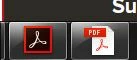
If I double-click a pdf file, whether on my computer or on a network/in an email, it opens with the icon on the left in the picture below. However if I wait any amount of time to open a second pdf file, it will open with the icon on the right.  Both program headers show that they are open in adobe acrobat pro so I know one is not open in Adobe Reader.  I can only print the file that has been opened in the program with the first icon.  The second file will not send anything to the printer or give me a prompt.  Yet both programs look and appear to be the exact same Adobe Acrobat Pro.  Wondering if anyone has insight on this.
This topic has been closed for replies.

5 replies

Participant
December 14, 2018

Any update to this?

Abambo
Community Expert
Community Expert
December 14, 2018

If you have both Acrobat Reader and Acrobat (DC?) 2017 on your machine and you start one session, the program you choose or get chosen to open the file will also open the second file, regardless which program you chose. That is Windows managing that. Acrobat is not involved here.

Now for the prompt you get:

Open the one that does not allow printing (by really paying attention to close the other one first, if that one is running), open a pdf file and go to the print menu.

Open the advanced print dialogue and check the "print to file" make. That should not be checked. If checked, Acrobat prints to a file instead of the printer.

ABAMBO | Hard- and Software Engineer | Photographer
Participant
November 13, 2018

patron011965​ I just tried the Open with option.  First PDF opens with the icon on left.  Then if I open another one the exact same way, I see the icon on the right. 

patron011965
Participant
November 13, 2018

The first icon seems to be for Acrobat Reader, but you mentioned that is not. Have try to right click on the file you want to open and choose the Open with option?

Participant
November 13, 2018

Adobe Version: 2015.006.30457

OS: Windows 7 Pro

Abambo
Community Expert
Community Expert
November 13, 2018

You do not give a lot of information on your Acrobat version and OS version.

ABAMBO | Hard- and Software Engineer | Photographer