Participant
September 25, 2020
Answered

Why does it keep the same name, even if I change the "save as" to a different one?

  • September 25, 2020
  • 1 reply
  • 2257 views

Why does it keep the same name, even if I change the "save as" to a different one?


Correct answer AnandSri

Hi!


I hope you are doing well.


If you wish to keep the Filename and the Document title, you can enable the preferences settings in Acrobat/Acrobat Reader from Acrobat/Edit>Preferences>Document>'Always use the filename as document title' Click OK and restart the application.
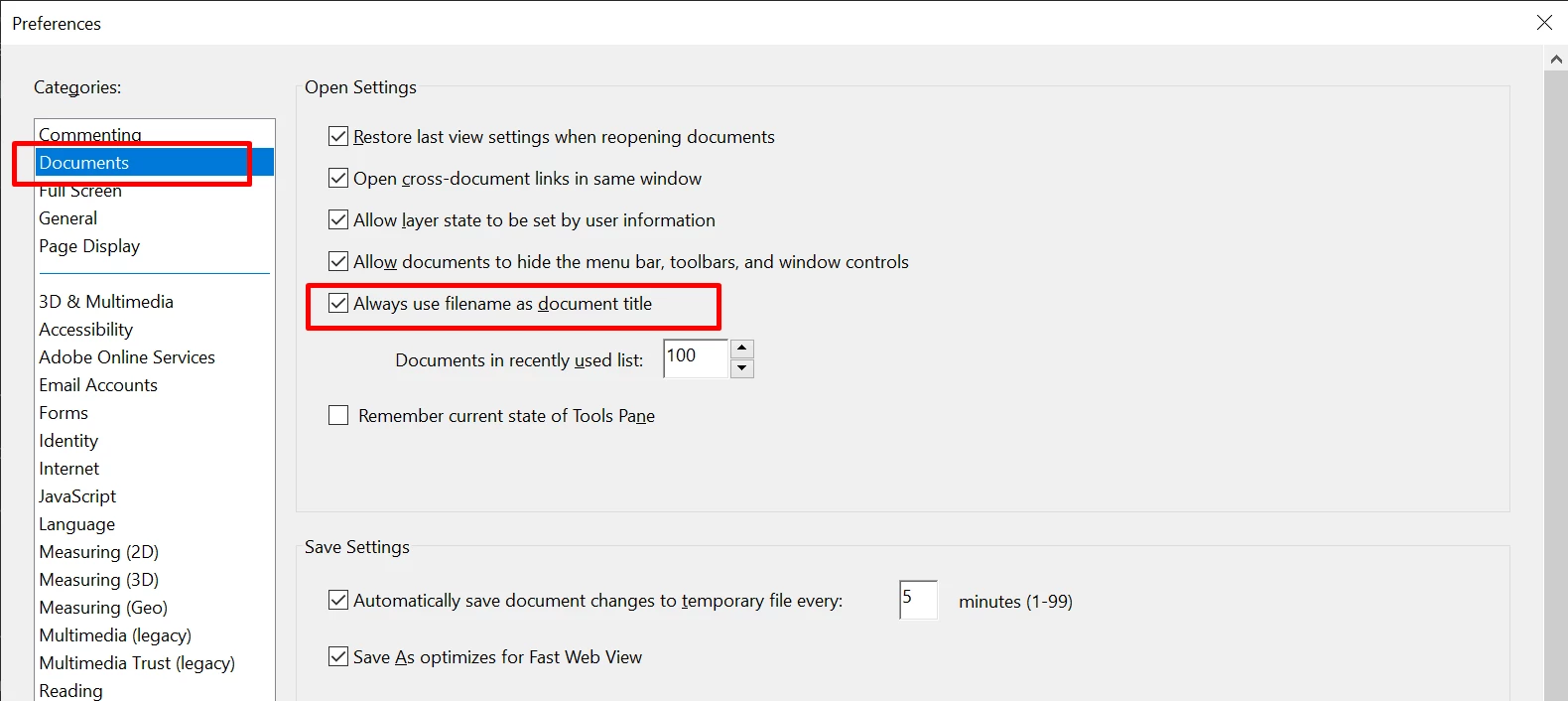


Let us know if that works for you.


Thanks,

Anand Sri.

1 reply

AnandSri
Community Manager
AnandSriCommunity ManagerCorrect answer
Community Manager
September 25, 2020

Hi!


I hope you are doing well.


If you wish to keep the Filename and the Document title, you can enable the preferences settings in Acrobat/Acrobat Reader from Acrobat/Edit>Preferences>Document>'Always use the filename as document title' Click OK and restart the application.


Let us know if that works for you.


Thanks,

Anand Sri.

Participant
March 18, 2025

My Adobe no longer has that option, what do I do????

Community Manager
March 19, 2025

Sorry for the troubled experience, @Energetic_person8485
Could you please share the screenshot of the preferences from your computer? Also, let us know the version of Acrobat installed on your machine: https://adobe.ly/3FDJMdu;


Also, ensure you are using Modern Experience: https://adobe.ly/42dxHV0


~Tariq