


mikes38487167
Participating Frequently
October 10, 2018
Answered

Why does PDF display correctly but prints wrong?

  • October 10, 2018
  • 2 replies
  • 30625 views

I have thousands of documents created in Word on a Mac that have a textbook at the top with the course name and other information.

Using the Acrobat tab in Word to create a PDF worked correctly like the top textbox below until the Word update to 16.16 (and now 16.17). Since then, PDFs display correctly, but print like the bottom textbox instead.
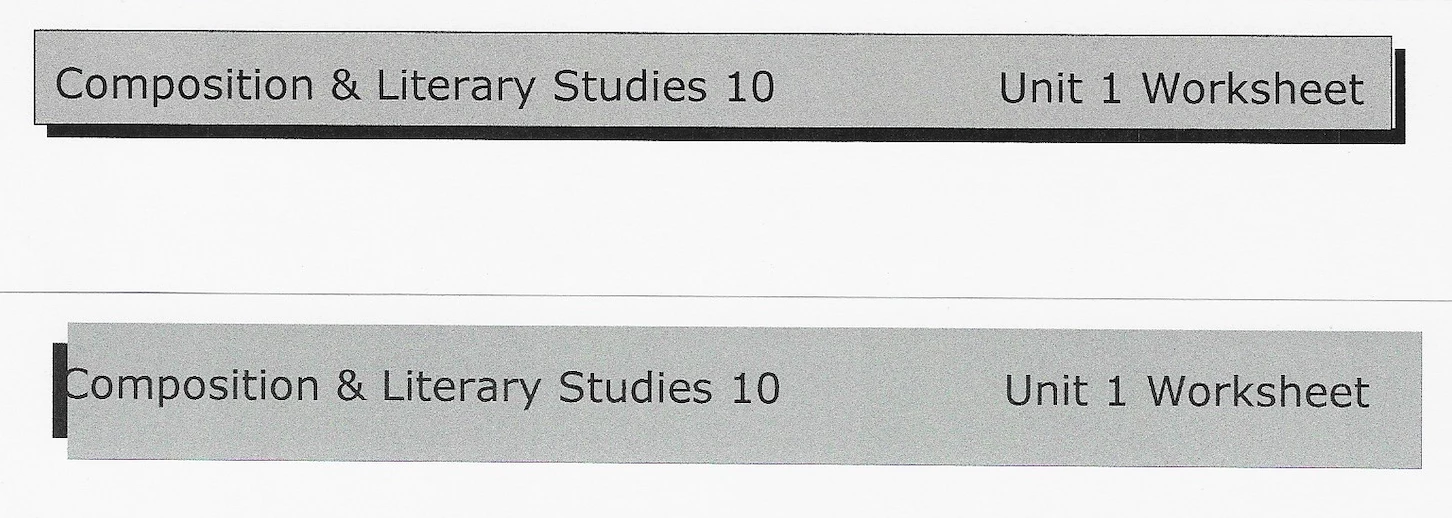
Removing the drop shadow from the textbox makes everything print correctly again, but I have many thousands of documents, and more importantly, it used to work just fine. They also display and print correctly in Preview on the Mac as well as from Windows 10 on a borrowed laptop. This issue occurs across two different printers that I have access to, from different manufacturers.

My Mac developed this issue running a fully up to date High Sierra OS, as well as fully up to date Office and Adobe Creative Suite. In an attempt to cure the problem, I erased my HD, did a clean install of MacOS Mojave, and have fully up to date installs of MacOS Mojave 10.14, Office 2016 (16.17 (180909)) and Adobe Acrobat Pro DC 2019.008.20074. Sadly, nothing has changed.

I appreciate any and all help you can give me.

Mike

Correct answer AkanchhaS8194121

Hi Akanchha:

Maybe I am confused. It seems that Document Cloud is an additional cost over and above my CS subscription? If so, I am not willing to spend an additional monthly fee trying to troubleshoot this issue: It seems like it is taking me away from the real issue, which is the broken printing of my pdfs from Acrobat Pro.

I have sent you test documents twice now. Have you gotten them?

Mike


I just received the files. Thanks for sharing it again.

I have checked your account and found that you have an active subscription with us. So the subscription and service is not the problem here.

Since you have shared the last message in the screenshot "You need a valid Acrobat DC subscription to create pdf...". The purpose of asking you to go on web and try using your service was just to see whether your subscription is working fine or not.

Hope that is solved and you are able to create pdf using Acrobat?

However, we are still focusing on the initial issue of Printing pdfs incorrectly using Acrobat DC. We will be sharing the files with our concern team to look into it. The update will be shared with you as soon as possible.

Thanks,

Akanchha

2 replies

Participating Frequently
August 14, 2019

I am seeing essentially the same problem: graphical elements created in MS Word (now version 16.27) on a Mac are rendered correctly on-screen in Adobe Acrobat Reader DC (now version 2019.12.20036), but often print incorrectly from Reader DC.  This happens for about 50% of the graphical elements in a file.  (For me, these are drawings, rather than the drop shadow of OP.)

I can duplicate the exact same results from Reader DC on my Mac and Reader DC on a Windows computer.  By "exact same", I mean that the printing errors are identical.  Conclusion: the problem is in the core software of Reader DC.  It may well be that Word+Mac has started producing faulty PDF, as suggested by OP.  But whatever the originating problem, it seems that Reader DC's screen rendering can handle it, but Reader DC's printing capability cannot.

"Print as image" succeeds as a work-around.  However, I have to send my files to be printed by others.  I can't very well tell each recipient that they have to enable an "Advanced" option in their printing.

Dov Isaacs
Legend
August 15, 2019

Unless you can post a sample file exhibiting this problem and advise us as to printer model, PDL used (PostScript, PCL, other), and driver, there isn't anything we can do to assist. It would also assist us if you can advise as to exactly what isn't printing – text, vector, images, some combinations?

          - Dov

- Dov Isaacs, former Adobe Principal Scientist (April 30, 1990 - May 30, 2021)
Participating Frequently
August 17, 2019

I'm happy to help out, and have a sample PDF file ready to upload, as well as a PDF file showing precisely the problem that occurs upon printing.  However, I do not see any way to post the files into this discussion board.  How do you recommend that I post the sample files?  I can provide full version details and debugging information when I post.

AkanchhaS8194121
Legend
October 11, 2018

Hi MikeS,

Sorry to hear about the trouble you have been experiencing and thanks for giving the detailed description of the issue. With the latest release of Acrobat DC [Oct 2018 (19.008.20071)] the printing issue have been reported by the users. However, the fix to this problem there is a latest patch Acrobat DC 2019.008.20074 has been released.

Looking at the information shared above, it seems that the issue hasn't been resolved for you. So is it the only file which is still causing problem printing the pdf or this happens with all the pdfs?

You may check once after rebooting the computer. Also, for testing please check the printer drivers whether its up to date or not-

https://helpx.adobe.com/acrobat/kb/troubleshoot-pdf-printing-acrobat-reader.html

If possible, please share a sample file with us, as we would like to test the same at our end.

"You can share the file with us via email. And you can send it to the email that is shared via private message. Please do mention your forum thread in the subject"

Regards,

Akanchha

mikes38487167
Participating Frequently
October 11, 2018

Hi Akanchha:

Thanks for your response.

I have the .20074 release of Acrobat Pro DC installed. The computer and all drivers are fully up to date, and the computer has been restarted multiple times. The only thing that has changed is the nature of how the text box prints incorrectly. This happens with all PDFs created on my Mac through MS Word.

Just now I tried to create a PDF in Acrobat Pro DC by using the Create PDF button, but when I tried to open a .docx file, it said I needed a subscription which I do have. I was signed in to Acrobat Pro DC when I tried to create the PDF.

I have sent you a file for your investigation.

Thanks for the help.

Mike

AkanchhaS8194121
Legend
October 12, 2018

Hey Mike,

Thanks for sharing the detailed information. Unfortunately I have not received any pdf via email, so I have shared the information again via private message.

For testing purpose, can you login on Document Cloud web interface Adobe Document Cloud  and check whether you are able to create the pdf or not? Or you are getting the same message as shared above.

-Akanchha