Exit
  • Global community
    • Language:
      • Deutsch
      • English
      • Español
      • Français
      • Português
  • 日本語コミュニティ
  • 한국 커뮤니티
1

Why does PDF only include half the page when coverted from word?

New Here ,
Mar 12, 2018 Mar 12, 2018

When I convert a PDF from Word 365 it only includes half of the page on the PDF.  Hopefully its just a setting and not something more serious

TOPICS
PDF forms
2.9K
Translate
Report
Community guidelines
Be kind and respectful, give credit to the original source of content, and search for duplicates before posting. Learn more
community guidelines
1 ACCEPTED SOLUTION
Adobe Employee ,
Apr 16, 2018 Apr 16, 2018
LATEST

Hi Andrewh,

Sorry for the delayed response.

Could you let us know if are converting word doc to pdf using Acrobat tab in Word or using File > save as > Browse > save as type > .pdf?

If using Acrobat tab, check if the text isn't selected in the doc file when converting because that can result in only the selection getting converted to pdf.

Below is the screenshot:
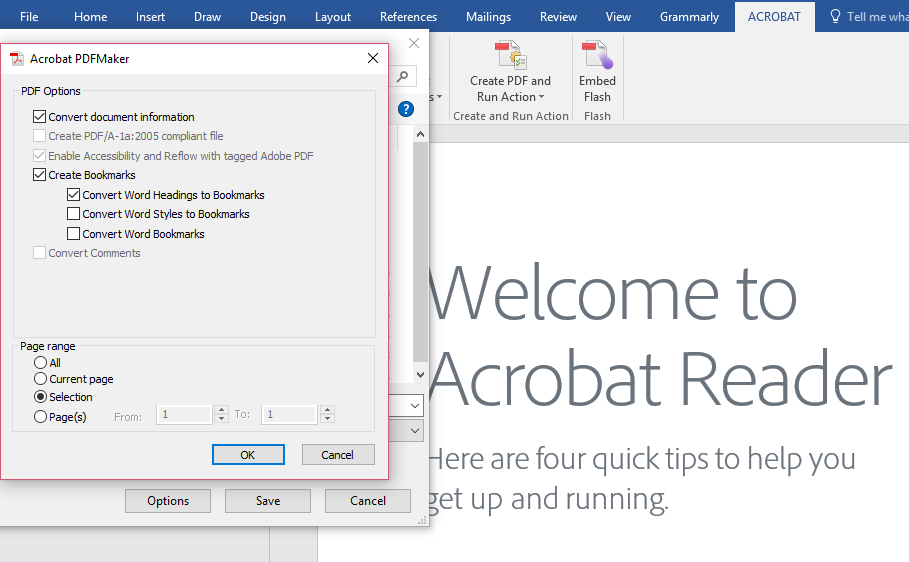
Also, try creating pdf using File > Create > PDF from file option in Acrobat and check if this behavior continues.

Thank You,

Shivam

View solution in original post

Translate
Report
Community guidelines
Be kind and respectful, give credit to the original source of content, and search for duplicates before posting. Learn more
community guidelines
Adobe Employee ,
Apr 16, 2018 Apr 16, 2018
LATEST

Hi Andrewh,

Sorry for the delayed response.

Could you let us know if are converting word doc to pdf using Acrobat tab in Word or using File > save as > Browse > save as type > .pdf?

If using Acrobat tab, check if the text isn't selected in the doc file when converting because that can result in only the selection getting converted to pdf.

Below is the screenshot:

Also, try creating pdf using File > Create > PDF from file option in Acrobat and check if this behavior continues.

Thank You,

Shivam

Translate
Report
Community guidelines
Be kind and respectful, give credit to the original source of content, and search for duplicates before posting. Learn more
community guidelines
