Answered
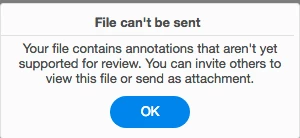
Why: File can't be sent. Your file contains annotations that aren't yet supported for review.????
annotating a file and clicking Share and getting this new error. Why?

annotating a file and clicking Share and getting this new error. Why?
Apparently not all of the annotation types can be viewed through the new Acrobat DC for web. I was able to get the same error message. In doing a quick test, a PDF that contains any comments other than a sticky note, when you click "Share" this error will appear.
And another thing I just noticed is that Adobe has assigned a new meaning to the word "review." Now it is the official "Review", as in their own Review service available through Acrobat DC for web. The implication being that there is no other way to review a file... of but there is... the way that worked just fine before October 2.
Review file
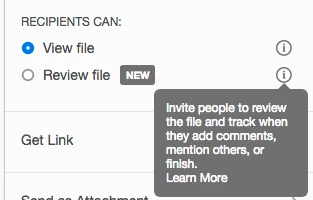
Another thing that's not mentioned in the little information buttons is that if you just send the file to people to "View", they can't see any of the comments you've made. Well, they can see the sticky note, but not the content.
View File

I personally stick with the old way of sending filed for review: I upload a dropbox link (or use a dropbox shared folder), ask them to download the file, comment on it in Acrobat or Reader, and then either save it right in dropbox, or email me the comments as an FDF file.
The new online review doesn't have all the commenting tools available in desktop Acrobat.
Already have an account? Login
Enter your E-mail address. We'll send you an e-mail with instructions to reset your password.
 AdChoices