

infomamun
Inspiring
January 24, 2023
Question

Why "Copy selected fields across" is disabled in pdf form

  • January 24, 2023
  • 4 replies
  • 1559 views

Hi There,

I have  near about 100 pages which have same background/form. So I want to create a "Text Field" and want to copy this field across 100 pages and at the same time Text Field Name should be different (sequential to original text field name) across pages so that they can't copy the enterned text in one page over multiple pages.


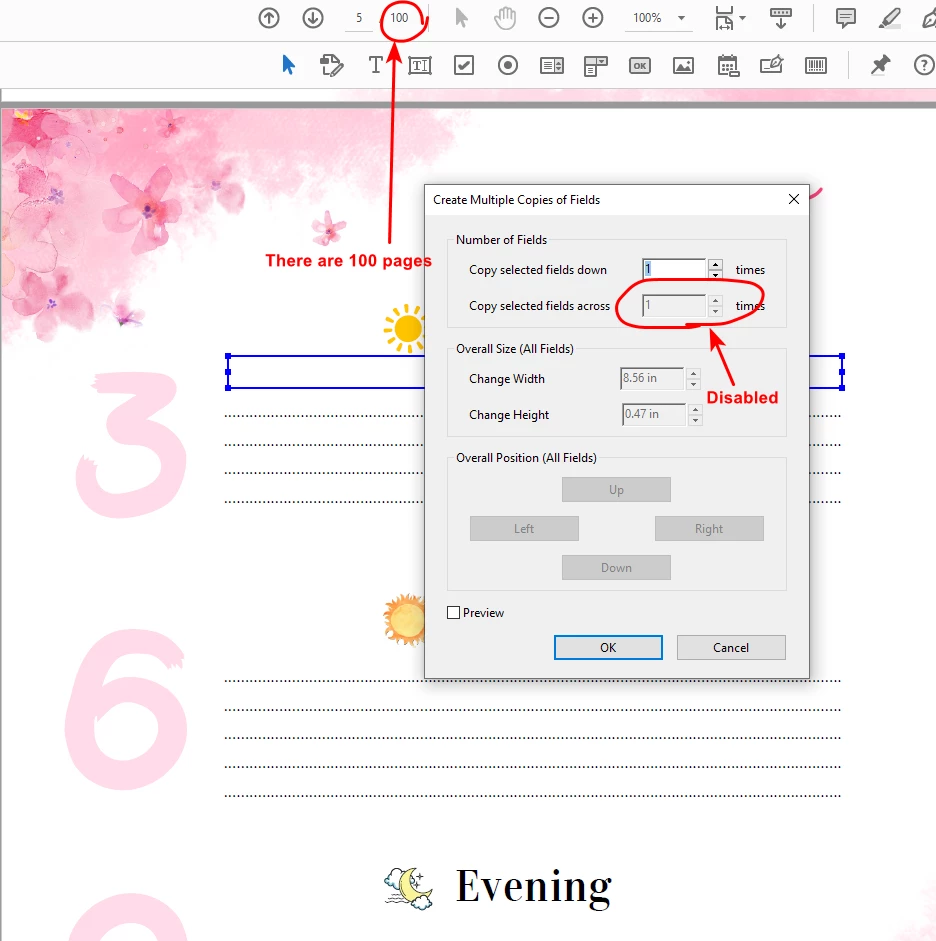
If I use "Duplicate across pages" option, that text field is creating over 100 pages but there name are keeping same, so after creating changing their names take too many times. So, I want to use "Create Multiple Copies>Copy selected field across" option. But surprisingly that option is disabled/greyed out. Can anyone tell why it may be disabled in my case? Please see the attached screenshot for your convenience.


thankyou
This topic has been closed for replies.

4 replies

Bernd Alheit
Community Expert
Community Expert
January 25, 2023

You can change the first entry. The second entry is disabled because there is no space for a additional field.

Bernd Alheit
Community Expert
Community Expert
January 25, 2023

Try this:

Delete the text field and create a new field.

infomamun
infomamunAuthor
Inspiring
January 25, 2023

Could not understand clearly. Did you mean that the text field is somehow corrupted? If so, I have tried by creating a new text field but that failed also.

Bernd Alheit
Community Expert
Community Expert
January 25, 2023

Have you tried it with a other document?

try67
Community Expert
Community Expert
January 24, 2023

There's no built-in tool to do what you want (assuming the fields detection wizard didn't work).

You can use a script, though, to rename the duplicates fields so that they have unique names. Well, actually, you can't rename them directly, but you can re-create them using unique names.


I've created a (paid-for) tool that does just that, if you're interested: https://www.try67.com/tool/acrobat-rename-duplicate-fields-to-unique-fields


infomamun
infomamunAuthor
Inspiring
January 25, 2023
Hello There
There is a built in tool in Acrobat DC Pro, I attached a screenshot in the
question. Please check that.

ABDULLAH MAMUN-UR-RASHID
try67
Community Expert
Community Expert
January 25, 2023

As JR wrote, this tool only creates fields on the same page as the original one.

JR Boulay
Community Expert
Community Expert
January 24, 2023

"Duplicate across page" can't rename the field.

"Create multiple copies" works on the current page only. In your capture the item is greyed out because there is not enought space to duplicate the selected field on the right side.


Did you try the automatic detection?


Acrobate du PDF, InDesigner et Photoshopographe