
Participant
November 25, 2021
Question

Win 11 / Adobe Pro DC / Outlook Public Folder "Convert to PDF Failure"

  • November 25, 2021
  • 2 replies
  • 918 views

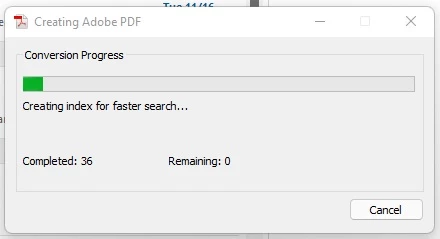
Everthing used to work but since I upgraded to Windows 11 when I ALT Click on a Public Folder to Convert it to a PDF it freezes on the part when it tries to Index the PDF.  I let it sit overnight and nothing.  Just stuck.


TIA


You need to ask program questions in the forum for the program you are using
To ask in the forum for your program please start at https://community.adobe.com/
Moving from Using the Community (which is about the forums) to the correct forum... Mod

Also, there is no such program as Adobe Pro... Moving to Acrobat fourm

This topic has been closed for replies.

2 replies

Participant
November 28, 2021

Update:

Performed an uninstall and upon thrying the reinstall the application continuously failed.  Had to do an uninstall using the cleaning tool and then was able to do a successful reinstall but alas I'm right back to where I was before.  😞


Any help is appreciated.  


ls_rbls
Community Expert
Community Expert
November 28, 2021

I am not sure if this is a dupplicate post, but this was my contribution in this other discussion:


https://community.adobe.com/t5/acrobat-discussions/converting-outlook-folders-to-pdf-no-index/m-p/12556036#M339793


Before you reset the indexing search for your new installation of the operating system, I think that most important is to consider if your version of Outlook is supported at all by MS Windows 11.


Outlook 2013 and earlier are unsupported in MS Windows 11.


If this is the case, you may need to try and see if the same issue occurs with a 2016 version of Outlook or later.


If the issue occurs with a supported version of Outlook in MS Windows 11, then you may need to manually rebuild the Outlook index, not just resetting  the operating system's files and folders indexing.


Hopefully these observations will steer your troubleshooting attempts in the right direction (but I may be wrong since I don't have Windows 11 yet).


Participant
November 29, 2021

Running Office 365 for Business Version 16.0.14527.20276

BarlaeDC
Community Expert
Community Expert
November 25, 2021

Hi,


Have you re-installed ACrobat after you updated you OS? if not, I would give that a shot.

Participant
November 25, 2021

I did a repair - but will try a reinstall


Thx!!