
Participant
Jul 8, 2025 6:18 AM UTC
Answered

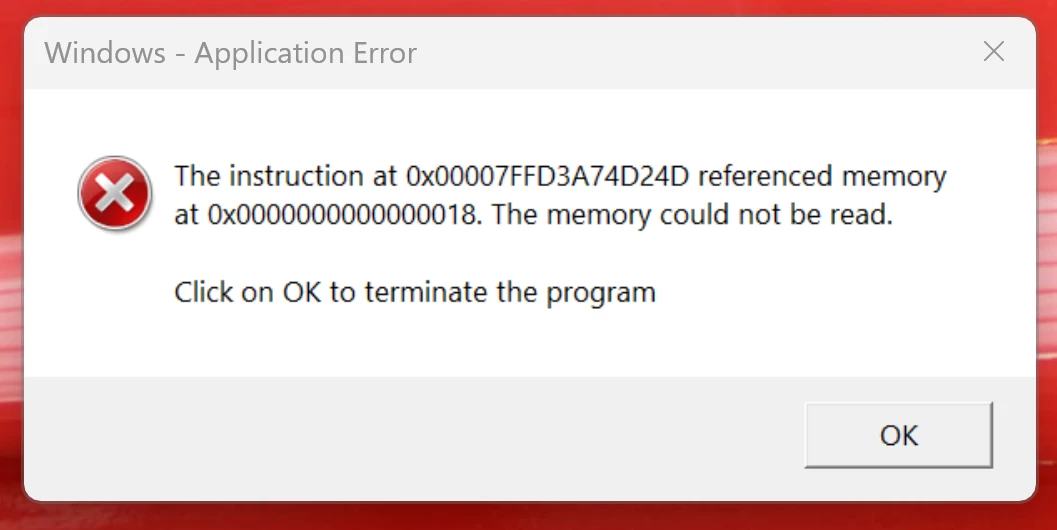
Windows Application Error - The Memory could not be READ

Opening an attached pdf from the new outlook app with Adobe Acrobat Pro installed locally, throws a windows application error saying the memory could not be read. When opening a pdf file from file explorer there is no problem or error. Not sure if this is an Adobe Acrobate Pro issue or New Outlook app issue? I can just click ok and prompt goes away. PDF opens fine as it should, it just always will pop up with this error message everytime I open a pdf attachment on a mail, which I then have to actively click ok.

I had this problem on my old computer for a long time, tried everything. Couldn't find a resolution. Just got a brand new laptop, with new installs of Windows 11, New Outlook and Adobe Acrobat Pro. Everyting is up to date. I am now haunted by the same issue. This is not good for my OCD 🙂

Also, I have run virus scans to make sure it isn't a virus causing this issue. Used Copilot for assistance, still no luck. If anyone out there has solved this. Would love to hear from you.


Participant
Sep 26, 2025 1:28 PM UTC

Hello,


Hope you are doing well. 


We are live with a new update (25.1.20744) that fixes this issue. Please update the app to the latest version and let us know if the issue is fixed for you.

To check for updates, go to Menu > Help > Check for Updates.


To know more: https://adobe.ly/4pGVEOq


Regards,
Souvik.


The update resolved the issue for my client.
I had to go to https://adobe.ly/4pGVEOq and download/install the correct version.
Check for Updates was not finding the update.

12 replies

Participant
Sep 10, 2025 4:34 PM UTC

I'm also having this issue opening PDFs from the New Outlook. I'm dissapointed Adobe is taking this long to fix this issue.

Translate
Participant
Sep 11, 2025 6:50 AM UTC

Ditto. Any fixes would be appreciated. 


Translate
Souvik Sadhu
Legend
Sep 25, 2025 7:53 AM UTC

Hello,


Hope you are doing well. 


We are live with a new update (25.1.20744) that fixes this issue. Please update the app to the latest version and let us know if the issue is fixed for you.

To check for updates, go to Menu > Help > Check for Updates.


To know more: https://adobe.ly/4pGVEOq


Regards,
Souvik.

Translate
Participant
Sep 5, 2025 8:26 PM UTC

I am also having this issue.

Translate
Participant
Sep 3, 2025 8:30 PM UTC

I have several users having this issue. Has there been a fixed for this?


The users are getting this error when ever they open a PDF from New Outlook.

Translate
Participant
Sep 3, 2025 6:11 PM UTC

It' been months .... Still no updates?

Translate
Participant
Jul 28, 2025 1:35 PM UTC

Is there any updates to this issue?

Translate
Souvik Sadhu
Legend
Jul 28, 2025 4:36 PM UTC

Hi @IT Rob,


No updates yet. 


This is a work in progress. We will update the thread once we hear back from the team.


Your kind understanding and patience is highly appreciated.


Regards,
Souvik.

Translate
Participant
Aug 28, 2025 9:22 PM UTC

I have found the workaround is to enable the compatibility mode, but are there no updates yet?


Translate
Amal.
Legend
Jul 8, 2025 6:53 AM UTC

Hi there 


Hope you are doing well and thanks for reaching out and we are sorry for the trouble you are experiencing. 


This is a known issue to our engineering team, and they are actively working on a fix. We will keep you posted as soon as we get more information to share.


Thanks for your understanding

Translate
Participant
Aug 28, 2025 12:39 PM UTC

Have there been any updates on this?

Translate