Participating Frequently
September 17, 2021
Answered

Word - Acrobat keeps readding to ribbon

  • September 17, 2021
  • 4 replies
  • 5331 views

I keep removing it and it keeps coming back. There's a whole tab for Acrobat. I don't need it taking up real estate on my home tab where styles should be. 

Is this pathological behaviour expected? Is there a way to get it stop reading itself?

Using current O365 and Acrobat DC Pro.

Thanks, 

Jim 🙂

Correct answer mark_7653

Hi there


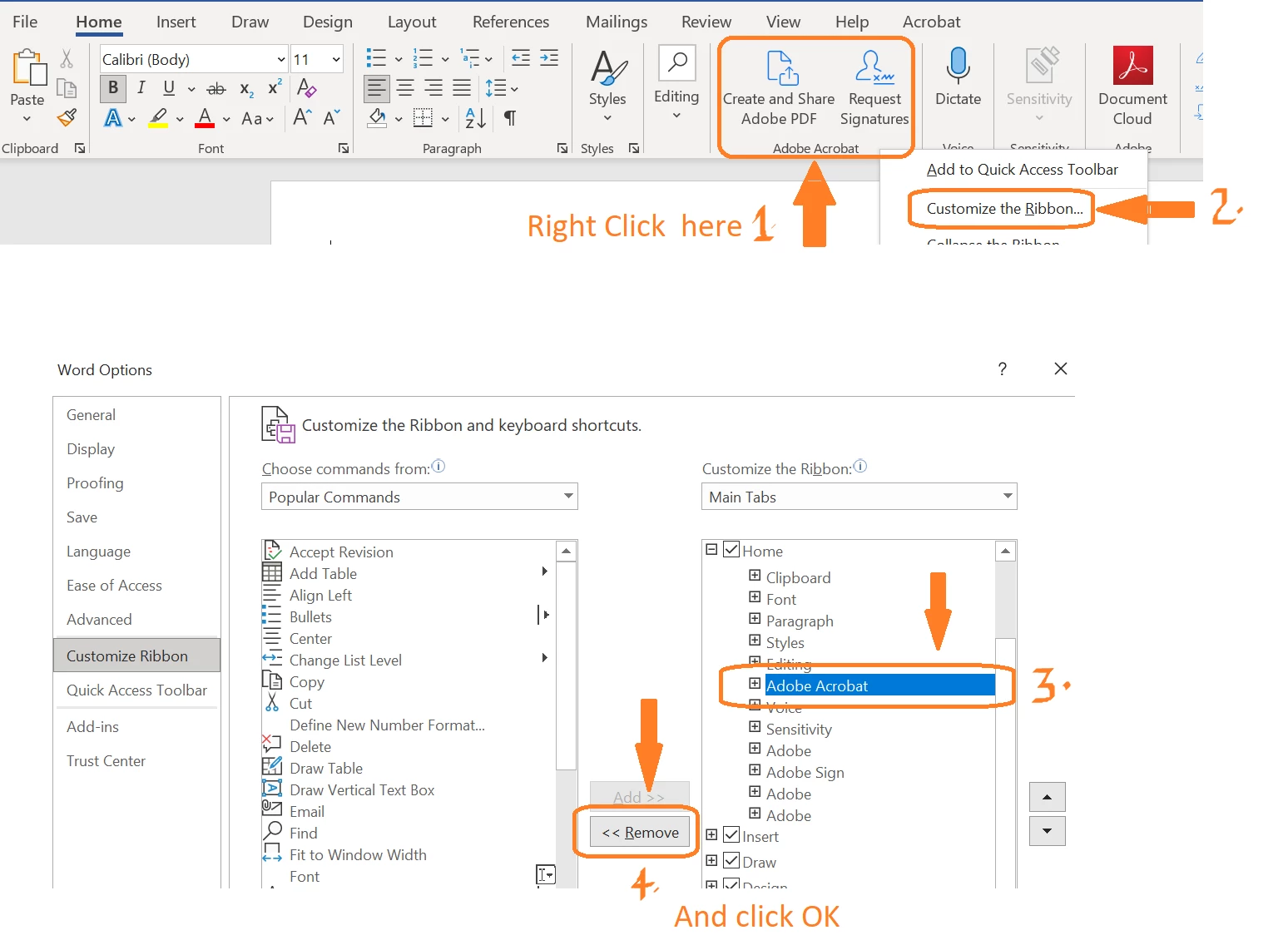
As you wanted to remove the Adobe Acrobat ribbon but keep the Acrobat tab, please check the steps shown in the screenshot below and see if that works for you:


Regards

Amal


The September 28, 2021 response by the user Amal is incorrectly marked as "Correct," since Amal's response doesn't address the issue this thread raised. The original poster clearly stated (prior to Amal's 9/28/21 response) that they had successfully removed the ribbon icons temporarily only for them to reappear. Amal's response showing how to remove the ribbon icons is thus not useful. 

Amal or a moderator should correct the 9/28/21 response and/or remove the "Correct" marking. Adobe charges a hefty price for Acrobat, and part of Adobe's pitch is providing continuous support to subscribers. The least Adobe can do is not prioritize spam and low-value content on threads where users look for help with the software's bugs. 

4 replies

Participating Frequently
August 8, 2025

Acrobat can't even respect the order of tools an end user sets for the toolbar. Obviously, this is an institutional issue. I must have reordered these things a hundred times. 


Dave Creamer of IDEAS
Community Expert
August 8, 2025

This thread is about the Acrobat plugin for Word. It doesn't seem your post is related to that unless I'm wrong. 

If it's not, you should start a new thread.


David Creamer: Community Expert (ACI and ACE 1995-2023)
Participating Frequently
September 22, 2025

Hey Dave,


Am aware of what the thread is about, as I created it over four years ago. My point is that, if Adobe can't provide a consistent way to manage their internal toolbars, what hope do they have of doing so in a third party application. At this point I am just glad I don't have to use Acrobat that much any more. 

New Participant
August 5, 2025

We have the same issue, in in enterprise deployment.   We don't use the Adobe share or sign functions, so these extra home buttons are confusing/wrong (besides taking up real estate). 

I am told disabling the addin completely isn't an option as that breaks some file explorer right click functionality. 

This is such an issue we are considering leaving Adobe.   

martir68364484
Inspiring
January 15, 2025

I HAVE DONE THIS MORE THAN 100 TIIMES AND NOTHING STOPS IT FROM COMING BACK. IF IT DID NOT CRASH MY ENTIRE SYSTEM I WOULD NOT MIND. WHEN I GET RID OF SOMETHING I WANT IT GONE AND I WANT IT TO STAY GONE. WHAAT KIND OF BS IS THIS???

New Participant
July 25, 2025

I’m facing the same issue. I’ve tried many different approaches, but the problem always comes back.
Why do Acrobat buttons replace the Word paragraph styles, even though the Acrobat plug-in already has its own tab? This is incredibly frustrating and feels like a major disregard for users' preferences.

New Participant
July 25, 2025
The bottom line is Adobe is a trash company snd Acrobat is a trash product.
They don’t care about their customers. Try Nitro PDF instead.
Amal.
Community Manager
Community Manager
September 17, 2021

Hi Jim


Hope you are doing well and sorry for the trouble.  As described you want to remove the Acrobat tab in MS Word?


Are you referring to the Acrobat Ribbon present in MS Word/Office applications in the tool bar at the top? If yes, please try the steps below:
In Word, Go to File > Options > Add-Ins, At the bottom of the Word Options dialogue box, select Manage "COM Add-ins", click Go. In the COM Add-ins screen which pops up, uncheck Acrobat to disable the Add-in. Click OK and reboot the application.


You may also go through the similar Microsoft help page: https://support.microsoft.com/en-us/topic/get-the-adobe-acrobat-tab-to-appear-b83cbba3-7bc1-4c75-b8dc-511e07a283f0
Note: It talks about how to enable the addin, by following the instructions in reverse you can disable it.


Hope this information will help


Regards

Amal

Participating Frequently
September 23, 2021

Hi Amal,

Thanks for your response. I definitely want to keep the Add-in. I constantly use the options in the Acrobat tab and it isn't taking up precious real estate on the home tab. 

The above is fine (I assume that's the entry for the Add-in you are referring to). I want to keep that. Below is what I want to get rid of. These sit on the Home tab at far right. No matter how many times I remove the entries they keep repeappearing, but going on what you were saying it sounds like there is no way to permanently remove them without removing the add-in. If that's the case it is a horrible development. That space is meant to be for my styles. 

Amal.
Community Manager
Community Manager
September 24, 2021

Hi there


Please check the help page https://helpx.adobe.com/sign/using/microsoft-word-powerpoint-signature-add-in.html and try the steps in reverse as it talks about how to install the Adobe sign add in  and se eif that works.


Regards

Amal