
New Participant
January 5, 2021
Answered

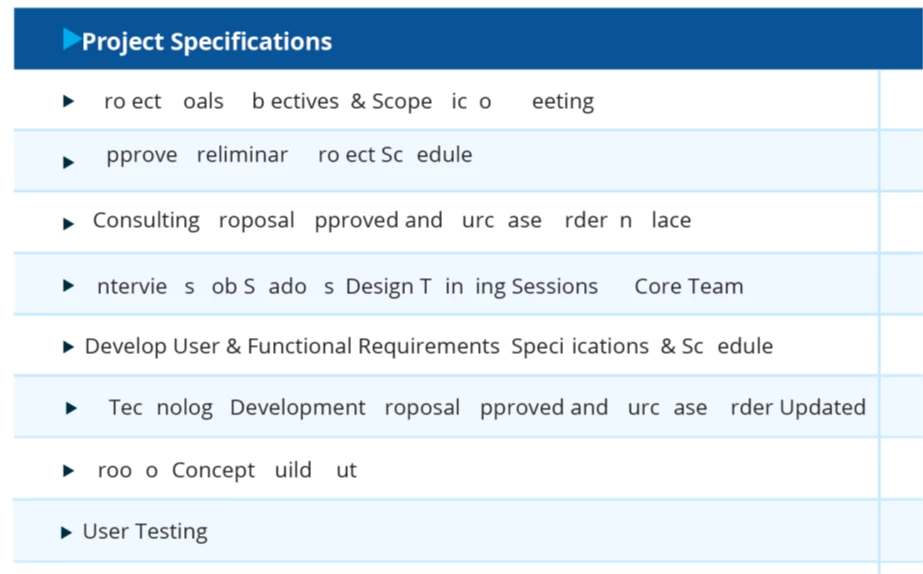
Words and letters missing after exiting and reopening document

  • January 5, 2021
  • 6 replies
  • 63324 views

Over the past few days, my pdf's are missing letters and words after saving, closing, and reopening. The first time this happened was when I duplicated a page in the document. Ever since then, when I open files with "Open Sans" embedded font, the words and letters are randomly missing and it doesn't happen with all Open Sans text boxes. My only recourse has been to select the text box, change the font to another font, and switch back to the original font.


Any thoughts on how to resolve this issue permanently?


System Details:

Adobe Acrobat Pro DC Version: 20.13.20074.411690

OS Name: Microsoft Windows 10
OS Version: 10.0.18363


Correct answer ABHI37171992e2vd

It can resolve easly.

1) Switch to Edit tool

2) select the font error affected text.

3) change font style to some other.

4) Get back to the previous font style.

5) Error will be fix.

6 replies

New Participant
October 22, 2025

This happens to me roughly once a month. It can be any document, ones I create or from other people. I save copies of any PDF that I have to sign so if something happens to the signed one I have the unsigned PDF. I go into "Fill and Sign" move the text around and 99.99% of the time it fixes the problem. Its like it has to update the text to show "Oh yes these letters are still here" Have never found a solution and I have been dealing with this since 2023. I have given up on Adobe ever fixing any thing.

Karl Heinz  Kremer
Community Expert
October 22, 2025

Did you file a bug report with Adobe (https://www.adobe.com/products/wishform.html)? 

Adobe Employee
August 30, 2024

Try embedding the fonts or converting the fonts to outlines via Preflight and check.

ABHI37171992e2vdCorrect answer
New Participant
May 4, 2024

It can resolve easly.

1) Switch to Edit tool

2) select the font error affected text.

3) change font style to some other.

4) Get back to the previous font style.

5) Error will be fix.

New Participant
May 4, 2024
Obviously I tried re-editing the font but a soon as I would save and reopen would happen again elsewhere not to mention there was SO much text missing was impossible to deal with

Sent from my iPhone
Amal.
Community Manager
Community Manager
May 7, 2024

Hi there 
 
Hope you are doing well and sorry to hear that
 
Is this an issue with a particular PDF file or with all the PDFs? Please try with a different PDF file and check. If the file is stored on a shared network/drive please download it to your computer locally and then try again.
 
What is the version of the OS and the Acrobat DC you are using? To check the version go to Help > About Acrobat and make sure you have the recent version 24.02.20736 installed. Go to Help > Check for updates and reboot the computer once.
 
Also try to repair the installation from the help menu (Win Only) and see if that works.
 
Please try to reset the Acrobat preferences as described here https://adobe.ly/3QA0T2h
 
You may also try to create a new test user profile with full admin rights in Win or enable the root account in MAC and try using the application there and check.


~Amal

New Participant
November 2, 2023

I'm also having this problem on Windows 11 - created a pdf and it keeps disappearing random letters and numbers when I save it. All the same font so no reason for it to be random letters. A pdf that I created so it's not been emailed from elsewhere.  Changing the missing letters to or from bold, or italics and back again displays them again. Running very slow too, even though CPU and memory on laptop is OK. Acrobat is so unstable, but maybe it has yet to be updated for compatibility with windows 11?

Dave__M
Community Expert
January 5, 2021

I had a PDF once that behaved similarly.  I didn't create it, but when I opened it, I had some characters just refuse to show.  After much hair-pulling, I stumbled on the fact that there were some stray characters from a non-English, non-standard typeface.  If I recall, there was an F-like character that wasn't really the letter F at all.  Once I replaced it, the PDF seemed to magically work as it should.  Can you spot anything out of place by Document Properties>Fonts?

Do you get the impression that the characters are there, but not displaying, or actually missing from the text stream?

My best,

Dave

New Participant
January 5, 2021

They are definitely there. Once I change the font to something else and then back to the original, everything is back perfect again.

New Participant
November 27, 2021

Hi! - Have you managed to resolve this at all? I am having the exact same problem and am rushing to meet a deadline!

Karl Heinz  Kremer
Community Expert
January 5, 2021

Open up Acrobat's preferences, then go to the "Page Display" category. In the "Rendering" section, you will find a setting called "Use local fonts". Does it make a difference when you change this setting? 

New Participant
January 5, 2021

Karl,

Unfortunately, this made no difference. Also tried to use the Print Production tools to analyze and fix missing fonts and embedded fonts at no avail.


Any additional thoughts?

Karl Heinz  Kremer
Community Expert
January 5, 2021

OK, so we know it's not due to local vs. embedded fonts. Is this a doument that you assembled by combining from different sources? If so, the workaround I have here might help: http://helpx.adobe.com/acrobat/kb/missing-or-garbled-text-printing.html