
Participant
October 3, 2019
Answered

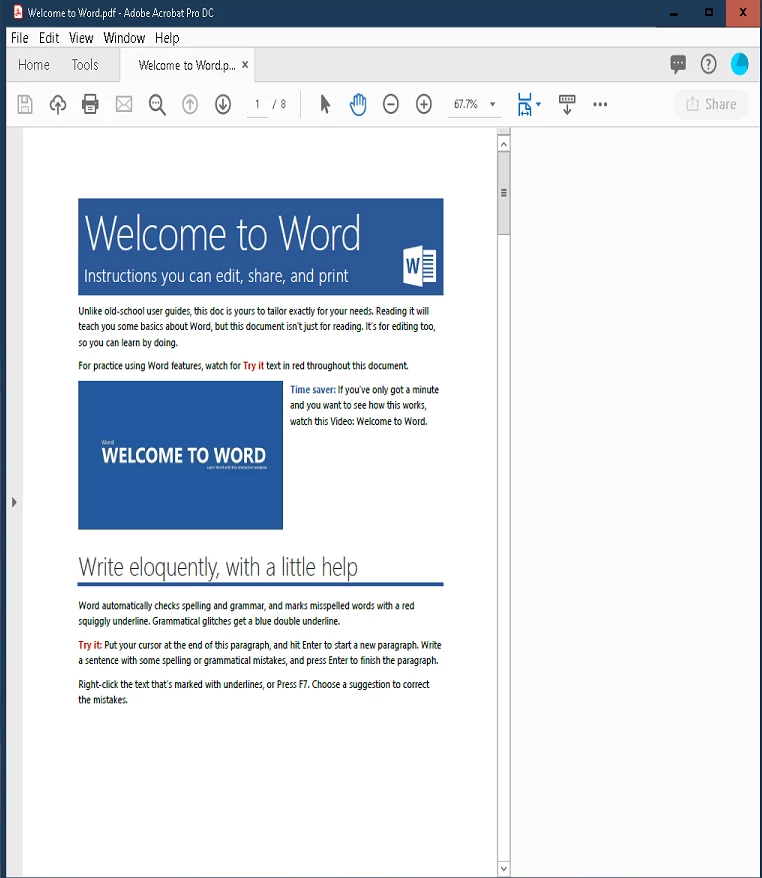
Acrobat DC Share button shows blank column

  • October 3, 2019
  • 1 reply
  • 5429 views

Hello - 


I'm having an issue with a user that is using Acrobat Reader DC, and after clicking on the share button, they don't have any of the share options appear, it's just a blank white column.(See screenshot below). Every once and awhile it will work once or twice but then stops working again. 

Below are the troubleshooting steps I've already attempted


Fresh reinstall, including using the Adobe cleaner. 

Multiple different PDF files


Adobe Version is 19.012.20040
    This topic has been closed for replies.
    Correct answer Amal.

    Hi AHoffman, 


    Thanks for reaching out. As described above, Acrobat DC Share button shows blank column, correct?


    Are you on personal computer or using a company device?


    As you have tried some troubleshooting steps without any success, please try the following steps:


    Let us know if that works for you


    Regards

    Amal


    1 reply

    Amal.
    Community Manager
    Amal.Community ManagerCorrect answer
    Community Manager
    October 3, 2019

    Hi AHoffman, 


    Thanks for reaching out. As described above, Acrobat DC Share button shows blank column, correct?


    Are you on personal computer or using a company device?


    As you have tried some troubleshooting steps without any success, please try the following steps:


    Let us know if that works for you


    Regards

    Amal


    AHoffman1Author
    Participant
    October 8, 2019
    Hello! Thank you Amal, resetting the preferences resolved the issue.