
Participant
March 23, 2018
Answered

Acrobat Pro DC Color problems

  • March 23, 2018
  • 1 reply
  • 1805 views

Good morning everyone,

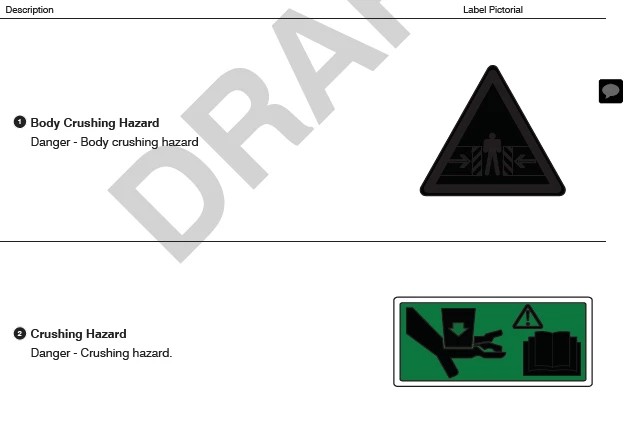
For some unknown reason, Acrobat Pro DC started to display colors in a different way (inverting colors).  I already uninstalled the program and installed it again, but nothing changed. When I open the same files with Adobe Acrobat Reader, everything shows just fine. Any idea why this is happening? Thank you!!

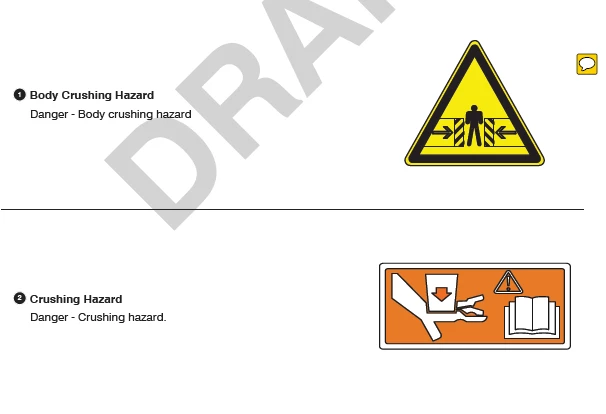
This is how the file looks with Adobe Acrobat Reader
This is how it looks with Adobe Acrobat Pro DC
This topic has been closed for replies.
Correct answer manuelu12936474

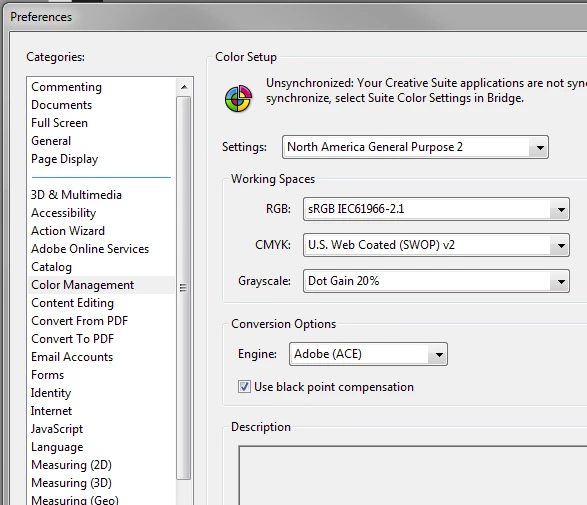
Thanks for the answer, I managed to fix it by changing the color setup settings under the Color Management category.

1 reply

try67
Community Expert
Community Expert
March 24, 2018

Compare the settings under Edit - Preferences - Page Display in both applications. It's probably something to do with transparency blending, overprint preview, or something like that.

manuelu12936474AuthorCorrect answer
Participant
March 26, 2018

Thanks for the answer, I managed to fix it by changing the color setup settings under the Color Management category.