


- Home
- Acrobat Reader
- Discussions
- Acrobat Reader DC printing problems - WIN 10
- Acrobat Reader DC printing problems - WIN 10
Acrobat Reader DC printing problems - WIN 10

Copy link to clipboard
Copied
Since I updated to Acrobat DC I am unable to print any PDF documents.
I am able to print these same documents using other PDF readers like Foxit Reader on this same printer, using this same computer but not on Acrobat DC
I have checked all my updates, installed and reinstalled Adobe reader several times, used REPAIR option on multiple occasions and so far no changes and no solutions.
My computer is running Windows 10 and here what happens after every attempt to print. I get a dialog box like this with message "hang on when Win reports a problem to Microsoft...etc" and then this exact dialog box comes up and program closes completely.
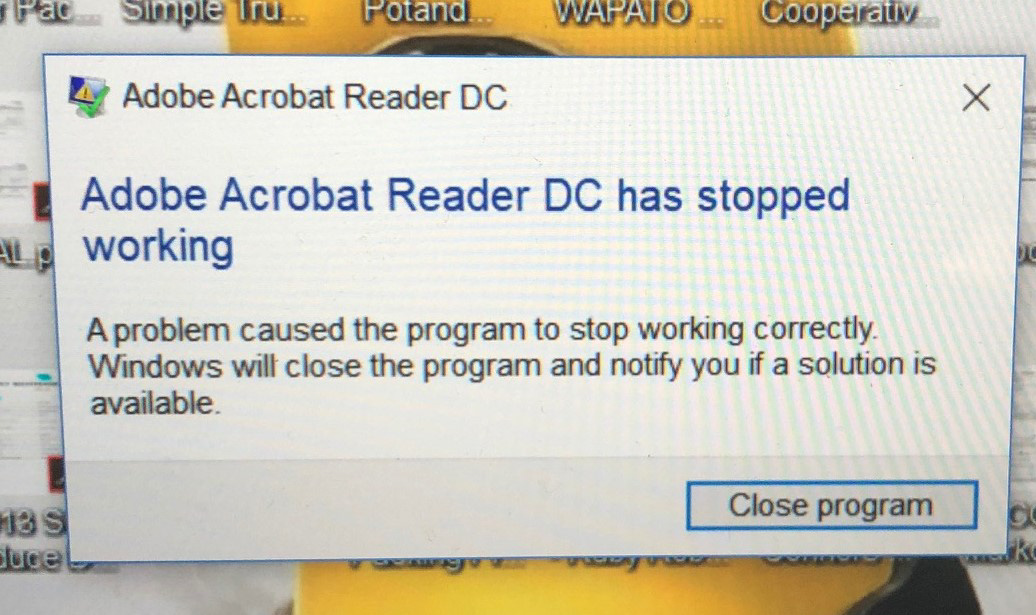
Do we have any explanations/solutions. mjt


 3
Replies
3
3
Replies
3


Copy link to clipboard
Copied
Hi Marcint,
Sorry to hear the inconvenience caused to you and thanks for sharing the troubleshooting steps.
As repairing installation and uninstalling/reinstalling the application didn't help. Then we would recommend you to try installing the latest patch through- Release notes | Acrobat DC, Acrobat Reader DC, Acrobat DC Classic 2015, Acrobat Reader DC Classic 20... and let us know the update.
Also, if that doesn't fix the problem then use cleaner tool to uninstall the application- Download Adobe Reader and Acrobat Cleaner Tool - Adobe Labs
and reinstall it - Adobe Acrobat Reader DC Install for all versions
Hope this helps.
Regards,
Akanchha
Copy link to clipboard
Copied
Thank you for the answer but this did not make any difference with my problem.
I have done these same steps several times before without any change, based on comments I found on the web.
I have also followed your instructions step by step again this morning after I received your post.
Sorry to report with same result. No difference.
So do we have any other "magic steps" we can take to fix this?
Marcin
Copy link to clipboard
Copied
Hi Marcin, I apologize for the delay in response to your last message.
As you have shared that the issue hasn't been resolved yet, so would you please check the following settings.
1- Refer to the help document and update the printer driver as suggested- Troubleshoot PDF printing in Acrobat and Reader
2- Check the Windows update.
3- If none of them works then check the same in "Hidden Administrator" account.
How to create hidden admin, for that you may refer to-
Enable Built-in Administrator Account in Windows
First you’ll need to open a command prompt in administrator mode by right-clicking and choosing “Run as administrator” (or use the Ctrl+Shift+Enter shortcut from the search box).
Note that this works the same in all versions of Windows. Just search for cmd and then right-click on the command prompt icon in the Start menu or Start screen.

If you are in Windows 8.x or 10 you can right-click on the Start button and choose to open a command prompt that way.
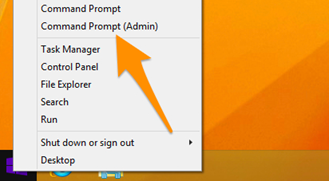
1- Now type the following command:-

2- You should see a message that the command completed successfully. Log out, and you’ll now see the Administrator account as a choice. (Note that this screenshot is from Vista, but this works on Windows 7 and Windows 8 and Windows 10)
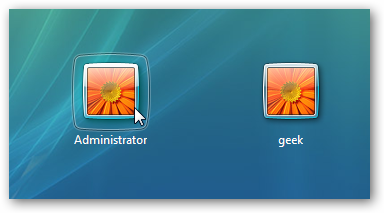
You’ll note that there’s no password for this account, so if you want to leave it enabled you should change the password.
Disable Built-in Administrator Account
Make sure you are logged on as your regular user account, and then open an administrator mode command prompt as above. Type the following command:
net user administrator /active:no

Regards,
Akanchha


Get ready! An upgraded Adobe Community experience is coming in January.
Learn more
 AdChoices