
Exit
  • Global community
    • Language:
      • Deutsch
      • English
      • Español
      • Français
      • Português
  • 日本語コミュニティ
  • 한국 커뮤니티
0

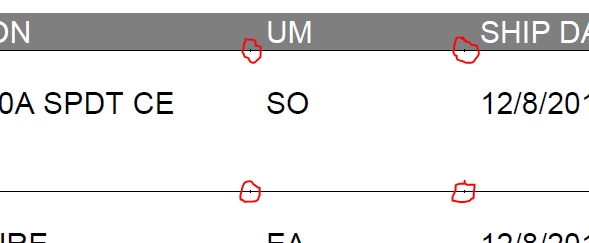
Acrobat Reader Displaying Hash Marks on PDF Where Columns Would Normally Start/End

New Here ,
Dec 22, 2017 Dec 22, 2017

I am generating a PDF document using merge fields in a word document. The merge fields are inside of a table which has borders turned off ("No Borders"). In place of the border, there are small hash marks that appear around the document where column separation would normally occur. Screenshot attached for reference.Hash Marks.png
2.3K
Translate
Report
Community guidelines
Be kind and respectful, give credit to the original source of content, and search for duplicates before posting. Learn more
community guidelines
Adobe Employee ,
Jan 24, 2018 Jan 24, 2018
LATEST

Hi Keongarvin,

Sorry for the delay in response.

Are you creating pdf file using File > Save as > PDF option in MS Word or using Acrobat tab > Create PDF option in MS Word?

Acrobat Reader version you are using to view the pdf: Identify the product and its version for Acrobat and Reader DC

Have you tried with another word file to check if this is not related to this specific file only?

Also, would it be possible if you can share the original word file with us via private message? You may send the private message by hovering over the mouse over person's username and click Message.

Thanks,

Shivam

Translate
Report
Community guidelines
Be kind and respectful, give credit to the original source of content, and search for duplicates before posting. Learn more
community guidelines