
Exit
  • Global community
    • Language:
      • Deutsch
      • English
      • Español
      • Français
      • Português
  • 日本語コミュニティ
  • 한국 커뮤니티
0

Acrobat Reader installs McAfee WITHOUT my permission (no boxes to untick)

Jun 09, 2022 Jun 09, 2022

Acrobat Reader installer automatically downloads installs McAfee and McAfee Safe Connect garbage.

There are NO BOXES that I could untick in the installer or on your website. You're straight up scamming people into downloading this crap.

I saw in the other thread that people showed checkboxes that allow to decline McAfee on the download page. Here is the screenshot. The only checkbox here is for Adobe Acrobat Chrome extension.
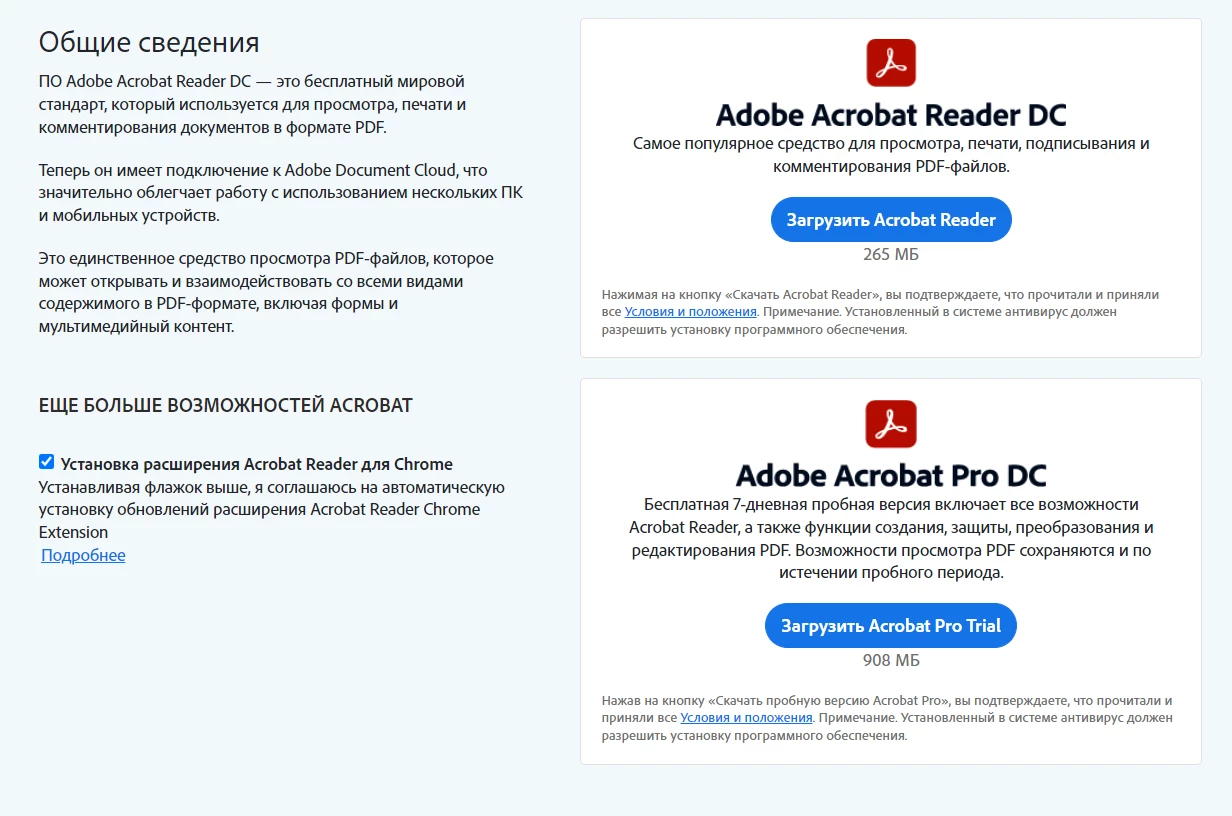
acrobat-scam.png

TOPICS
Download and install , Windows
1.5K
Translate
Report
Community guidelines
Be kind and respectful, give credit to the original source of content, and search for duplicates before posting. Learn more
community guidelines
Adobe Employee ,
Jun 09, 2022 Jun 09, 2022

Hi there


Hope you are doing well and sorry to hear that.


Would you mind sharing the link of the page from where you downloaded the Acrobat Reader DC?


We do have the options available to uncheck the additional services as shown below:

Untitled.png


Regards

Amal

Translate
Report
Community guidelines
Be kind and respectful, give credit to the original source of content, and search for duplicates before posting. Learn more
community guidelines
Community Expert ,
Jun 10, 2022 Jun 10, 2022

I know for a fact this page works differently depending on your location. In the EU, for example, those boxes are unticked by default, but in the US they are. Maybe in other parts of the world (Russia?), they don't exist at all, and Adobe is just pushing this third-party nonsense onto its users without their consent?

Translate
Report
Community guidelines
Be kind and respectful, give credit to the original source of content, and search for duplicates before posting. Learn more
community guidelines
Jun 17, 2022 Jun 17, 2022

I'm in Serbia but my OS and browser are in Russian.

Translate
Report
Community guidelines
Be kind and respectful, give credit to the original source of content, and search for duplicates before posting. Learn more
community guidelines
Jun 17, 2022 Jun 17, 2022

Here is the link: https://get.adobe.com/ru/reader/

The weird thing I've noticed is that if I look at the page in Chrome, I don't see checkboxes. I tried disabling adblock extensions and nothing changed.

But if I look at it in Chrome incognito or Firefox I can see checkboxes.

This is definetely not how it should work.

Translate
Report
Community guidelines
Be kind and respectful, give credit to the original source of content, and search for duplicates before posting. Learn more
community guidelines
Community Expert ,
Jun 17, 2022 Jun 17, 2022

Try this:

Remove the cookies in the browser.

Translate
Report
Community guidelines
Be kind and respectful, give credit to the original source of content, and search for duplicates before posting. Learn more
community guidelines
Contributor ,
Dec 25, 2022 Dec 25, 2022
LATEST

Installed Acrobat Reader on spouse's PC. THERE ARE NO CHECKBOXES. NO OPTION to exclude McAfee apps. It was excruciating to uninstall/delete all the McAfee files. I hope I did not miss any.

OUTRAGEOUS!!

Translate
Report
Community guidelines
Be kind and respectful, give credit to the original source of content, and search for duplicates before posting. Learn more
community guidelines