
Participating Frequently
September 18, 2023
Answered

Acrobat reader quick print not working

  • September 18, 2023
  • 19 replies
  • 31386 views

Hi Adobe,


I have been trying to get the quick printing function working again on Adobe Acrobat Reader. I have installed any updates, and still no change. Reinstalled the application and reset the printer within Windows. None of this has worked. After a long afternoon of troubleshooting, I have found the problem.


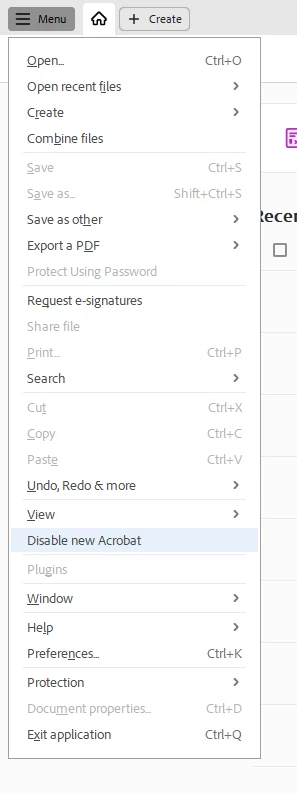
It has to do with running the latest version of Acrobat. If you click on the menu and scroll down until it says, turn off the latest version of Adobe Acrobat. Restart the application, and your problems will be resolved.


I hope this helps someone who is having the same problem.


Josh 
 

Correct answer abhisi

Hi Josh,


We have fixed this issue in the latest version (2023.006.20360) of Acrobat or Reader. Please upgrade Acrobat or Reader to the latest version by following the below steps:


Click on the MENU button in the top left corner > Help > Check for Updates.

Please confirm if the issue is fixed or not at your end after checking the issue on the latest version of Acrobat.


Thanks,
Abhishek Ranjan Singh

19 replies

Meenakshi Negi
Community Manager
Community Manager
September 27, 2023

Hi All,


Thank you for reaching out and reporting this.


Could you please confirm if the option does not work only when you use the new UI? Share the current Acrobat Reader version number. It would be helpful if you could share the screen recording so we can get this behavior checked.


We acknowledge that the new Acrobat represents a notable change, however, we hope that as you get familiar with the new interface, you will be able to be more productive & get more out of Acrobat. 


As we made these changes in the interface, we have tried to ensure all tools & features that are currently supported retain their familiar functionalities and workflows as they did in the previous version. We are committed to addressing any gaps or issues reported by users related to any break in current workflows in all our past & upcoming releases. In case any of your current workflows are not functioning as expected, do share them with us on this thread, and we will address them with the highest priority.


Thanks,

Meenakshi

Participating Frequently
September 27, 2023

Hi Meenakshi,


Here is a screenshot of the version of Adobe Acrobat.


Many thanks,


Josh


Participant
September 26, 2023

Thank you Josh, that fixed my issue. 🙂 

Participant
September 25, 2023

Hi Josh,


It is not working. I can not go back to an older version.


thank you

Participating Frequently
September 26, 2023

Hi Nectar,

I have just checked my Adobe Acrobat and still have the option.

When you click the menu button, what does it display as your options?

Thanks,

Josh

Participant
September 25, 2023

Thank you Josh! This works.  It was frustrating and I am hopeful that Adobe will resolve it in the future.  THANKS AGAIN!

Participant
September 22, 2023

Spot on, worked straight away. Well done Josh, it's been driving me mad.

Participant
September 20, 2023

Thank you very much!

For germans image Attached. 

Hope It'll be fixed soon... Do we have to manually switch back to "new Acrobat" then, anybody knows?

JR Boulay
Community Expert
Community Expert
September 20, 2023

[MOVED TO THE ACROBAT READER DISCUSSIONS]

Acrobate du PDF, InDesigner et Photoshopographe
Participant
September 20, 2023

Thank you so much!  I have been having the same issue for a few days and I am in a transport business where i need to print large amount of paperwork for customer deliveries and had to open each document one by one and print it.  It was a nightmare!  Your solution really helped.  Sometimes these "upgrades" make our life a lot more difficult. 

Participating Frequently
September 20, 2023

That's great. I was in a similar situation where we print offloads of invoices daily, which slowed us down.

Participant
September 20, 2023

Thank you, Josh, for sharing your solution!

My users in Malaysia have been experiencing this issue since early this week.

I noticed that the users' laptops had recently updated or installed Adobe Reader, and that's when the issue started.

Disabling the new Acrobat option resolved it.


Thanks!

Participating Frequently
September 20, 2023

I am glad I could help you.
Josh