


acrobat reader

Copy link to clipboard
Copied
hi i dont know much about pdfs and acrobat reader so im hoping someone can help. recently i updated my version of reader and now it wont start when i click a pdf i uninstalled it and downloaded the most recent version but still it wont open when i click a pdf. though it will open when i right click the short-cut and run as admin. Im running win 7 i really hope someone can help. thanks in advance.


 9
Replies
9
9
Replies
9




Copy link to clipboard
Copied
Discussion successfully moved from Forum comments to Acrobat Reader
You need to connect PDF files to the current Accrobat version. This is not a function of Acrobat but of your OS (in this case Microsoft Windows 7).
See here (Microsoft Windows support) on how to change default programs: https://support.microsoft.com/en-us/help/18539/windows-7-change-default-programs . See here for a step by step instruction: https://www.digitalcitizen.life/how-associate-file-type-or-protocol-program
Copy link to clipboard
Copied
thank you so much for your imput its greatly appreciated and apologies for posting in the wrong section. I followed the links you posted and tried the suggestions but all my PDFs are associated with Acrobat and it is the default program to open them. Adobe will only open with run as administrator. i really dont know what to do now.

Copy link to clipboard
Copied
Hi
Does it work when you launch Adobe Reader and then choose File > Open?
~ Jane
Copy link to clipboard
Copied
Hi jane when i right click and run as administrator a box opens titled ( adobe reader protected mode ) giving me 3 options.....1. open with protected mode disabled, 2.always open with protected mode disabled and 3. do not open with protected mode disabled. i have tried all 3 options and then i can open adobe and read pdfs but still nothing when i just click run from the short-cut or when i click open on a pdf.This is so strange as up to a week ago i had no problems and i have used avast ant-virus for several years 😞
Copy link to clipboard
Copied
imback wrote
Hi jane when i right click
Hi
I'm confused. When you launch Acrobat Reader first, and then go to the menus and choose File > Open, then I am not sure what (if anything) you might be right-clicking on?
~ Jane
Copy link to clipboard
Copied
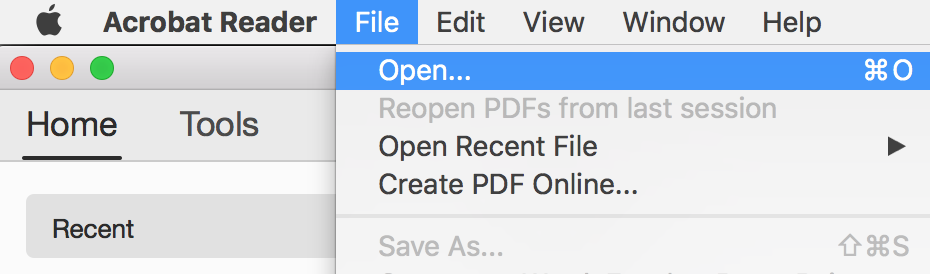
!hi jane this is how it looks when it opens from administrator when i click file everything is grayed out except "open " from which i can navigate to the files i want to display, hope you understand this 
Copy link to clipboard
Copied
Hi
The File menu is in the upper left of your screenshot. Click the word File to open the menu, then click Open.
Alternately, click My Computer to access other files.
~ Jane


Copy link to clipboard
Copied
Hi there,
Looking at the screenshot shared above, it seems all the options available at the menu-bar at the left are grayed out, which shouldn't be.
Either the application isn't installed correctly or few files were missing during installation. Because of that its not launching properly. and you have got only shortcuts to open PDFs.
Try the workaround given by the expert above, and select File>Open>Open from.... does it work or still grayed out?
If it still gives the same result, then use cleaner tool to remove the application: Download Adobe Reader and Acrobat Cleaner Tool - Adobe Labs and reinstall it through: Adobe - Adobe Acrobat Reader DC Distribution
Let us know if it still doesn't work
Thanks,
Akanchha
Copy link to clipboard
Copied
hi akk_24
thank you for your suggestion and helpful links, i followed your advice and uninstalled adobe with the tool then reinstalled it after which my pdfs where then associated with adobe but still refused to open when i click on them plus the only way i can get adobe to run is with "run as administrator" but with the options under file all greyed out. I also installed adobe digital editions which works well and opens all my PDFs so i think i will just stick with it and forget about using acrobat reader. I thank both you and jane for your help i really appreciate it.


Get ready! An upgraded Adobe Community experience is coming in January.
Learn more
 AdChoices