Participant
January 16, 2017
Question

acroRd2.exe

  • January 16, 2017
  • 3 replies
  • 1054 views

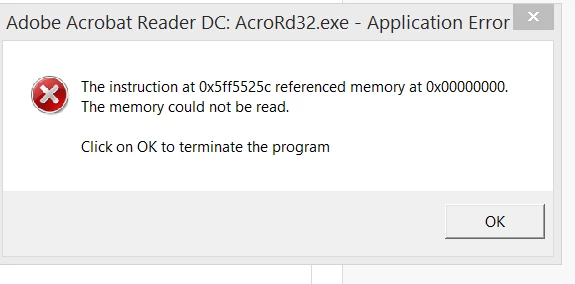
I keep getting the above error, how do i fix?
    This topic has been closed for replies.

    3 replies

    Participating Frequently
    January 17, 2017

    I just started having the same problem a few days ago, even after uninstalling and reloading adobe reader today?

    is there a issue now with windows 7 and adobe reader?

    marcyd72530009
    Participant
    January 17, 2017

    A couple days ago I was having the same problem. I removed Adobe DC and reinstalled Adobe XI.  It seemed to work, but now today I am getting a Windows Error.  So is Adobe and Windows 7 having a problem?

    Participating Frequently
    January 20, 2017

    Where is the answer?


    go to forums search acroRd2.exe and you'll see yesterdays forum with Adobe tech notice on update & process

    Participant
    January 16, 2017

    Same issue here...

    Found several solutions but none worked...

    Created the folders in Users/appdata/local...

    Added regedit entry to disable sandboxing

    Reinstalled

    Repair installed

    Hope we find it here together

    ...

    Just found pattern...

    Opening fresh acrobat with PDF from Mail...-> crash when it tries to load active components on right screen (tools)

    Opening attached PDF when Adobe read is open from regular PDF viewing and components on right are already loaded-> NO problem

    Opening regular PDF from desktop or where ever-> no problem

    Any thoughts?

    John T Smith
    Community Expert
    Community Expert
    January 16, 2017

    Remove/reinstall Reader

    -or re-install C runtime may help https://www.microsoft.com/en-in/download/details.aspx?id=48145

    Participant
    January 16, 2017

    Thanks John! I actually already tried removing and reinstalling the program and it did it again
