
AcroReader DC 2100120135 and up to -42 break digital signature access on Win10 20H2
Hi folks and sorry for this rather long topic title.
After deploying AcroRdrDCUpd2100120135.msp in our network (100 clients), we saw that users could no longer sign a document when using the Adobe Reader plugin for internet explorer on Win10 20H2.
I am sure my analysis was thorough: it works with the same versions on Win10 1909.
It also works, if you simply download that PDF and open it in Adobe Reader - it's just the plugin that is broken.
Our digital signatures are secured with a password, in case that matters. What happens, is this error message after you select the certificate to sign with:
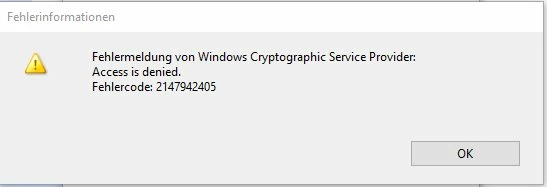
Since we use Sharepoint as DMS server and Sharepoint works best with internet explorer, we are not willing to change the browser in order to overcome this, nor will we suggest our users to download the documents - this plugin usage is very important to us and signing is used frequently.
Since the last 4 updates all changed the signing components, I am sure that Adobe introduced a bug that only surfaces with the plugin on Win10 20 H2.
Please advise
 AdChoices