
Participating Frequently
March 1, 2021
Answered

AcroReader DC 2100120135 and up to -42 break digital signature access on Win10 20H2

  • March 1, 2021
  • 3 replies
  • 3781 views

Hi folks and sorry for this rather long topic title.


After deploying AcroRdrDCUpd2100120135.msp in our network (100 clients), we saw that users could no longer sign a document when using the Adobe Reader plugin for internet explorer on Win10 20H2.

I am sure my analysis was thorough: it works with the same versions on Win10 1909.

It also works, if you simply download that PDF and open it in Adobe Reader - it's just the plugin that is broken.


Our digital signatures are secured with a password, in case that matters. What happens, is this error message after you select the certificate to sign with:
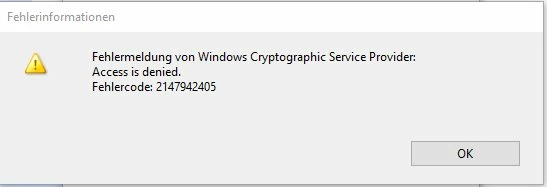
 

Since we use Sharepoint as DMS server and Sharepoint works best with internet explorer, we are not willing to change the browser in order to overcome this, nor will we suggest our users to download the documents - this plugin usage is very important to us and signing is used frequently.


Since the last 4 updates all changed the signing components, I am sure that Adobe introduced a bug that only surfaces with the plugin on Win10 20 H2.

Please advise

This topic has been closed for replies.
Correct answer absethi17096557

Naman,


may I assume that this has shifted to will-not-fix?

I mean, this thread has been accepted haldf a year ago... Please tell us what to expect.


@MTGAlberts  The fix is now live.
Please refer to KB Article :- https://helpx.adobe.com/acrobat/kb/windows-cryptographic-service-provider-error-214794205.html for more details.

3 replies

Fernando30654476t5q5
Participant
June 22, 2023

At Windows 10/11 one can get over the 214794205 error also by opening Adobe Acrobat Reader and going to menu Edit, Preferences, Security (Enhanced) and disable option "Enable Protected Mode at Startup", then add the site by [Add Host] button"

Participating Frequently
June 22, 2023

Hi Fernando.


Thanks, but I prefer to leave that mode on since it has been solved two years ago, anyway.

Fernando30654476t5q5
Participant
June 22, 2023

The fix does not apply at signing within forms at Edge on Internet Explorer mode: after the registry fix is applied the error goes away, yes, but Adobe Reader hangs up every time there.

Participating Frequently
April 26, 2021

Dear absethi,


can you tell me whether Adobe is planning to issue a fix for this issue? It's still there with the latest version.

Adobe Employee
June 9, 2021

@MTGAlberts 

This issue is specific to particular windows version (20H2 and above). We have debugged the issue at our end and got few leads what is causing the problem. We are working on finding a feasible solution for this problem and keep you posted whenever a fix is available. 


Regards,

Naman Gupta

Participating Frequently
September 30, 2021

Naman,


may I assume that this has shifted to will-not-fix?

I mean, this thread has been accepted haldf a year ago... Please tell us what to expect.

Adobe Employee
March 2, 2021

Hi @MTGAlberts,


  1. Can you please share the concerned file with us?
  2. Can you please also confirm that issue is visible on Adobe Reader / Internet Explorer (Adobe plugin), Can you share the workflow, are you opening a signed PDF or signing the PDF using the Internet Explorer  (Adobe plugin) or Adobe Reader?
  3. Can you please also confirm that the workflow is working fine with an older version of Reader, it works fine for Win10 20 H2?


It would be great if you can share the video for workflow.

You can upload to drive and share the link with us.


Thanks for your support.


Regards,

Abhinav Sethi


Participating Frequently
March 2, 2021

Hi @absethi2997221 

1 I uploaded the PDF file and a video of  "the workflow".

2 Yes, I can confirm that this is about the Adobe Reader Plugin in Internet Explorer. I am opening a PDF with the plugin in Internet Explorer in order to sign it

3 It is working fine with the same Adobe reader version on all Win10 1909 machines. it is also working fine on Win10 20H2 if I use an outdated version of Adobe Reader. It also works when opened in Adobe Reader and not within the plugin.


So it should take you seconds to reproduce this.

Participating Frequently
May 12, 2021

Please tell me if you are still alive. I hope so.

The problem is not yet fixed, so please update the status.