
Participant
October 17, 2017
Question

Adobe Acrobat IX, Disappearing Menu and Windows Title Bar.

  • October 17, 2017
  • 1 reply
  • 2826 views

My issue is similar to a post by another user:  Case of the disappearing Acrobat X Pro Toolbars

with the following differences:

1.  I do not have Kapersky or any other anti-virus software on my PC. 

2.  I have tried right clicking on the application and tried all compatibility modes without success.

PC Details:

  Win7

  HP-DV7000 with Intel HD Graphics and NVIDIA card (dual monitor setup)

  Adobe Acrobat IX Standard

I do not load software regularly on my machine, and do not use Acrobat frequently enough to know when the issue first occurred, other then within the past few months.

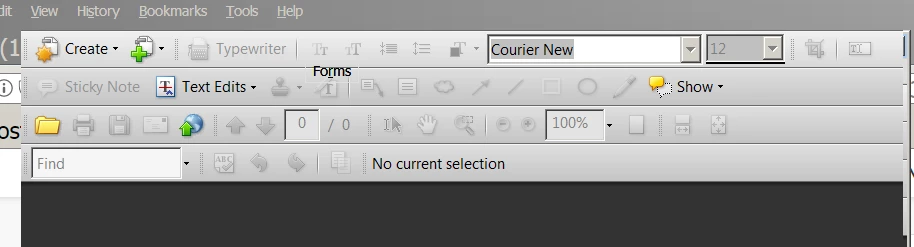
Here is a screenshot of the missing Windows Title Bar
Here is a screenshot of a jumbled Acrobat toolbar:
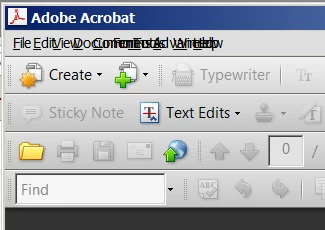
F9 does restore/toggle the menu bar, but moving the cursor around/near the menu bar causes the Windows title and Acrobat menu bar to disappear.

    This topic has been closed for replies.

    1 reply

    AnandSri
    Community Manager
    Community Manager
    October 18, 2017

    Hello,

    As per the description above, the Menu and Windows Title bar is missing in Acrobat Standard 11, Is that correct?

    Please repair  the installation file of Acrobat Standard 11 from Help>Repair Installation.

    Also, check for any pending updates as well from Help>Check for Updates.

    You may also try to run the Acrobat Standard 11 in compatibility mode, right+click on the Acrobat application and under Compatibility > choose run this program Windows XP.

    Hope this helps, and keep us posted with the results.

    Regards,

    Anand Sri.

    Participant
    April 13, 2022

    I did try the above suggestion to solve the disappearing Windows Title bar on Adobe Acrobat Reader DC (ARDC) (64bit core version 22.256 / version 22.001.20117.0) but did not change a thing. The Windows Title Bar still automatically disappears when the mouse pointer is moved somewhere else in the screen.


    ARDC panel sticks in the position, and can only be moved after clicking either Home or Tool tab so the Windows Title bar will appear again allowing the ARDC panel to be resized, moved, closed. and etc.

    Participant
    April 21, 2022

    Same behavior here. Pressing F9 has become a standard process which really sucks and only works just for the moment. In my case I identified the program 3DxService.exe from 3Dconnexion as the reason but I don't want to blame it alone. ARDC had the same problem with another program called "Hardcopy" in the past. If I terminate the 3DxServices.exe eveything works fine but I need it for my CAD mouse...