


- Home
- Acrobat Reader
- Discussions
- Adobe Acrobat Reader DC Crashes when Printing
- Adobe Acrobat Reader DC Crashes when Printing
Adobe Acrobat Reader DC Crashes when Printing

Copy link to clipboard
Copied
Hello,
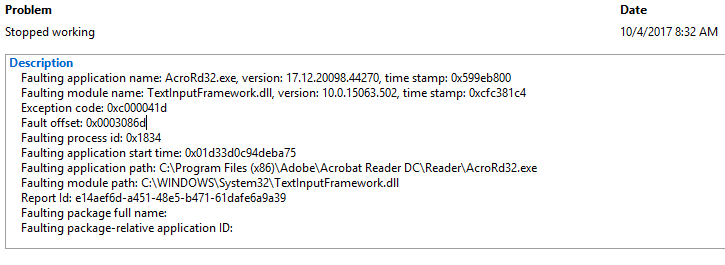
Reader stops responding and crashes when printing a PDF that is 2MB in size. See image for log.
I also noticed that the task manager is showing over 2GB of memory being used when the file is open in Reader.
OS: Windows 10 Pro
Acrobat Reader DC is up to date, I went to "Help" and "Check for Updates" to verify
It seems like the size when opened is causing the slow down and eventual crash when printing. It takes a while for the Reader to "settle down" before it becomes responsive enough to print. Other files act in a similar manner.
Thanks for any input,
Tim


 4
Replies
4
4
Replies
4


Copy link to clipboard
Copied
Hi Tim,
Based on the issue description mentioned above, Adobe Reader is crashing when trying to print, is that correct?
Please try following troubleshooting steps:
1- Launch Reader as an administrator and try printing. Follow the steps given here on how to: Run an Adobe program as administrator | Windows 7, Vista
2- If that doesn't work, try printing as image. Under Print dialogue > select your printer from the drop-down list > click Advanced > check the box which says Print as Image > click OK, relaunch Reader and try again.
3- If that doesn't resolve the issue, disable protected mode by going into Edit > Preferences > Security (Enhanced)
Uncheck Enable Protected Mode at startup > click OK > relaunch Reader and try again.
Please note: Disabling protected mode is for troubleshooting purpose only, and not recommended. Please turn the feature back on after troubleshooting is complete.
Let us know how it goes.
Shivam
Copy link to clipboard
Copied
1- would not open as administrator. I tried from the Start menu, from the desktop shortcut, and from the file location
2- Crashed before I was able to get to this point.
3- Disabling protected mode did not help
Thank you for trying!
Copy link to clipboard
Copied
Could you please try repairing Reader by clicking "Repair Installation" under "Help" menu and see if that works?
Reboot the machine after repair and try again.

Copy link to clipboard
Copied
I've been having this same issue.


Get ready! An upgraded Adobe Community experience is coming in January.
Learn more
 AdChoices