
Participant
April 13, 2017
Answered

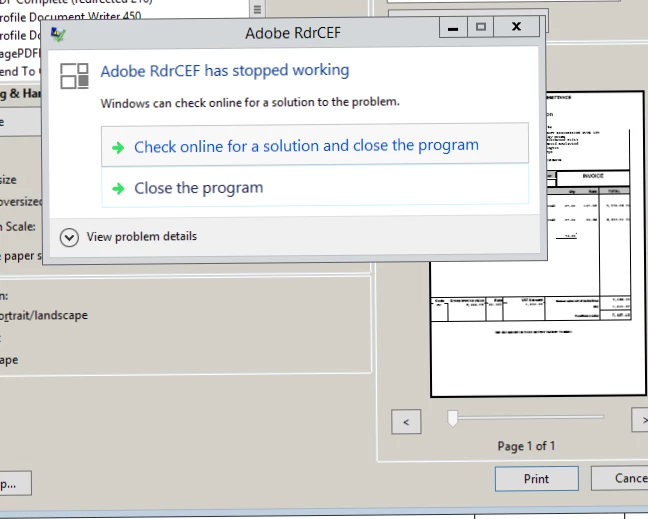
Adobe RdrCEF has stopped working - Server

  • April 13, 2017
  • 12 replies
  • 30166 views

I am working on a clients server and the users RDP onto the server. When they open a PDF file, adobe acrobatic reader DC comes with an message which is now not letting them print or save, this happening the majority of the users. The server recently had a virus and I dont want to do anything major to it just in case the server goes down again. 

What would be the best solution to get rid of this?
This topic has been closed for replies.
Correct answer Meenakshi Negi

Hi lesliek17660528,

Could you please try once to restart your server. Check if that resolves the issue.

Also, try Repairing Adobe Acrobat Reader DC. Go to Help menu > Repair installation.

Let us know if the issue still persists.

Regards,

Meenakshi

12 replies

Participant
June 19, 2017

Why marked as answered when it isn't resolved?

Participant
June 19, 2017

I now have this happening on a Windows 7 PC that is not associated with a Terminal Server. Any updates on a fix for this issue?

Participant
June 12, 2017

Please send me instructions for uploading crash dumps.

This issue also affects acrobat.exe ( 2015 ) and acrord32.exe ( DC ), along with the RdrCEF.exe and AcroCEF.exe that go with these products.

Restarting Server doesn't permanently resolve.

Repairing installation doesn't permanently resolve.

Issues re-occur and it is only with the lastest updates of these products.

Can you share the remedy for previous users that have uploaded crash dumps?  Is it third-party related, such as Anti-Virus products?

Participant
June 1, 2017

Is there any movement on this issue?

I am also experiencing this as well.

Sunil_Soni
Adobe Employee
Adobe Employee
June 2, 2017

Hi dfish4554,

Please confirm if repair application and restarting machine resolves the issue.

If not,

We need your help to diagnosis the issue. Please enable the automatic crash dump generation setting using Shared Files - Acrobat.com and Share the dump file with us.


-Thanks

Sunil Soni

concareiti81741037
Participant
May 11, 2017

HI,

Whether adobe update was released already?

Participant
April 26, 2017

Really need to get this patched. I have multiple users complaining of this same error.

Participant
April 25, 2017

Same problem try to open or print a pdf and screen freezes what do we do to fix this

Sunil_Soni
Adobe Employee
Adobe Employee
April 19, 2017

We have figured out the issue and working on it's fix.

We will release this patch as soon as we are done with it's fix and verification.

-Thanks

Sunil Soni

jakobfriis
Participant
April 24, 2017

When will this patch be ready?

concareiti81741037
Participant
May 11, 2017

Hi all,

We had already made a fix on 13th April that takes care of this crash scenario. Are you still seeing the "Adobe RdrCEF has stopped working" message?

If yes, can you please mention the exact steps to reproduce the issue?

Thanks,

-ashu


HI,

You wrote that You already released fix on 13 April?? but Sunsil Soni wrote on 24th April :

"

We will release this patch as soon as we are done with it's fix and verification but as workaround you can restart the server, it should resolve your problem.

Please keep us posted how it goes.

-Thanks

Sunil Soni"

so when will be the updated release?

Sunil_Soni
Adobe Employee
Adobe Employee
April 18, 2017

Sorry for the inconvenience caused to you.

We are still working on the fix of the issue but as workaround you can restart the server, it should resolve your problem.

Please let me know how it goes.

-Thanks

Sunil Soni

Participating Frequently
April 18, 2017

This is a follow up to my previous post above.

We are still having this issue it is in no way shape or form resolved.

The only "workaround" which is a huge pain in the ass is to repair or re-install the instance on each server and then restart the server (when no one is logged in) and this temporarily fixes the issue.

The issue DOES come back and this whole process must be re-done for each and every instance on each and every server...

klxz79
Participant
April 14, 2017

Can confirm issue goes away by installing Acrobat XI from here, just choose XI from the drop down menu instead of DC.  So far issue has been resolved by installing XI

Adobe Acrobat Reader DC Install for all versions

Poorvi Singhal
Community Manager
Community Manager
April 15, 2017

Thanks for the response.

We are aware of this issue and are working on resolving the problem on priority.

Regards,

Poorvi

Participant
April 18, 2017

Hi Guys, Have we had anymore info?

Thanks