


- Home
- Acrobat Reader
- Discussions
- Adobe Reader 'Attach to Email' is not working
- Adobe Reader 'Attach to Email' is not working

Copy link to clipboard
Copied
I have a client that is running Windows 7 and when opening a PDF with Adobe Reader is unable to use the "Attach to Email" function. We tried this with Adobe X, Adobe 9.3, Adobe 9.4.2. None of these will work. An error occurs: "Acrobat is unable to connect to your email program." We get the same error on any of these versions. For some reason Adobe 9.3.4 upgrade does not install with 9.3, where I read in a resource discussion that this version should work ion Windows 7.
Adobe Reader X seems to be a known issue with Windows 7 for this problem. My client recently upgraded from Windows XP and did not have this problem on that OS. A current work-around is to save the PDF then attach it to an email, but she would greatly prefer to use the Attach to Email function within Adobe Reader without having to save the PDF and manually attach it.
Thanks for any help!


 1 Correct answer

I found a solution:
open regedit and found the KEY
HKEY_LOCAL_MACHINE\SOFTWARE\Clients\Mail. You will find 2 or more key like "windows mail" "outlook" etc...
You have to erase all the key but not the one of you REAL mail client.
For example if you use Outlook you have to leave only the Outlook KEY.
In that way I solve that problem on Acrobat Reader X installed on Windows 7 64bit with Outlook 2010 as e-mail client.


 14
Replies
14
14
Replies
14


Copy link to clipboard
Copied
have you tried with protected mode off?
Copy link to clipboard
Copied
We did try turning protected mode off. That did not resolve the issue.
Copy link to clipboard
Copied
I will have our user try it with protected mode off and report back, but this is also an issue with other versions of Adobe Reader. Thanks for the suggestion.

Copy link to clipboard
Copied
This issue might be related to the Adobe Supported email clients. It would be great if you could share with me some machine specific details so that we can dig deep into the issue.
1) Which default email client was the user using when the Machine was XP? Which default email client is the user using now that the machine has been upgraded to Win7?
2) Is the Machine 32 bit or 64bit?
3) Is the email client (if it is Outlook) 64bit?
Thanks in advance
- Abhilasha.
Copy link to clipboard
Copied
1) The email client is the same for the old WinXP install and the new Win7 install. Both are Lotus Notes 8.5. Lotus Notes is set to the default email client.
2) Both old XP and new Win7 installs are 32 bit.
3) Email client is Lotus Notes 8.5, 32 bit.
Thanks!

Copy link to clipboard
Copied
I have the same issue using Acrobat X and Thunderbird 3.1.6 on Windows 7. Attach to email function is NOT working.
It worked when I had outlook 2007 installed, but I couldn't find where to change the setting to thunderbird.
I uninstalled outlook. Now the attach to email feature won't work at all.
Thunderbird is set to the default email client in windows . . . this is extremely annoying!!
File > Attach to email . . . It appears this feature doesn't work with any emails client except outlook??????
Copy link to clipboard
Copied
Updated email client to Thunderbird 3.1.9 and this is still not working. Apparently this was also an issue with Acrobat Reader 9.3.4 and older versions of Thunderbird.
http://forums.techguy.org/business-applications/950100-solved-acrobat-unable-connect-your.html
Copy link to clipboard
Copied
I have the same issue using Acrobat X and Thunderbird 3.1.6 on Windows 7. Attach to email function is NOT working.
It worked when I had outlook 2007 installed, but I couldn't find where to change the setting to thunderbird.
I uninstalled outlook. Now the attach to email feature won't work at all.
Thunderbird is set to the default email client in windows . . . this is extremely annoying!!
File > Attach to email . . . It appears this feature doesn't work with any emails client except outlook??????
------------------------------------------------------------------------------------------------
Attach to email worked on WinXP for Lotus Notes 8.5 email client (maybe an older Adobe Reader, version 9.4), but not after we upgraded to Win7. No Adobe Reader versions we have tried will work on Win7 for Lotus Notes.
Copy link to clipboard
Copied
Not working reliably for me on Windows XP with Office 2007. I was testing this with one of our users, but after trying this half a dozen times, the user only received one of them.
Copy link to clipboard
Copied
I found a solution:
open regedit and found the KEY
HKEY_LOCAL_MACHINE\SOFTWARE\Clients\Mail. You will find 2 or more key like "windows mail" "outlook" etc...
You have to erase all the key but not the one of you REAL mail client.
For example if you use Outlook you have to leave only the Outlook KEY.
In that way I solve that problem on Acrobat Reader X installed on Windows 7 64bit with Outlook 2010 as e-mail client.


Copy link to clipboard
Copied
Hello everybody,
I have a user with the same issue, trying to send a pdf file per email. The email client he wants to use is Lotus Notes. Same error occurs, although he apparently has the setting Lotus Notes as preferred email client.
See print screens attached. Can you give me a solution to this? What exactly does he need to modify?
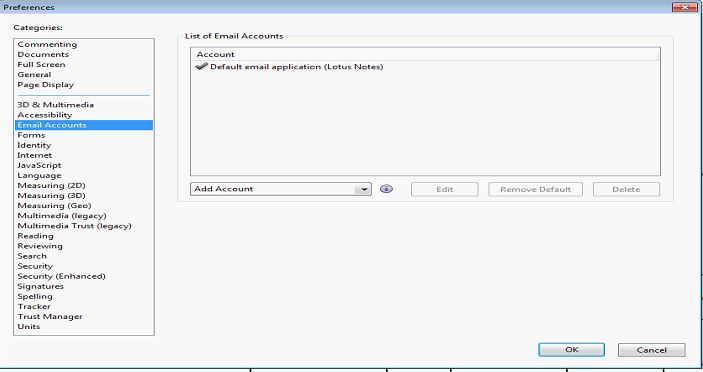

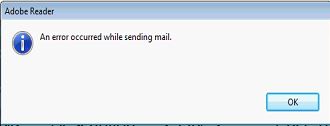
Thanks a lot for your help.
Copy link to clipboard
Copied
Hello.
Can you please help with this topic?
Thank you.

Copy link to clipboard
Copied
Please just Check for updates and repair acrobat and Microsoft office as well. This really helps.
Copy link to clipboard
Copied
why not working


Get ready! An upgraded Adobe Community experience is coming in January.
Learn more
 AdChoices