


- Home
- Acrobat Reader
- Discussions
- Re: Adobe Reader could not open a pdf file - eithe...
- Re: Adobe Reader could not open a pdf file - eithe...
Adobe Reader could not open a pdf file - either not supported file type or file damaged

Copy link to clipboard
Copied
On March 5th, I started getting the Adobe Reader error message "Adobe Reader could not open a pdf file because it is either not supported file type or the file has been damaged.
I get this when I try to open the pdf file as an attachment in Outlook 2013 from my G-Mail account. If I save the attachment and then try to open the pdf document, I get the same error4.
I get this error message with every pdf file that now comes to me in Outlook.
If I log on to my G-Mail I am able to open the pdf document. If I also save the attachment to my computer, I do not get the error message when I open the pdf file. This would suggest the file is okay
This would lead me to believe the problem maybe with Outlook.
I'm using Adobe Reader XI v11.0.10
I'm using Windows 8.1
Is anyone encountering this same issue with outlook?


 44
Replies
44
44
Replies
44



Copy link to clipboard
Copied
~graffiti--i'm back. trying to read through everything. It appears the moderator finally approved the communication, so I guess you have seen what I sent? Are you saying I have an html file, which is kid of what I thought? Is there a way to open with from the attachment? I didn't see anything, but open. I can go to the root directory and can select what s/w to open with. I'm still reading, but is that my issue? James has something else going on? I thought the latest release of Reader was XI, which I use. If I saw his code, it didn't look like a current version of Reader. I use mine on a windows 8.1 platform.
Copy link to clipboard
Copied
I located the file in Windows Explorer and right clicked on the file. I select the "Open with...". If Notepad was not shown as an open, then click "More..." and it should present you with Notepad as an App. Make sure you uncheck the box to make this your default application or else it will open Notepad for the pdf extension.
Copy link to clipboard
Copied
James, just wanted to tell you . I looked at that code. I don't know much about code, but it looks like it could be some kind of image. Have you tried opening it up with whatever you use to view photos? Just a thought. I hope you get it figured out right away.

Copy link to clipboard
Copied
Can you open a problem .pdf file in Notepad or some other text editor and copy/paste the first few lines of code please?
Copy link to clipboard
Copied
Here you go...
%PDF-1.3
1 0 obj
<</Type /XObject /Subtype /Image /Name /Im1 /Width 1700 /Height 2200 /Length 311063/ColorSpace /DeviceRGB /BitsPerComponent 8 /Filter [ /DCTDecode ] >> stream
ÿØÿà JFIF È È ÿÛ C
$.' ",# (7),01444 '9=82<.342ÿÛ C
2! !22222222222222222222222222222222222222222222222222ÿÀ ˜ ¤ " ÿÄ
ÿÄ µ } !1A Qa "q 2‘¡ #B±Á RÑð$3br‚
%&'()*456789:CDEFGHIJSTUVWXYZcdefghijstuvwxyzƒ„…†‡ˆ‰Š’“”•–—˜™š¢£¤¥¦§¨©ª²³´µ¶·¸¹ºÂÃÄÅÆÇÈÉÊÒÓÔÕÖ×ØÙÚáâãäåæçèéêñòóôõö÷øùúÿÄ
ÿÄ µ w !1 AQ aq "2 B‘¡±Á #3Rð brÑ
$4á%ñ &'()*56789:CDEFGHIJSTUVWXYZcdefghijstuvwxyz‚ƒ„…†‡ˆ‰Š’“”•–—˜™š¢£¤¥¦§¨©ª²³´µ¶·¸¹ºÂÃÄÅÆÇÈÉÊÒÓÔÕÖ×ØÙÚâãäåæçèéêòóôõö÷øùúÿÚ ? ³ÿ ù0_ù ÐØ?è ¦ë§\UÏøgë?- ü$w[ƒüçìË‚¾ƒž NyúW²ÑEÂǯìýd#!¼Ev[p ‹t Æ3Ö¥? t¼ñ¯ßíçƒ ~ ëô´ ä?ð ´‘q! î£äŸ¸›#Èúœ`þTØ> éj ÎׯÜ÷Ù kŸ¦A÷¯`£ €±ä ü Ó _Í×ïÝ÷ H‘BŽÙÈ9ý)ßð ´-‡öæ£æ ò‘à ¦:×®Ñ@ @ÿ tœ.ÍwP w;£Œå}:u÷ªÒþÏÖìƒÊñ,áÇÞ/h¬1ô 9¯h¢€<Z/Ùö ÃÍñ<Ì»‡Ü³U8ïüGžŸáV"ø ¦ v¿|í‚ HQyíë^ÁŠZ ò ð J ±¯_àôýÔ|~”ÿ øPZ.GüNõ>¾‘ôÿ ¾k×)1@ :ß 4ó* ñ
èŒ}å0&ãô=¿*–/€Z8 ¾×5) û ÿ 0{W®ÑŠ òdø ¡o f±ª•î Æ ç¶…ø ¡m ÖuRàõýÞ1ôÙ^³Š( Ê ÀM c Æ® # h¿øŠpø
áî‡VÖ1Æ>x¿øÝzµ'á@ Uÿ
Û†5]_`ê7ÅŸý H> øoË û[X.:Ÿ2,~^]z½&( V~ øo<jºÎ3Ïï"ÿ ãtÁð øçWÕ÷nìñtôÿ Wú׫⊠ò¯øPž ÉΫ¬c°ó" ûNøP¾ òêºÊÈW ¼È±œzyÖ½W ´ åŸð¡¼3å…þÓÖx9ÿ Y ÿ ö¦Ÿ€ž ÿ ž³ÿ aÿ ãuê´è ÊGÀ? cWW<ñóÅÓþýÓ¿áBxk êšÉÿ ¶‘ñºõZ( ÉÛà'‡r1«jà ¼_üGÒš> èX_øœê½0Õõÿ ¾+Ö©1@ P~ x¶«ýÞí ù½~çOjbü ÐöÚÖ¨[<‘åŽ?ïšõºLP <¬| ðÞ[v«¬ î$C ù ü ðß ÕuØåâÿ ãuêÔ˜ ,ÿ … áœÿ ÈOZÇýu‡ÿ Ñÿ
Âÿ ô Öÿ ïô_ün½O P <·þ '…ÿ è%ÿ ßèøÝ'ü(O ÐK[ÿ ¿ÑñºõJLP <³þ '…ÿ è%ÿ ßèøÝ à'…Ïüĵ¿ûý ÿ ¯SÅ +? <1—SÖ÷š#ÿ ´èÿ … áœø™ë>ÿ ½‹ÿ תbŒP –„ð¿}KZÿ ¿ÑñºOøPž àOZÆyýì_ün½S b€<³þ '…ûêZ×ýý‡ÿ Ñÿ
Âÿ ô Öÿ ïì_ün½O P –Â…ðÆyÕ5®ŸóÖ/þ7J> ø\ K
Copy link to clipboard
Copied
i'm still trying
Copy link to clipboard
Copied
still can't even get it into notepad. That could be user error
Copy link to clipboard
Copied
I opened with two different notepads and got different information.here it is from Windows Notepad. First few lines are:
<!DOCTYPE html PUBLIC "-//W3C//DTD XHTML 1.0 Transitional//EN"
http://www.w3.org/TR/xhtml1/DTD/xhtml1-transitional.dtd
>
<html xmlns="http://www.w3.org/1999/xhtml">
<head>
<meta http-equiv="Content-Type" content="text/html; charset=utf-8" />
<style type="text/css">td img {display: block;}</style>
</head>
Here it is from MS Notepad:
<HTML><HEAD><style>.ending {font-family: Calibri; font-size: 18px;}</style><BODY><TABLE><TR><TD colspan=100%><a href="http://www.trulynolen.com/questionnaire?l=14115468&o=141050070&z=85087-7515"><img src=http://newsletter.tnolen.com/email/service.png border=no></a></TD></TR><TR><TD align=center class="ending">If you would not like to receive email communication from Truly Nolen in the future, please <a href="http://newsletter.tnolen.com/unsubstart.asp?b=14115468&z=85087-7515&e=ss52@earthlink.netwsletter.tnolen.com/unsubstart.asp?b=14115468&z=85087-7515&e=ss52@earthlink.net">click here</a></TD></TR></TABLE></BODY></HTML>
Copy link to clipboard
Copied
Thanks. I was thinking it could have been an encoding issue but that more than likely would have removed the %PDF-1.3.
But that %PDF-1.3 implies that this is a very old pdf file or possibly saved back many versions for some unknown reason? I can't think of a reason to save a modern pdf as version 4.
Copy link to clipboard
Copied
Where in the Notepad information that I provided you does it say it's a v4 pdf document?
Copy link to clipboard
Copied
It's in the first line of code:
1.3 is version 4.

Copy link to clipboard
Copied
Here is what I see in another pdf document that I received as an attachment that had the following in the first line as opened by Notepad that generated the problem...
%PDF - 1.7%âãÏÓ
Here is a pdf document that I received as an e-mail attachment that had the following in the first line as opened by Notepad that is "not" having a problem...
%PDF - 1.74 0 obj<<
Copy link to clipboard
Copied
James, I found that on my hard drive, C:/program data/adobe/arm/ (select a folder)/ (then there is probably a numeric named folder to open)/(then there are 2 files: Adobe ARM (Adobe Acrobat and Reader Manager--seems like it may have been for a re-install (?).
Then there is the Adobe ARM Helper Manager--seems like a thorough troubleshooter.
I don't know if these came over on an auto update or I went to Adobe to try to troubleshoot my problem. I wonder if you have them. In the end, I still ended up here, but wanted to be sure I share that with you before I log off.
I don't see ~graffiti posting, so I guess we're done for now. I hope you get yours figured out. It is so frustrating and time consuming.
Copy link to clipboard
Copied
Stuarts,
Am I understanding that you resolved your issue - you were sent a file that was not really a pdf file?
I looked in the Adobe folder you listed. Here is what I found...
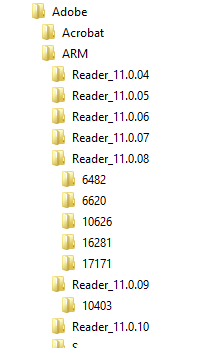
The numbered folders under v 11.0.08 each had 4 files, included the 2 you listed. The numbered folders under v 11.0.09 had only your 2 files listed.
Not sure what this has to do with my problem.
Anyhow, I have other Outlook issues that may or not be the cause of my Adobe Reader problem, so I plan to uninstall Outlook 2013 and re-install. I also plan to go back to v XI of Reader and see if I still have issue. Maybe get rid of all these Adobe folder in case there is a corrupt file lingering in one of them.
Thanks,
James

Copy link to clipboard
Copied
James,
I don't think all these subfolders under ARM should influence Adobe Reader in any way. But if you uninstall Reader (e.g. using http://labs.adobe.com/downloads/acrobatcleaner.html), then I would say it's safe to delete all these before re-installing the latest Reader version.
Copy link to clipboard
Copied
And the corruption that is typical with email encoding would have removed that number.
Copy link to clipboard
Copied
Who were you directing your comment regarding the HTML? Are you saying the file I posted (James) at 7:07 AM this morning is HTML?
Copy link to clipboard
Copied
No. I was replying to Stuart.
I replied to you earlier. I'm not sure what's up with yours other than I found it odd that the version is so old. I can't think of a reason to save back to version 4 (1.3).
Copy link to clipboard
Copied
I resorted to an older version of Adobe Reader because I thought the issue might have been with V11. The problem occurs with both version. If I go to my G-Mail account, I can open the file fine. What in Outlook could cause this problem?
Any suggestions on what further action can be taken to resolve my issue.
Copy link to clipboard
Copied
The check I had you do earlier was a quick way to see if email encoding was corrupting the files. I'm not convinced that it isn't but there's no easy way to tell.
I mean, it could be that Outlook is encoding your gmail before you receive it but I'm a little less familiar with Outlook issues so I'm hoping someone that is familiar with it will come along.
Can you share one of these corrupt files with us? You can post it to acrobat.com or any web space and give us a link to it.

-
- 1
- 2

Get ready! An upgraded Adobe Community experience is coming in January.
Learn more
 AdChoices
