Participant
March 15, 2024
Question

Adobe Reader crashing and not opening after update 24.001.20604

  • March 15, 2024
  • 5 replies
  • 9146 views

Hi,

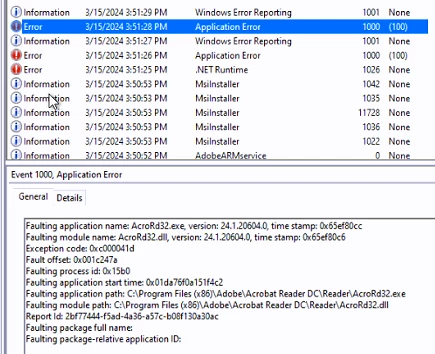
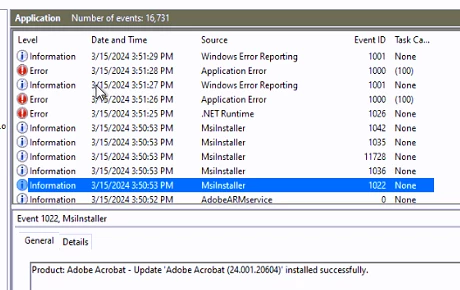
We have just had Acrobat Reader update, it looks like it got a new interface, however it keeps crashing, it will stay open for a couple of seconds and then close, no error reported to the user. However we do see the crash events in the event log.   We had no issues on the previosu version and this has now become a real issue for us.

The adobe Version is Adobe Acrobat Reader 24.001.20604
 

I've tried to re-install but get the same result. Is there an easy way to roll back?


Thanks


Kevin

This topic has been closed for replies.

5 replies

Participant
April 1, 2024

We are having the same issue with Adobe reader however ours is on a newer version past the optional update listed. Any permanent fixes to this? We use this on all our Domain computers. Our helpdesk is getting flooded with tickets and currently we have to change users defaults to edge to view pdfs. Thanks for any help. 

Participant
March 28, 2024

The newest optional update seems to adress the issue: 24.001.20615 Optional update, Mar 20, 2024 — Acrobat-Acrobat Reader Release Notes (adobe.com). Correct @Meenakshi Negi ?

Kind Regards
Jan Philipp

Participant
March 27, 2024

Same problem over here. Seems to be connected to the latest update. It randomly occurs among our users. You really need to fix this via patch, Adobe. We are deploying all our software via intune and have currently no option of rolling back. As it would run into the same problem because I am not really enclined to stop the auto-updating feature.

Please get on it, asap and release a patch.

Kind regards

Jan Philipp

Meenakshi Negi
Community Manager
Community Manager
March 15, 2024

Hi Kevin22497813mghj and Amanda36106022n9d9,


Thank you for reaching out, and sorry about the trouble.


Try the troubleshooting steps suggested in the following help document for a crash: https://helpx.adobe.com/acrobat/kb/acrobat-dc-crashes-on-windows-os.html.


If the above suggestion does not work, try reinstalling the application using the following steps:
- Remove the application and run the cleaner tool (https://www.adobe.com/devnet-docs/acrobatetk/tools/Labs/cleaner.html).
- Reboot the machine
- Install Adobe Acrobat Reader from the following page: https://get.adobe.com/reader/.


Let us kow if the issue persists.


Thanks,

Meenakshi

Participant
March 16, 2024

I'll just put it down to a rubbish update, I can't have this not working, thankfully I kept a copy of the older 23 version. Removed this mess and installed the previous. Have now turned updates off. We are now working again but I really didn't need this at the end of the week. Really need to find an alternative.

Participant
March 27, 2024

@Meenakshi Negi Will you not fix this via patch or new update release?

Participant
March 15, 2024

I'm also having the same issues. Unable to do anything in the app because it keeps freezing.