


Participant
June 20, 2017
Question

Adobe Reader DC Font Pack won't install

  • June 20, 2017
  • 1 reply
  • 6767 views

Hi

I'm getting the following error when installing the Extended Asian Language font pack for Adobe Acrobat Reader DC (Continuous)
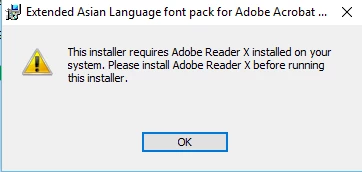
Event Log

Product: Chinese Simplified Fonts Support For Adobe Reader X -- This installer requires Adobe Reader X installed on your system. Please install Adobe Reader X before running this installer.

I'm using version 2015.007.20033 (though I've tried multiple other versions as well - 15.017.20050, 15.023.20070, 17.009.20044 and have got the same result).

I've tried uninstalling, and reinstalling, using the cleaner tool, deleting all the registry keys, and Adobe files I can find (AppData, ProgramData etc). I've read multiple forum posts about this, but there doesn't seem to be a solution besides using the Classic track where the Font pack is built in.

Please advise on how to go about fixing this.

Cheers

    This topic has been closed for replies.

    1 reply

    Adorobat
    Community Manager
    Community Manager
    June 22, 2017

    Hi ajp25289814,

    As per the issue description mentioned above, you are unable to install font pack for Acrobat Reader DC, is that correct?

    Could you try logging into administrator account then try installing font pack and see if that works?

    Below are the steps on how to enable and login into administrator account on Windows:

    https://support.microsoft.com/en-in/help/555910/how-to-enable-the-built-in-administrator-account-in-windows-vista

    Let us know how it goes.

    Shivam

    Participant
    June 22, 2017

    Yes, I am unable to install the font pack for Acrobat Reader DC.

    I've tried as a domain administrator, as well as the local administrator.

    Operating System: Windows 10 Enterprise Version 1511

    Adorobat
    Community Manager
    Community Manager
    February 8, 2018

    Hi ajp25289814,

    Please try following troubleshooting steps:

    1- Download and run cleaner tool from here: Download Adobe Reader and Acrobat Cleaner Tool - Adobe Labs

    2- Reboot the machine.

    3- Install Reader DC from here: Adobe - Adobe Acrobat Reader DC Distribution

    4- Reboot the machine and try again.

    Also, let us know if you have Adobe Acrobat installed on the machine?

    Thanks,

    Shivam