


Adobe Reader DC Freezes / Slow

Copy link to clipboard
Copied
Hello,
We are experiencing slow/freezes Adobe Reader DC performances with several customers.
All the deployments are on Remote Desktop Servers.
The complaints are that Adobe Reader freezes when scrolling through the document.
It looks like all the complaints come since a specific version of Adobe Reader DC.
We have deployed Adobe Reader DC on several RDS from different customers and since a few months they are complaining about this isssue.
Does anyone else experienced this issue?


 11
Replies
11
11
Replies
11


Copy link to clipboard
Copied
Hello Metaloader,
I am sorry for the trouble and for the delayed response. What is the version of Adobe Reader DC installed on the machine? To identify the version, please take help from the article Identify the product and its version for Acrobat and Reader DC
What is the version of the operating system installed?
Make sure you have the latest version of Adobe Reader DC 19.010.20100 installed. Reboot/log off the machine or user profile and check.
Are you/users experiencing this issue while opening the PDF files saved locally or saved on a network or shared drive?
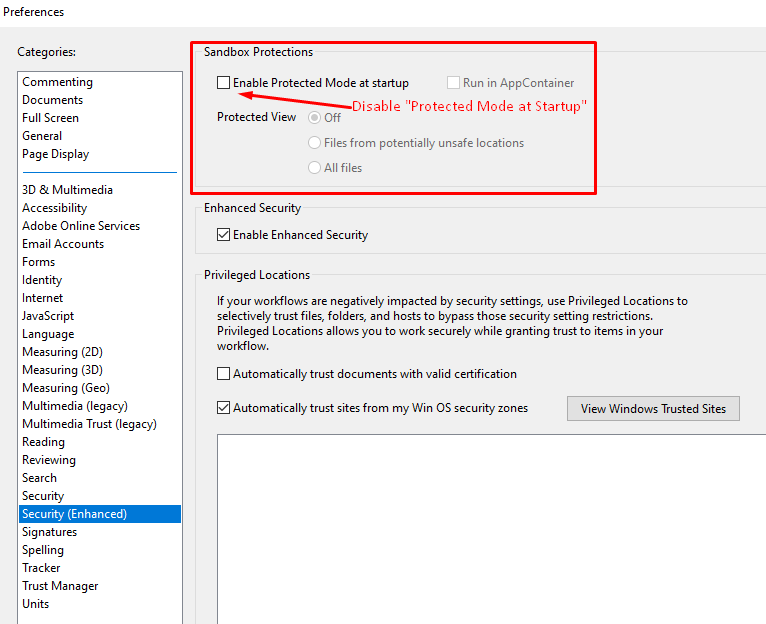
For testing purpose, navigate to Adobe Reader's Preferences Edit>Preferences>Security(Enhanced)> and uncheck 'Protected Mode at startup', 'Run in AppContainer' & 'Enhanced Security'>click OK, restart the application and check.
Note: Disabling the Protected Mode, enhanced security is only for testing purpose, please enable it back.
Let us know how it goes and share your observation.
Thanks,
Anand Sri.
[Edited response]
Copy link to clipboard
Copied
Hi AnandSri,
Thanks for you reply.
It happens on multiple servers from different customers/environments
Server1:
- Windows Server 2012 R2 Standard
- Adobe Acrobat Reader DC Version 2019.010.20098
Server 2:
- Windows Server 2016 Standard
- Adobe Acrobat Reader DC version 2019.010.20099
Server 3:
- Windows Server 2012 R2 Standard
- Adobe Acrobat Reader DC version 2019.010.20099
It happens when users open PDF documents from an Outlook attachment.
By default we disable protected mode because DC won't even open when protected mode is enabled ....

Copy link to clipboard
Copied
I'm having the exact same behaviour and disabled all the suggested modes does NOT help ('Protected Mode at startup', 'Run in AppContainer' & 'Enhanced Security')
Copy link to clipboard
Copied
Hello Danim,
Please install the latest patch available of Adobe Reader 19.012.20034 from help menu>select check for updates.
Reboot the machine and check.
Let us know if you experience any issue.
Thanks,
Anand Sri.
Copy link to clipboard
Copied
I confirm that with the 19.012.20034 version the problem still happens. In my case with Outlook 2016.
Copy link to clipboard
Copied
Hello AnandSri,
I will try to install the latest version tonight to see if it helps.
Copy link to clipboard
Copied
Hello AnandSri,
On the first server I uninstalled Adobe Reader and downloaded it and reinstalled from the website.
I asked the end users to see if that makes any difference.
On the other 2 servers I clicked on: "Check for updates" and it showed that the servers already got the latest version.
Do you have any other suggestions?
Seems like our customers are not the only ones with this problem as you can see that Danim fgdtc also mentioned this.
Copy link to clipboard
Copied
Hello AnandSri,
When can we expect an answer?
Our customers are waiting for a fix and I've tried to contact Adobe support, but they told me that the forums are the only way to get support.....
Copy link to clipboard
Copied
Hello,
we are also experiencing this issue, the Software is running on Windows server 2012 R2 Terminalservers with the current version 19.012.20034
most of the times the no response/crash comes when you open the first document, every other document work better
also when opening a PDF from an Email attachment in Outlook 2010 causes this problem.

Copy link to clipboard
Copied
Hello, I have the same symptoms: upon opening local files, no larger than 10 MB, the display hangs. Meaning that the PDF is being build up and that process stops midway, then resumes after a couple of seconds. Then, when scrolling, the app stops responding again. Basically, it feels like it is freezing upon most user inputs.
I am opening files locally. The app is at it's latest version 19.012.20035. Windows 1903 with all updates and all drivers up to date. All other apps happily run on my workstation. Hardware should not be an issue here, the device has two Xeon CPUs with 20 combined cores, 64 GB of RAM, a GTX 1080 and two SSDs.
Yet Acrobat Reader DC feels like it is trying to move in cold tar.
Can Adobe kindly provide some hints for fixing this, if it is fixable on our ends? Otherwise an app update would be great. Because right now, this is such a frustrating experience.
Copy link to clipboard
Copied
It appears that disabling Protected mode makes the app useable again. Question is, what risks are involved? Can someone please clarify?


Get ready! An upgraded Adobe Community experience is coming in January.
Learn more
 AdChoices