
Exit
  • Global community
    • Language:
      • Deutsch
      • English
      • Español
      • Français
      • Português
  • 日本語コミュニティ
  • 한국 커뮤니티
1

Adobe Reader DC RdrCEF.EXE Application Error

Community Beginner ,
Nov 15, 2016 Nov 15, 2016

Whenever user opens up a PDF (Either in an attached email or from the desktop), the "RdrCEF.EXE - Application Error" will pop up. See attached. I have tried the following:

Complete uninstall/reinstall of Adobe Reader DC

Clearing out Temporary data of Adobe in the AppData folder

Opening Adobe as Administrator

Forcing the Right tool bar to not open on startup through preferences

After clicking OK, the adobe does not crash and the user can continue viewing the PDF.

Any troubleshooting steps or advice would be helpful.

Thanks,
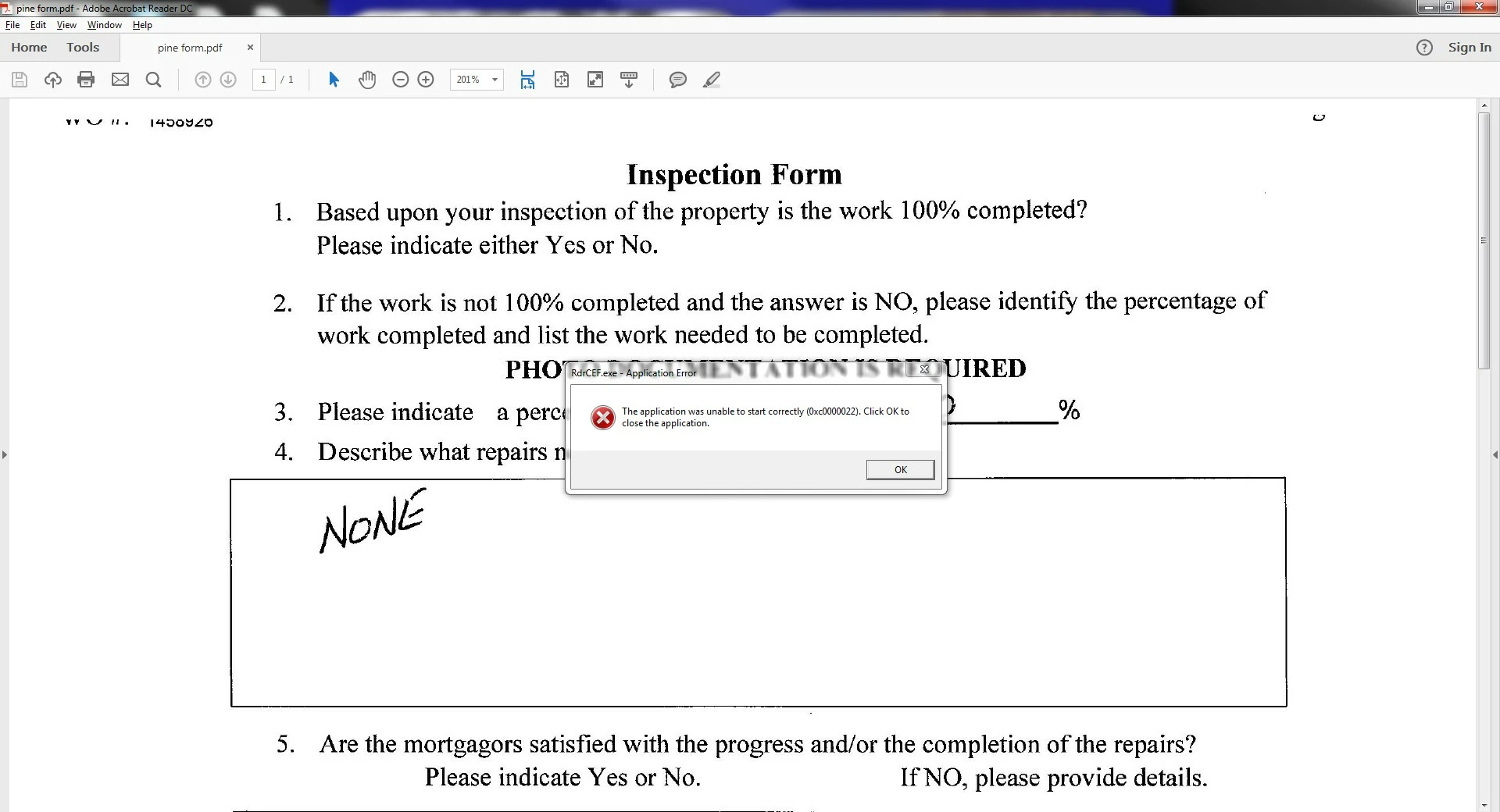
RDRCEF.exe Error.jpg

9.3K
Translate
Report
Community guidelines
Be kind and respectful, give credit to the original source of content, and search for duplicates before posting. Learn more
community guidelines

correct answers 1 Correct answer

Community Beginner , Nov 18, 2016 Nov 18, 2016

I decided to uninstall DC and just install Adobe XI Reader. Please close out this ticket.

Translate
Adobe Employee ,
Nov 16, 2016 Nov 16, 2016

Hi LeverageITC

Could you please try the following steps and see if that resolves the issue:

1- Check for updates, launch Reader>navigate to Help menu>select Check for Updates.

2- If that doesn't work, try disabling Protected Mode, launch Reader>select Edit menu>Preferences>under Categories, click Security (Enhanced)>uncheck the box next to Enable Protected Mode at startup and then click OK.

Please note: Disabling Protected Mode is for troubleshooting purpose only, and not recommended, Please turn the feature back on after finishing the troubleshooting.

Could you let me know the version of Adobe Reader DC installed on your machine?

To check the version of Acrobat Reader DC, launch Reader DC>navigate to Help menu>select About Adobe Acrobat Reader DC.

Translate
Report
Community guidelines
Be kind and respectful, give credit to the original source of content, and search for duplicates before posting. Learn more
community guidelines
Community Beginner ,
Nov 17, 2016 Nov 17, 2016

No new updates available, but issue still occurs intermittently.

Attempted Disabling Protected Mode, but still issue persists, especially when i expand the tools on the right hand side.

Version 2015.020.20042

Translate
Report
Community guidelines
Be kind and respectful, give credit to the original source of content, and search for duplicates before posting. Learn more
community guidelines
Adobe Employee ,
Nov 17, 2016 Nov 17, 2016

Hi LeverageITC,

Try to remove Reader DC using Cleaner tool from here: Download Adobe Reader and Acrobat Cleaner Tool - Adobe Labs  , restart the computer, download and install Adobe Reader from here: Adobe - Adobe Acrobat Reader DC Distribution  (choose operating system, language, and version accordingly)

Could you please confirm the Operating System you have on the machine?

Translate
Report
Community guidelines
Be kind and respectful, give credit to the original source of content, and search for duplicates before posting. Learn more
community guidelines
Community Beginner ,
Nov 18, 2016 Nov 18, 2016

I decided to uninstall DC and just install Adobe XI Reader. Please close out this ticket.

Translate
Report
Community guidelines
Be kind and respectful, give credit to the original source of content, and search for duplicates before posting. Learn more
community guidelines
New Here ,
Oct 05, 2020 Oct 05, 2020
LATEST

Thankyou, Running as adminstrator worked. I also tried re-installing but when I Signed in this error started popping up again 

but when i read all the fixes and i find to run adminstrator, this fixed my problem. Excelent Service, Thankyou again.

Translate
Report
Community guidelines
Be kind and respectful, give credit to the original source of content, and search for duplicates before posting. Learn more
community guidelines