Exit
  • Global community
    • Language:
      • Deutsch
      • English
      • Español
      • Français
      • Português
  • 日本語コミュニティ
  • 한국 커뮤니티
0

Adobe Reader DC - Recent file list problem with redirected folders

New Here ,
Mar 03, 2017 Mar 03, 2017

Hi,

Adobe Reader DC has problems to open a file from the recent list, when the PDF file is stored on a redirected folder like the users desktop.

E.g.

Open a PDF from the redirected desktop via double click -> this is no problem

(File->Properties->Location is showing the correct document path)

Close Adobe Reader DC

Start Adobe Reader DC -> now you will see the file in the list of recently used files.

The recent list is now showing a wrong path for the file. The correct UNC path is modified with network drive letter in front, instead of \\...

By double clicking the file on the recent list, you will get an error message “The file is no longer available and could not be opened”

Tested with

Client: Windows 10 Pro 1607 and Adobe Reader DC 2015.023.20070

File server: Windows Server 2012 R2 Datacenter with DFS

Can someone verify the problem? Or knows an workaround?

Jan-Peer

2.0K
Translate
Report
Community guidelines
Be kind and respectful, give credit to the original source of content, and search for duplicates before posting. Learn more
community guidelines
Adobe Employee ,
Mar 05, 2017 Mar 05, 2017

Hi Jan-Peer,

Could you please try repairing Reader and see if that works?

Launch Reader>click Help menu>select Repair Installation

Have you made any changes to the computer recently which can result in this behavior?

Translate
Report
Community guidelines
Be kind and respectful, give credit to the original source of content, and search for duplicates before posting. Learn more
community guidelines
New Here ,
Mar 06, 2017 Mar 06, 2017
LATEST

Hi Adorobat.

I did a repair of the Reader like you described. But that did not solve the problem.

We have the problem in the complete company on several hundred systems.

Win7, Win10 and XenApp clients.

I did some additional tests:

I can reproduce the problem now independent from folder redirection.

So it is not an problem with folder redirection.

It seems that the Reader has a problem with our DFS shares.

When I map the network drive without DFS, the recent list is using the correct path.

UNC path:

The Reader seems to convert an DFS UNC path into a path with network drive, when the program is closed.

Network drive path:

The Reader converts an network drive path (with DFS) as well into an wrong path with network drive.

Crazy is, the problem occurs only when the reader application will be restarted.

When a PDF is closed but not the Reader application, the recent list will show the correct path.

Before Reader restart (the path is correct):
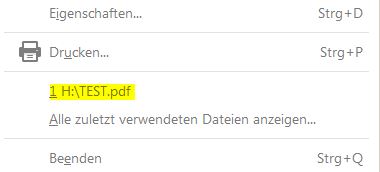
BeforeReaderRestart.JPG

After Reader restart (the path is wrong. It contains now a wrong drive letter and parts of the UNC path):
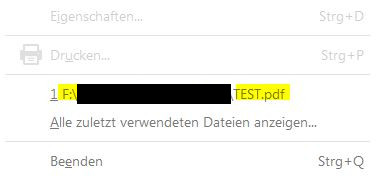
AfterReaderRestart.JPG

Other progams like MS-Office have no problems with their recent lists and DFS.

Translate
Report
Community guidelines
Be kind and respectful, give credit to the original source of content, and search for duplicates before posting. Learn more
community guidelines
