
Copy link to clipboard
Copied
Hi,
I am in the process of locking down cloud features in Adobe Reader and have received a number of complaints that Adobe Reader no longer remembers the last saved location after we implemented "bToggleAdobeDocumentServices = 1" setting.
Is there a way to disable "Document Cloud" under "Save As" dialog yet retain "My Computer" with "Save in Recent Folder" list?
Like this:

Unfortunately that doesn't work. If I enable the registry setting bToggleAdobeDocumentServices = 1 then that check box does nothing.
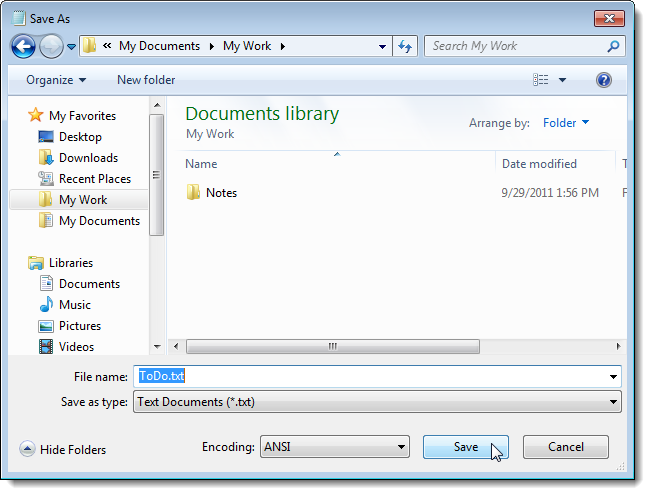
If I leave it unchecked Adobe Reader takes me to the default Windows Save As dialog (picture below), and does not show the "Save in Recent Folder..." even for My Computer.
Default Save As:

Copy link to clipboard
Copied
Hi Ale,
If I understand correctly, you would like to turn the "Document Cloud" storage off and want to save the documents locally?
If this is the case, then you may follow the steps suggested below-
Launch Acrobat>Edit>Preferences> General> "Show online storage when saving file" (Uncheck)

Hope this help.
Regards,
Akanchha
Copy link to clipboard
Copied
Unfortunately that doesn't work. If I enable the registry setting bToggleAdobeDocumentServices = 1 then that check box does nothing.
If I leave it unchecked Adobe Reader takes me to the default Windows Save As dialog (picture below), and does not show the "Save in Recent Folder..." even for My Computer.
Default Save As:

Find more inspiration, events, and resources on the new Adobe Community
Explore Now