
Adobe Reader - Fill&Sign - Hebrew text saved as symbols
Hello,
I am trying to fill my PDF document with Hebrew text with the Fill&Sign tool.
After saving the document with the filled Hebrew text, it is saved in symbols (image below).
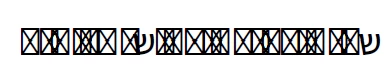
I have uninstalled Adobe Reader and all files and folders related to Adobe (Total Clean).
After that, I downloaded and installed Adobe Reader from the Adobe website, downloaded and installed the Extended Asian Font Pack Spelling and Dictionary, in Preferences under Spelling I checked Hebrew, but still the issue wasn’t solved.
It is important to mention that I have 3 PCs and all of them are experiencing this issue with Adobe Reader.
I noticed that this issue was addressed previously but I didn’t manage to find a solution. From what I saw you will probably need some more information:
- I have Adobe Reader the version is 2023.003.20269.
- I am using Windows 11.
- This behavior is with any PDF form that I try to fill.
- I am trying to fill in a form that is downloaded to my computer and then I am trying to fill in.
I saw that you will probably suggest the following troubleshooting steps:
- Go to Help>Check for updates. Did that.
- Go to Help>Repair Installation (windows). It happens on every PC I have tested it on.
- Go to Edit>Preferences>Language and try to toggle with the RTL /LTR options. (Windows). Did that.
- If you have Adobe Reader, you may try to install the Asian and Extended Language font pack. Did that.
I would highly appreciate your assistance in the matter. Thank you in advance.
 AdChoices