
Exit
  • Global community
    • Language:
      • Deutsch
      • English
      • Español
      • Français
      • Português
  • 日本語コミュニティ
  • 한국 커뮤니티
0

Adobe Reader menu font too large

New Here ,
Mar 04, 2018 Mar 04, 2018

Hi

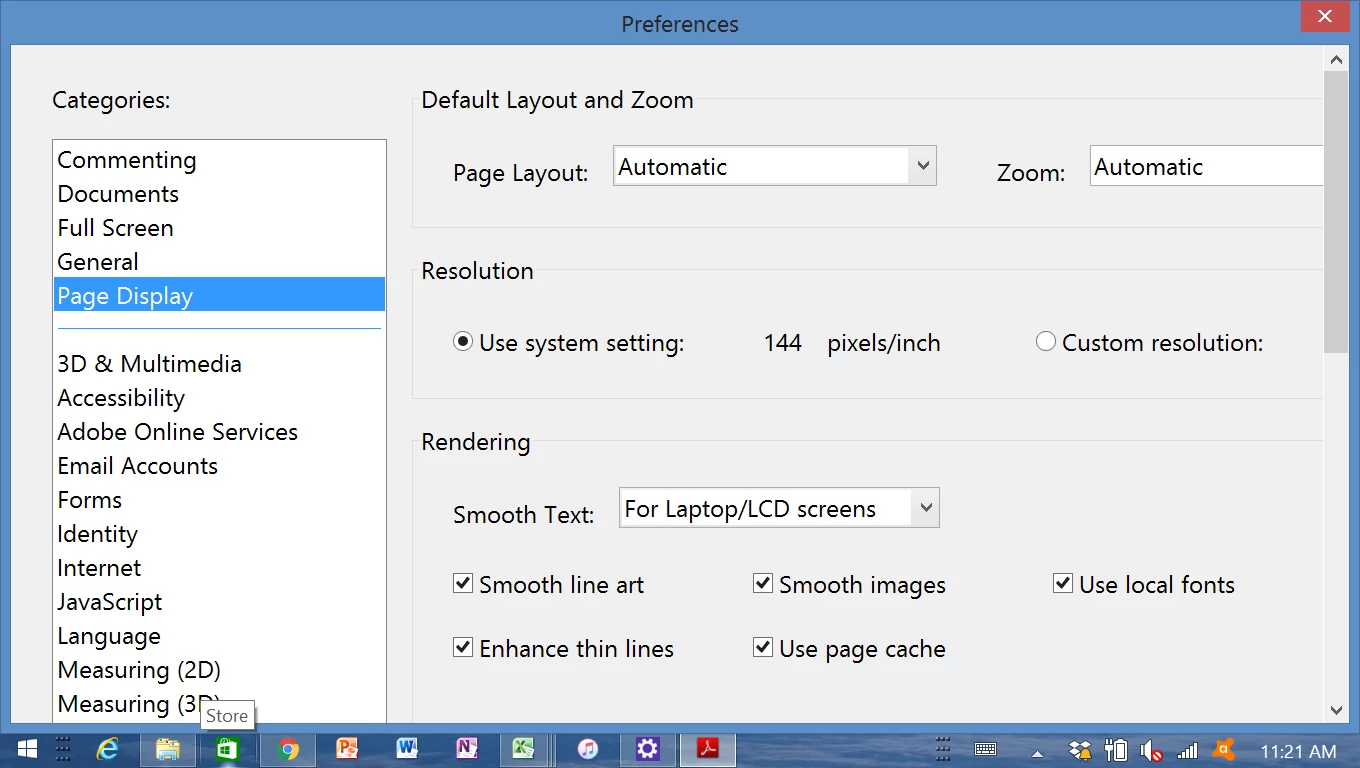
I'm running windows 8.1 with adobe reader and for some reason the menu font size has gone very large. I've tried to go into Edit-Preferences to change it but the screen is only partly showing as the font is too large, and there is no horizontal scroll bar so I can't even scroll to the OK button.

Any suggestions welcome please??
9.8K
Translate
Report
Community guidelines
Be kind and respectful, give credit to the original source of content, and search for duplicates before posting. Learn more
community guidelines
Adobe Employee ,
Mar 05, 2018 Mar 05, 2018
LATEST

Hi Natashas,

As you are not able to scroll to the OK button, please put your cursor on the blue bar at the top where you see the "Preferences" written.

Click and hold so you can move the window to get the OK button.

You can also check the option selected for "Scale for screens resolution" under General category in the Preferences window.

Try to toggle between the options provided there. Check if that makes any difference.

Try to update the application to the latest patch available.

If that does not help try to reset the preferences of the application.

Take help of the steps mentioned here: How to reset Acrobat Preference settings to default.

If the issue still persists, please share the exact version of the application installed there. Identify the product and its version for Acrobat and Reader DC

Let us know if you need any help.

Regards,

Meenakshi

Translate
Report
Community guidelines
Be kind and respectful, give credit to the original source of content, and search for duplicates before posting. Learn more
community guidelines