


- Home
- Acrobat Reader
- Discussions
- Re: Adobe Reader XI and DC both not responding - W...
- Re: Adobe Reader XI and DC both not responding - W...
Adobe Reader XI and DC both not responding - Windows 7

Copy link to clipboard
Copied
I have read through most the blogs / forums I could find online, and have not resolved my issue. Here's my operating system, what I've done and where I'm struggling:
- Windows 7 64 bit
- System requirements are met for HD and memory
- I am using Chrome primarily, because I'm having separate printing issues with IE (separate story....)
- I have used IE to do the file "cleaner" to remove program, and reinstall at least 3 or 4 times, trying either Reader DC or Reader XI.
- I have stopped all non-MS programs in startup, and also stopped most services
- My Windows 7 is up to date (no pending updates)
SYMPTOM / ISSUE: I can usually launch one PDF file from either a folder, or sometimes a browser, and then Reader freezes up. Typically just says "not responding" and I can't close the app except through Task Manager.
I have my folder / file preferences set to show hidden files, and when I try to find the application preferences file, it is not there in my new "11.0" folder (the current reader version I am trying to run). How do I recreate or download that preferences file? is that what is causing my issue, or is there another issue I should explore, such as disabling user access control? I am doubting it's a video card issue, this just started happening out of the blue. I am frustrated reading blog after blog and nothing is working.
PLEASE HELP - THANK YOU!


 9
Replies
9
9
Replies
9


Copy link to clipboard
Copied
HI stephaniew60273875,
Assuming you are able to access Reader's interface, could you please check if there is an update available for Reader?
Launch Reader>click Help>select Check for Updates
You may also download update from the following link:
Adobe - Adobe Reader : For Windows (scroll down the page to get to the version 11.0.xx )
Please confirm the version of Reader running on the machine.
Click Help>About Adobe Reader XI . You may also go to Control Panel>Programs and Features>search for Adobe Reader XI and check for version no. for the same.
Let me know how it goes.
Thank You,
Shivam

Copy link to clipboard
Copied
я вчора оновлював. в мене все на найновіших версіях. Але такого там не
найшов або не має. Дякую за швидку відповідь.
26 бер. 2017 07:37 "Adorobat" <forums_noreply@adobe.com> пише:
Adobe Reader XI and DC both not responding - Windows 7 created by Adorobat
<https://forums.adobe.com/people/Adorobat> in Acrobat Reader - View the
full discussion <https://forums.adobe.com/message/9415573#9415573>
Copy link to clipboard
Copied
Thank you very much for the software update link - I loaded it, and since I've used Reader, it has not frozen up. I will keep monitoring the situation, and I greatly appreciate your help!
thank you -
Copy link to clipboard
Copied
STILL HAVING ISSUES
Dear Shivam,
I am having the issue again in Reader. I am running this version since I downloaded the upgrade you sent me above: 11.0.19
Today I have opened a couple files, and they both caused Reader to freeze up - no response from any pull down menus, or the "close" X. I removed a few programs again from "startup" in MSCONFIG, but when I relaunch reader through a doc in Chrome Yahoo email, I get Reader at a "not Responding" state again.
Please help!
Many thanks,
Stephanie
Copy link to clipboard
Copied
Hi Stephanie,
Could you please try repairing Reader installation to troubleshoot the issue further?
Click Start menu>Control Panel>Programs and Features>select Adobe Reader XI>right-click>Change
Below is the screenshot:

Restart the computer after repair and relaunch Reader.
If Reader still shows the same error message, try to launch it as an administrator:
Locate Reader's shortcut on the desktop>right-click>Run as administrator
Also, try launching the application (without any pdf) by locating Reader's icon on the desktop or Start menu and see if that works.
Please keep us posted with the results.
Thanks!
Shivam
Copy link to clipboard
Copied
Hello Shivam,
I tried the first repair, it did not work -- I opened a PDF after restarting my PC, with the same result occuring (freeze up / not responding).
So I tried running Adobe reader as an administrator, and since then, I think it has worked ok for a couple of files, until just now. Error message received today: I opened a PDF from a zip file downloaded from my email, and I got this message:
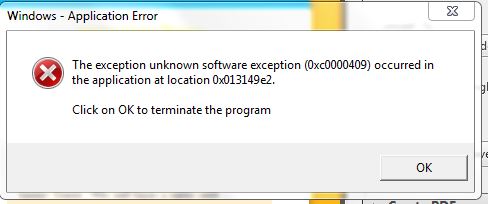
What does this mean? and how often do I have to go in to "open reader as admin" for that application?
Any other thoughts are appreciated - thank you,
Stephanie
Copy link to clipboard
Copied
HI Stephanie,
Thank you for trying the steps.
Could you please try disabling Protected mode and see if that helps?
1- Launch Reader>click Edit>Preferences.
2- Under Categories>Security(Enhanced)
3- Uncheck the box Enable Protected Mode at startup.
4- Press OK and relaunch Reader and see if the error message still appears when opening pdfs.
Please note: Disabling Protected Mode is for troubleshooting purpose only, please turn the feature back on after troubleshooting is finished.
To configure Reader to always run as an administrator, change the following setting under Reader's shortcut:
1- Under "Compatibility" tab>Priviledge Level>check the box Run this program as an administrator.
2- Click Apply>OK
Does this message appear only when you try to open pdfs from email?
Awaiting your response.
Thanks!
Shivam
Copy link to clipboard
Copied
Dear Shivam,
I have not had time to try the method above "safely", due to other priorities and work I'm doing with my PC. I had the issue again with a downloaded PDF from email. I did not get the error message, but Reader froze up with the document.
Please give me a couple weeks to test the above method, and I will try different docs, and report back.
Thanks for your patience, I will keep you posted either way.
Many thanks,
Stephanie
Copy link to clipboard
Copied
Hello,
I have not had the time to try the steps to troubleshoot in unprotected mode. However, when I opened a scanned PDF I created myself today (launched the file through my documents library), I got this error today:
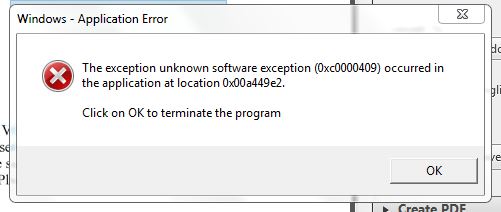
With this file it kept causing Reader to freeze up. Again, this was a file I scanned from my local scanner.
thanks for your help,
Stephanie


Get ready! An upgraded Adobe Community experience is coming in January.
Learn more
 AdChoices