Participant
February 12, 2021
Answered

After Update to version 20.001.20135 can not add comment

  • February 12, 2021
  • 5 replies
  • 2529 views

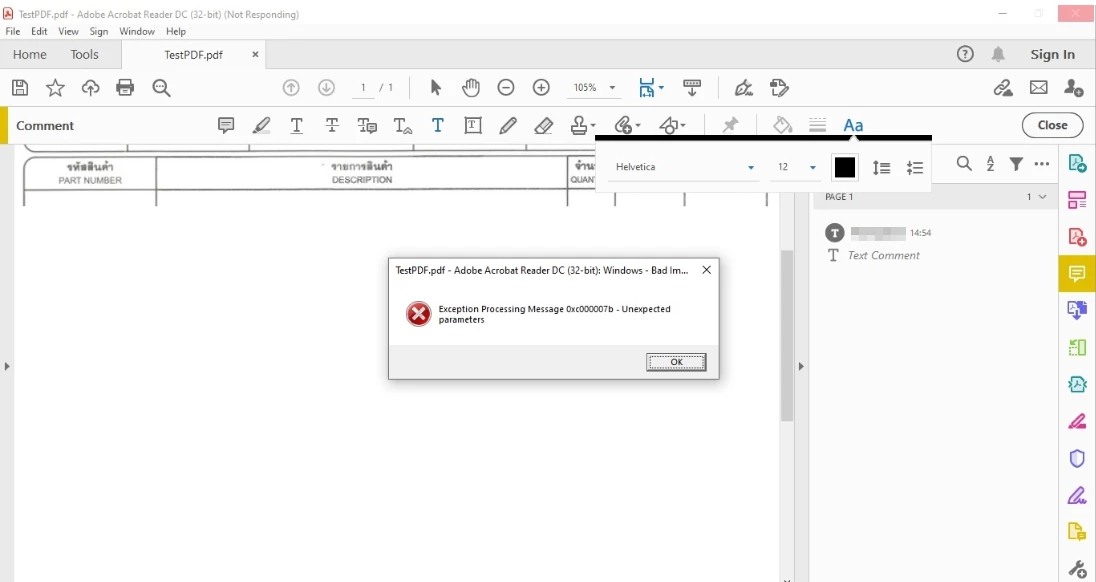
After Update to version 20.001.20135 can not add comment, when add commect with thai language it's error and close. This PC install Extended Asian Language font pack too.

 

This topic has been closed for replies.
Correct answer arvindy

Hi All,

The issue has been resolved now.

Could you please install the latest font pack from the following link:

https://helpx.adobe.com/acrobat/kb/windows-font-packs-32-bit-reader.html 

Kindly let us know how it goes.


Regards,

Arvind

5 replies

Participant
May 20, 2024

If Thai font still change to rectangle. For 2024. Go to 'Edit > Preferences > Commenting > Font' then select font that support Thai language e.g., Tahoma, Cordia New, Browallia New.

arvindyCorrect answer
Adobe Employee
February 16, 2021

Hi All,

The issue has been resolved now.

Could you please install the latest font pack from the following link:

https://helpx.adobe.com/acrobat/kb/windows-font-packs-32-bit-reader.html 

Kindly let us know how it goes.


Regards,

Arvind

FRiC
Participating Frequently
February 16, 2021

Thanks for the update. Tested working. Will the previous Font Pack automatically update or will I have to deploy it?

Adobe Employee
February 16, 2021

Hi There,
Thanks for the confirmation that the issue gets resolved at your end. Please note that the new Font Pack will not be updated automatically, you need to deploy it.

Regards,
Arvind

Adobe Employee
February 13, 2021

Hi All,

Apologies for the inconvenience caused!

Could you please let us know the following info so that we can try with the similar setup at our end:

- OS version and language of the OS

-  Does the issue happen with all non-English language or specific to some ?


Regards,

Arvind

FRiC
Participating Frequently
February 13, 2021

Hi, for me, the error happens on Windows 10. 10.0.10942.746 and also latest 804. The display language is English (US). When using either text comment or text box, as soon as any Thai text is typed in (or even pasted from clipboard), the Bad Image error pops up with identical exception error message as Mr. Kazuma's original post and Reader crashes and exits. The Thai keyboard we use is Thai Kedmanee but as mentioned above the problem affects even pasted text.


I tried pasting other languages but the error only seems to happen with Thai.


I also tested on Windows 7 and I get a different error text and Reader crashes but unlike Windows 10, Reader must be force closed with Task Manager.

Hope this can be resolved ASAP. I'm deciding if I need to roll back or wait for an update.

Adobe Employee
February 13, 2021

Hi,

We are actively working on it. Will update once the fix is available.


Regards,

Arvind

FRiC
Participating Frequently
February 12, 2021

I have the exact same issue and its affecting hundreds of my users. Probably needs an updated Extended Asian Language Font Pack.


P.S. The version number is actually 21.001.20135.

Adobe Employee
February 13, 2021

Hi,

Can you please confirm if you are using the latest release font pack: https://supportdownloads.adobe.com/detail.jsp?ftpID=6839. Thanks.

FRiC
Participating Frequently
February 13, 2021

Yes, we're already using 19.021.20058. Normally we keep Reader and the Font Pack automatically updated.

Amal.
Community Manager
Community Manager
February 12, 2021

Hi Kazuma,


Hope you are doing well and sorry for the trouble. As described you are unable to add comment to the PDF in Thai language and getting the above error message as shown in the screenshot.


Please try to reboot the computer once and see if that helps.


If it still doesn't work please try to repair the installation (Windows Only) and reboot the computer again and check. Go to Help > Repair Installation.


You may also look at the similar discussion https://community.adobe.com/t5/acrobat-reader/adobe-acrobat-reader-dc-search-find-functionality-crtr-f-does-not-work-anymore/td-p/10561941#M67849 and see if that helps.


Let us know if you still experience any trouble and need more help.


Regards

Amal

Kazuma_Author
Participant
February 12, 2021

I try to test english Language it's can add comment.

Reboot and Repair installation doesn't work same error.

Now I uninstall and install old version and disable task auto update for temporary use.

FRiC
Participating Frequently
February 12, 2021

Funnily my Thai users reported this issue to me. But the problem happens with any non-English language.