
Participant
November 6, 2018
Answered

auto pop-up comment wont go away

  • November 6, 2018
  • 1 reply
  • 761 views

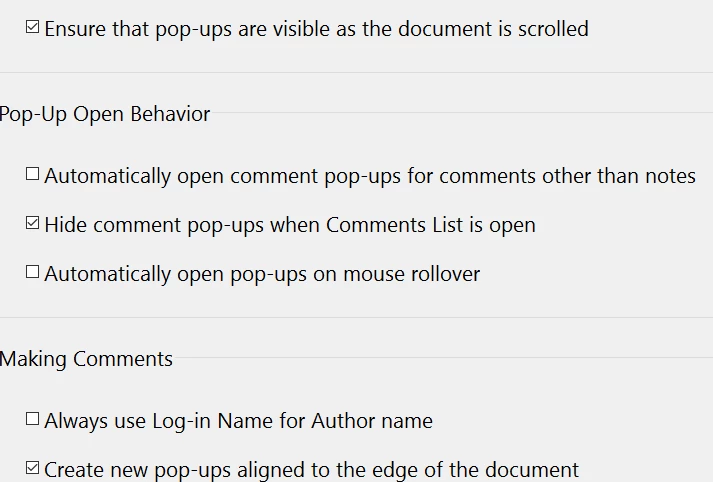
With the new update no matter how many times I adjust my settings when using comment tools like highlight it autogenerates a comment as well. Ive tried playing with my settings like ive done on previous versions but I still can't get it to stop auto-generating comments. Anyone know how to fix this?
This topic has been closed for replies.
Correct answer AkanchhaS8194121

Hey Charlottesimply, 

What you are referring here is a default behavior of the application. This feature has been introduced with the Acrobat patch released in Oct.

To disable it through preferences, you may follow the steps given below-

Open Acrobat Edit> Preferences>Commenting> Check Hide comment pop-ups on mouse rollover.

Hope this helps.

Regards,

Akanchha

1 reply

AkanchhaS8194121
AkanchhaS8194121Correct answer
Legend
December 21, 2018

Hey Charlottesimply, 

What you are referring here is a default behavior of the application. This feature has been introduced with the Acrobat patch released in Oct.

To disable it through preferences, you may follow the steps given below-

Open Acrobat Edit> Preferences>Commenting> Check Hide comment pop-ups on mouse rollover.

Hope this helps.

Regards,

Akanchha