
New Participant
December 17, 2018
Answered

Autocomplete still working after disabling in preferences

  • December 17, 2018
  • 6 replies
  • 11922 views

Autocomplete is giving my users two headaches after the latest update. We are on version 2019.010.20064.

The first issue is that autocomplete is resizing the zoom level of the document (sometimes to as small as 5%) making it impossible to see what is being typed.

To fix this, I would like to disable autocomplete altogether. However, when I disable it in preferences, nothing actually changes, autocomplete still functions as normal and even continues to add data to its list!
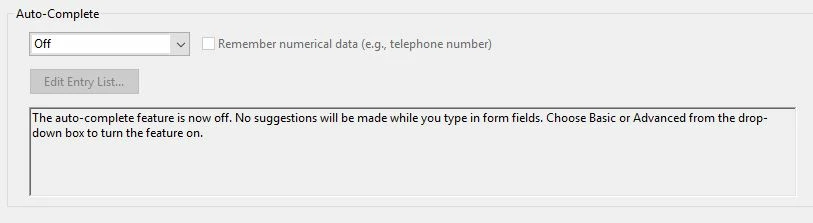
Is this a bug or is there another way to disable autocomplete? Better yet, is there a way to stop autocomplete from resizing the view of the document?

Thank you!

Correct answer sanchij24189538

Alright, thank you for your help!


Hi nickm11097162​,

You can disable auto-complete list.

Following are the steps:

  1. Login to https://cloud.acrobat.com/ with same id you logged in on Reader/Acrobat.
  2. Click on your name in top right corner , drop down list will appear. Then click on ‘Settings’.
  3. Now, a dialog will appear. You can uncheck 1st option "Suggest words or phrases..".
  4. Press Done. Your settings will get saved.

Thanks

Sanchi

6 replies

New Participant
February 28, 2025

Go to the "Prepare Form" tool and change the name of one of the two auto-populating cells. They should have the same name. Once you change the name of one of them, the problem should stop.

New Participant
March 1, 2023

Wow, this is terrible. I filled out some personal forms accidentally logged in to my work account, and now... these personal things will pop up forever? This is a personal information security nightmare.

New Participant
April 6, 2023

No kidding, I'm a counselor and other people's answers to mental health assessments are popping up where the new assessee can see previous responses that include things like names and dates. I literally am not able to use it right now

New Participant
November 7, 2020

This did not work for me. I was using a corporate version that had no cloud ablity on it. I had to go into each field and delete the autocorrect data one field at a time. Super annoying.

New Participant
December 30, 2022

This is still a problem as of Dec 2022. I cannot delete the "Fill & Sign" saved texts. Two texts (that I had copied and pasted) are so long that I cannot scroll to the right and find the X checkmark to delete them. 

New Participant
August 6, 2020

I did this fix. It still auto completes every sentence we try to type.

New Participant
June 19, 2023

I did the fix and it worked, only the website seems to have changed since the original post in 2018:

  1. Login to acrobat.adobe.com with same ID you logged in on Reader/Acrobat.
  2. Click on your name in top right corner , drop down list will appear. Then click on ‘Settings’.
  3. Now, a dialog will appear. You can uncheck 1st option "Suggest words or phrases..".
  4. Press Done. Your settings will get saved.
  5. **Important** close Adobe and re-open it. 
Mz Flawless
New Participant
November 21, 2023

Thank you so much! This was exactly what I needed to do to keep previous information from showing up on my forms. I create instructional videos, and the superfluous information was certainly a distraction and a frustration. This worked, and the dreaded white boxes with suggestions are gone!

bryceb80168810
Participating Frequently
December 19, 2018

Referencing this post:

Re: PDF shrinks

Adobe acknowledges that this is an issue when there is no one signed in to Adobe Reader so the "cloud" fix is not an option for this.  Looks like they are working on a solution.

Bernd Alheit
Adobe Expert
December 17, 2018

autocomplete doesn't change the view.

New Participant
December 17, 2018

It absolutely, 100% does. The autocomplete box with suggested text changes the zoom level of the document to accommodate the length of the suggested text. If you delete characters and enter new text it zooms out further. Example video below.

Bernd Alheit
Adobe Expert
December 17, 2018

This is not the autocomplete of form fields. It is a new feature of Fill & Sign.