
bAcroSuppressUpsell not working in DC 2017
Hi all,
I'm locking down Adobe Reader DC 2017 Classic Track, everything is going to plan, I've blocked the updater, all web services, the problem i'm having is that "bAcroSuppressUpsell" doesn't seem to block Adobe Reader advertising the mobile app.
Any ideas?
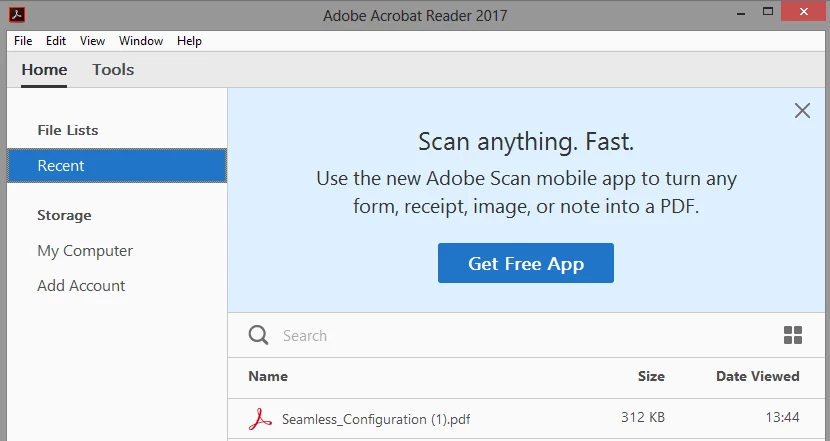
The registry setting I have set to date are:
[HKEY_LOCAL_MACHINE\SOFTWARE\Policies\Adobe\Acrobat Reader\2017\FeatureLockDown]
"bSuppressSignOut"=dword:00000001
"bToggleFTE"=dword:00000001
"bToggleShareFeedback"=dword:00000000
"bAcroSuppressUpsell"=dword:00000001
"bShowAdsAllow"=dword:00000001
[HKEY_LOCAL_MACHINE\SOFTWARE\Policies\Adobe\Acrobat Reader\2017\FeatureLockDown\cServices]
"bUpdater"=dword:00000000
"bToggleFillSign"=dword:00000001
"bToggleAdobeDocumentServices"=dword:00000001
"bToggleAdobeSign"=dword:00000001
"bToggleSendAndTrack"=dword:00000001
"bTogglePrefsSync"=dword:00000001
"bToggleWebConnectors"=dword:00000001
"bAdobeSendPluginToggle"=dword:00000001
[HKEY_LOCAL_MACHINE\SOFTWARE\Policies\Adobe\Acrobat Reader\2017\FeatureLockDown\cWelcomeScreen]
"bShowWelcomeScreen"=dword:00000000
[HKEY_LOCAL_MACHINE\SOFTWARE\Wow6432Node\Adobe\Acrobat Reader\2017\Installer]
"ENABLE_CHROMEEXT"="1"
"Disable_Repair"="1"
 AdChoices