I am running Windows 10. Adobe Acrobat Reader DC.
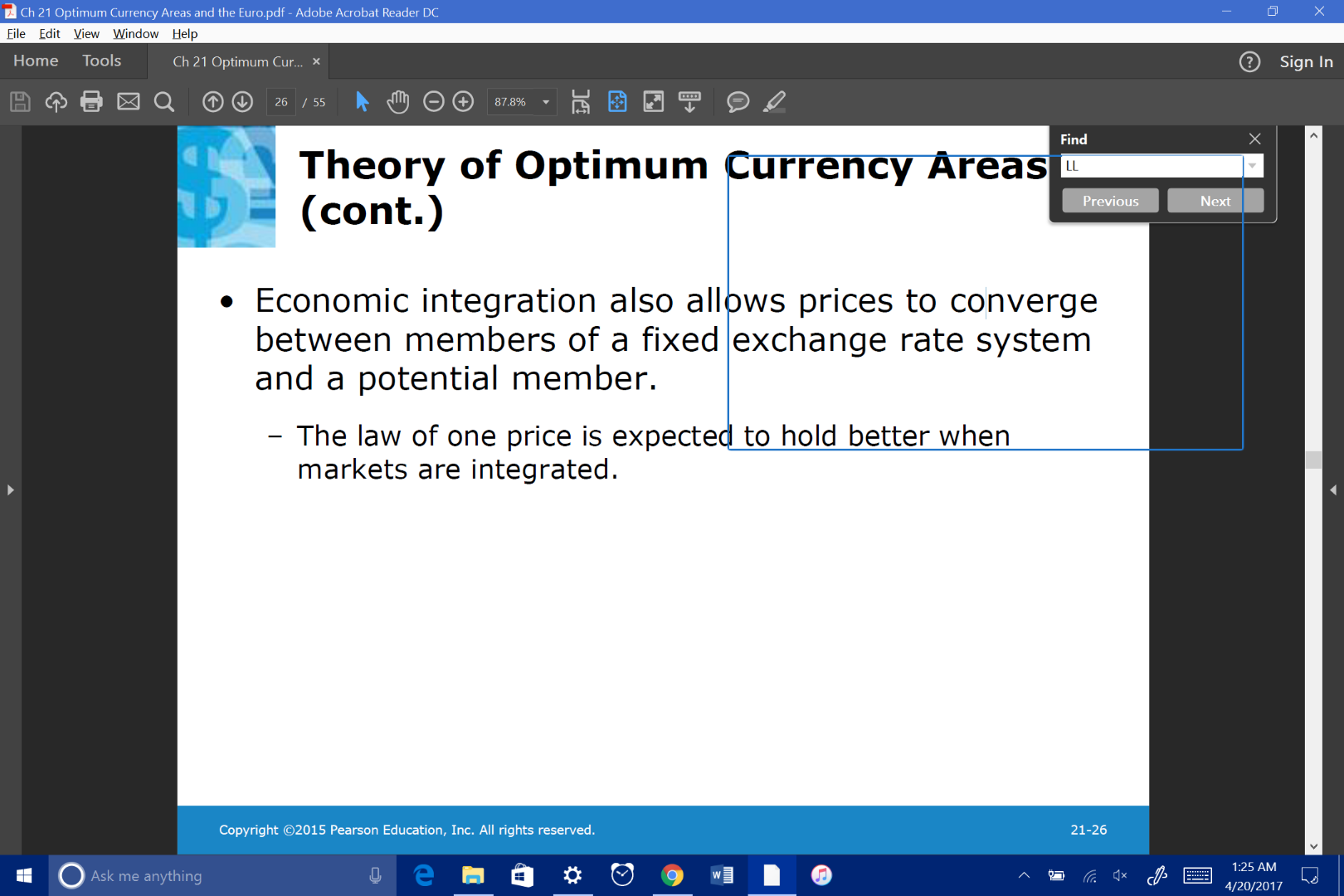
Summary of problem. I was using the find feature shortcut, ctrl f. I was searching for "LL" within the document. For some reason now, whenever I try to search for anything, this blue box appears over random areas. The search function does NOT work anymore, it just moves this blue square around the screen. I did not change any settings or preferences on the document. For some reason, highlighting the text is also broken, and will only highlight random sections of words and skip around.
I believe I may have accidentally pressed something else when searching for "LL". Maybe pressed the shift and control key and accidentally hit another key around the L key, because the find feature was working perfectly fine right before I searched for "LL."
tl;dr
-Pressed crtl f
-Went to press shift ll, to result in "LL"
-I believe I may have pressed something else.
-Searching for anything no longer works, I just get the blue box. Highlighting no longer works as well.
Even uninstalled/reinstalled Adobe Acrobat Reader DC, made no change.
Found no results on google.
Also, this only occurs on some documents (mainly the slide shows). Normal "word" format documents are searchable perfectly fine.
Screenshots are attached:





 1
Reply
1
Reply


 AdChoices