Answered
Bold texts in Layers
Hi,
I noticed that in some page in my PDF, the text in Layers panel are in bold, and some times they are not. Why is this so? Please see attached screenshot for reference.

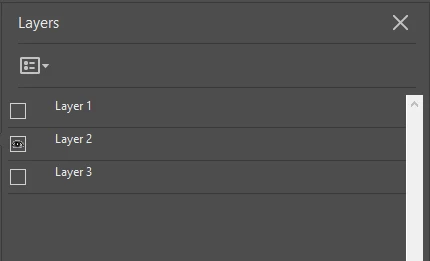
Thanks in advance! 
-Mark

Hi,
I noticed that in some page in my PDF, the text in Layers panel are in bold, and some times they are not. Why is this so? Please see attached screenshot for reference.
Thanks in advance!
-Mark
Ok. If I understood correctly, those 2 Lists behave similarly. The difference between the two is that one (List Layers for Visible Pages) removes the list completely when a page has no layers, while the other one just makes the list not bold (List Layers for All Pages).
Please correct me if I am wrong.
Those lists behave similarly. The difference is that if you select "List Layers for All Pages", layers on all of the pages in the pdf will be visible in the Layers panel whereas if you select "List Layers for Visible Pages", layers on the page currently you are on, will be visible in the Layers panel.
Already have an account? Login
Enter your E-mail address. We'll send you an e-mail with instructions to reset your password.
 AdChoices